
A spa can deliver a polished visit and still lose capacity between booking, staff coordination, and checkout. The problem often lies in the handoffs: teams may have to reconcile calendars, client records, sales, and performance data across separate tools. Spa operations software is most useful when it connects these workflows, rather than simply digitizing an appointment book.
That distinction matters for spa leaders. Fragmented information makes schedules harder to manage, adds friction at checkout, and limits the consistency of decisions about revenue, staff performance, and inventory. A connected workflow gives teams a shared operational record, from online booking and internal calendar coordination through point of sale and reporting.
This article explains what spa operations software should coordinate across a guest visit, where reliable records and clear handoffs matter most, and how priorities vary across day spas, resort spas, and Nordic spas. Use the practical framework to identify which workflows need to connect and what operating model can support consistent service delivery and business decisions.
Key Takeaways
- Evaluate spa operations software by how it connects records and handoffs, not by one feature such as appointment scheduling.
- Trace a guest visit from booking through checkout and reporting to find where information can become inconsistent.
- Set coordination priorities around your spa model: day, resort, and Nordic spas have different operational demands.
- Map each workflow by owner, source record, next handoff, and exception path before changing systems.
- See how Milano Software brings booking, staff coordination, point of sale, and reporting into a platform designed for spa operations.
Spa operations software connects the handoffs behind each guest visit
A guest visit involves a series of connected operational events: an appointment is booked, a staff member prepares, a service is recorded, payment is processed, and activity is reviewed. Spa operations software connects the workflows and records behind those events so teams can coordinate service delivery and leaders can make decisions using consistent operational information.
That scope is broader than a booking calendar or checkout terminal. A booking-only tool records an appointment. An operational platform carries relevant information into staff coordination, transaction records, and performance reporting. For an example of software that spans more than scheduling, the Wikipedia overview of spa and salon management software describes capabilities including booking, marketing, and staff tracking.
Which spa workflows need to connect?
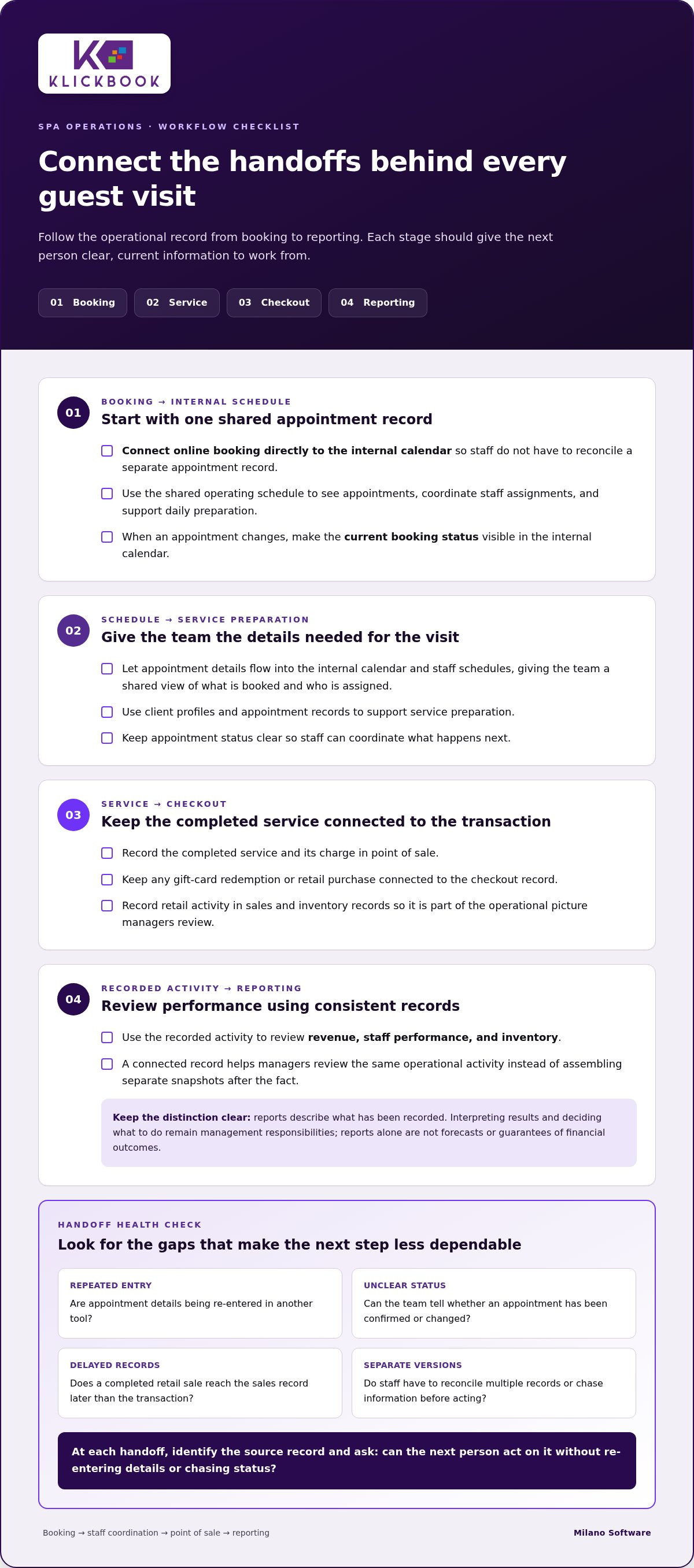
Start by identifying what information each stage needs from the one before it. Appointment details should flow into the internal calendar and staff schedules, giving the team a shared view of what is booked and who is assigned. Client profiles and appointment records can support service preparation, while a clear appointment status helps staff coordinate what happens next.
At checkout, the completed service connects to its charge and any gift-card or retail transaction. Recording these activities in the same operational picture supports accurate sales and inventory records. Managers can then use those records to review revenue, staff performance, and inventory metrics instead of assembling separate snapshots after the fact.
Where disconnected processes create operational friction
Fragmentation creates gaps between steps. Staff may re-enter appointment details in another tool, leaving multiple versions to reconcile. A team member may not know whether an appointment has been confirmed or changed. A completed retail sale may also reach the sales record later than the transaction itself. Each gap makes the next handoff less dependable.
These are process-design issues, not signs that employees lack effort. Even careful staff can end up working from different information when updates have to be made manually across disconnected records. Ask whether each handoff has a clear source record and whether the next person can act on it without rekeying details or chasing status. A connected system makes those dependencies easier to see and supports a consistent record from booking through review.
How spa operations software coordinates booking, service, checkout, and reporting
The value of spa operations software becomes clear in the handoffs between stages. A booking creates the appointment record, which informs the internal schedule and staff preparation. Once service is complete, the transaction is recorded, and sales and inventory activity can feed operational and financial reporting. Each stage depends on accurate information being available to the next.
This connected approach fits within the broader operational context of the spa sector. The International Spa Association provides a professional industry context for spa businesses. Within an individual spa, clear records help teams coordinate guest visits and give managers a consistent basis for review.
From online booking to the internal schedule
Online booking should connect directly to the spa’s internal calendar, rather than creating a separate appointment record that staff must reconcile. When a guest books, the synchronized information appears in the operating schedule, helping the team see the appointment and coordinate staff assignments and daily preparation from a shared view.
If an appointment changes, the internal calendar should show the current booking status. Staff can then work from the same schedule instead of relying on separate notes or manually updated lists. This connection supports coordination, while the spa’s own procedures guide staff preparation and exception handling.
From service delivery to checkout and performance review
After service, point of sale records the charge alongside any gift-card redemption or retail purchase. Retail sales can also contribute to inventory and sales records, keeping the transaction connected to the activity managers review. This creates a clearer record from appointment to completed purchase.
Consistent records make reporting more useful because managers can review revenue, staff performance, and inventory against the same recorded activity. Reports describe what has been recorded. Interpreting the results and deciding what action to take remain management responsibilities. Reports alone are not forecasts or guarantees of financial outcomes.
To see where this sequence fits your current workflows, trace one appointment from booking to reporting. Note where information is re-entered, delayed, or difficult to reconcile. Milano Software’s spa management software connects online booking with the internal calendar, staff schedules, point of sale, inventory and sales records, and operational and financial reporting.
Day, resort, and Nordic spa operations require different coordination priorities
The right operating model depends on the service mix, property context, and how transactions move through the business. Spa operations software should support those realities rather than impose one workflow on every facility. A day spa coordinating appointments and retail has different priorities from a resort spa managing services alongside hotel operations or a Nordic spa organized around its own visit model.
The comparison below highlights where coordination needs can differ. Use it as a planning framework, not a fixed specification for every spa.
Spa type
Coordination priorities
Day spa
Connect appointment flow to staff schedules, completed service charges, retail activity, and visibility into sales and staff performance.
Nordic spa
Align scheduling and staff activity with the spa’s specific service and visit model; record applicable transactions consistently for management review.
Resort spa
Coordinate spa appointments, staff schedules, and service transactions, while defining ownership and reconciliation for any hotel-related billing workflow.
Coordination priorities for day spas and Nordic spas
For a day spa, the operating sequence often centres on appointments, staff assignments, service charges, and retail purchases. Managers benefit when these activities produce consistent records for reviewing revenue, staff performance, and inventory. A practical test is whether staff can follow an appointment through to checkout without maintaining a parallel record.
Design Nordic spa workflows around the actual visit model. Scheduling may centre on specific services, and checkout may include the transactions the spa records for its offering. Don’t assume every Nordic spa needs timed access, capacity controls, or wristbands. The Holistic Spa Management overview from the American College of Healthcare Sciences discusses broad spa management responsibilities, including operations and team supervision. These responsibilities underscore why system workflows should reflect the facility’s actual operating structure.
Resort spa workflows and hotel-system boundaries
A resort spa may need to determine how to handle a guest’s spa purchase when it is billed to a room folio. This is a cross-system workflow. Define which system records the spa service, what process handles the room charge, who resolves discrepancies, and how records are reconciled. Treat these questions as operational requirements to map, rather than assuming they are capabilities of spa management software.
Spa systems coordinate spa-specific work such as bookings, staff schedules, point-of-sale transactions, and reporting. Hotel property management systems govern separate property functions. Clear boundaries and assigned ownership help prevent duplicate records and unclear accountability. The right configuration follows the spa’s service model, property context, and transaction flow.
Map spa workflows before changing operational software
Software decisions are more reliable when they follow a documented operating model. Before changing systems, map how information moves through a guest visit and identify where ownership, records, or exception handling are unclear. This gives leaders a practical basis for defining requirements for spa operations software instead of starting with a feature list.
Use this five-step sequence:
- Document: Trace a typical visit from booking through payment and post-visit reporting.
- Assign: Name the role responsible for creating or updating each record.
- Connect: Specify what information the next person or process needs.
- Test: Walk through the normal workflow and common exceptions.
- Review: Check whether records remain accurate and useful for operational decisions.
Document owners, records, and exceptions
For each handoff, record the owner, source record, next user, and exception path. A booking may begin with client and appointment details. Staff use the schedule to prepare, point of sale records service charges and any gift-card or retail transactions, and sales and inventory records support later review. Note who updates each item and when the next role relies on it.
Map exceptions alongside the standard process. A schedule change, service adjustment, or checkout correction should have a defined owner and a clear place in the operational record. A documented handoff identifies its owner, source record, next user, update point, and exception path. This checklist helps reveal gaps before they become routine workarounds.
Set operating measures and review data quality
Choose measures that reflect the workflows leaders need to manage. These may include revenue, staff performance, inventory activity, and appointment activity. Define each measure consistently, including what it counts and which record supplies the data. Set a review cadence before comparing periods; otherwise, differences in definitions or timing can weaken the analysis.
Reports are only as dependable as the records behind them. Check for missing transactions, inconsistent appointment statuses, and inventory entries that do not align with recorded sales. Use a report to identify a pattern for investigation, not to assume what caused it. A change in a measure can have several operational explanations, so validate the underlying records and workflow before drawing conclusions.
Use your workflow map to assess which handoffs your current processes support and where a shared operational record would help. Explore Milano Software’s spa management software, which connects online booking, staff schedules, point of sale, inventory and sales records, and operational and financial reporting.
Milano Software brings core spa operations into a coordinated platform
Once leaders have mapped the handoffs that matter, the next step is to align those workflows with an operating platform. Milano Software provides spa management software for day spas, resort spas, and Nordic spas, connecting core administrative work across booking, staff coordination, transactions, and reporting. Teams can work with records designed around day-to-day spa operations, while managers use operational and financial reporting for review.
Coordinate booking, staff activity, and client records
Online bookings synchronize with the spa’s internal calendar, helping teams coordinate around a shared appointment schedule instead of reconciling separate booking records. Staff schedules and client profiles support daily administration by keeping appointment and client information relevant to the work teams manage. Together, these capabilities connect booking with staff coordination and service preparation.
When assessing whether spa operations software supports your actual workflow, follow the information through each step: booking details enter the calendar, staff activity is organized against the schedule, and client profiles support spa administration. The platform supports these operational records; the spa’s procedures still guide work assignments and exception handling.
Connect transactions and reports to daily operations
At checkout, point of sale handles service charges, gift-card transactions, and retail purchases. Sales and inventory records provide context for reviewing what was sold and how inventory activity is recorded. These records support operational and financial reporting, including visibility into revenue, staff performance, and inventory metrics.
This connection helps managers review activity across more than one stage of a visit. Booking and staff records provide operational context; point-of-sale and inventory records document transactions; reporting brings those records together for management review. Reports provide a consistent basis for analysis, while interpretation and business decisions remain with spa leaders.
For operators, the key question is whether booking, staff coordination, checkout, and reporting reflect the way the spa actually runs. Milano Software brings these core workflows together for day spas, resort spas, and Nordic spas, while keeping spa management distinct from hotel property management. Explore Milano Software to see how its spa management platform can support the operational handoffs your team has identified.
Build a more coordinated operating model
Reliable spa operations depend on more than a well-managed booking calendar. Handoffs from appointment to staff preparation, checkout, and reporting need clear ownership and consistent records. Spa operations software can support that continuity when it reflects the facility’s service model, transaction flow, and management priorities.
Start by mapping each workflow: identify who owns the record, what information moves forward, and how exceptions are handled. Then define the measures leaders will use to review revenue, staff performance, inventory, and appointment activity. This creates a practical foundation for evaluating operational fit across day spas, resort spas, and Nordic spas.
Milano Software connects online bookings with the internal calendar, supports staff schedules and client profiles, and uses point of sale to record service charges, gift cards, and retail transactions. Operational reporting brings revenue, staff performance, and inventory metrics into view for management review.
Explore how Milano Software’s spa management platform can support your operating model and the workflows your team has mapped.
Frequently Asked Questions
What does spa operations software do?
Spa operations software coordinates the workflows and records behind a guest visit. It can connect online booking and the internal calendar with staff schedules, client profiles, point-of-sale transactions, inventory records, and operational reporting. This gives teams a more consistent record from appointment through checkout and gives managers information to review revenue, staff performance, and inventory. Its scope is broader than an isolated function such as appointment scheduling.
How is spa operations software different from spa booking software?
Spa booking software primarily supports appointment scheduling, while spa operations software connects booking to other administrative workflows. For example, appointment information can appear in the internal calendar and inform staff coordination. Completed transactions can then be recorded for sales and inventory reporting. A booking tool serves a defined purpose; an operations platform is intended to support continuity across more of the visit lifecycle and management process.
Can spa operations software manage staff schedules and appointments?
Yes. Spa management platforms can coordinate appointments with staff schedules. Online bookings that synchronize with the internal calendar give the team a shared schedule for daily coordination. Staff schedules and client profiles support routine administration around those appointments. Managers should also define how the team records changes or exceptions, so everyone works from consistent information rather than separate calendars or informal updates.
What should spa operations software coordinate at checkout?
Checkout should connect the completed service to its transaction record. Point-of-sale workflows can record service charges, gift-card transactions, and retail purchases. Retail activity should also appear in sales and inventory records where applicable, supporting consistent operational and financial reporting. Clear procedures for corrections or adjustments help maintain a dependable transaction history. The goal is an accurate record of activity, not an assumption that reporting alone explains business performance.
Does resort spa operations software need to connect with a hotel PMS?
Not in every operating model. First define whether spa charges are recorded separately or may be billed through a guest’s room folio. If a room-folio process applies, map the systems involved, assign ownership for each record, and establish how transactions and discrepancies are reconciled. Spa management software and a hotel property management system have distinct responsibilities. Treat a required cross-system workflow as a defined operational requirement, not an assumed capability.
How can spa operators measure whether their operations are improving?
Choose measures that reflect the workflows being reviewed, such as revenue, staff performance, inventory activity, and appointment activity. Define each measure consistently, identify its source record, and use the same review timing when comparing periods. Check data quality before drawing conclusions: missing transactions or inconsistent appointment statuses can distort the picture. Use reports to identify patterns for investigation, then review the underlying workflow before attributing a change to a specific cause.
