

A spa sales tracking system comparison should look beyond the feature list: software that reports transactions but leaves customer and property records disconnected can preserve reporting gaps. For Canadian spa operators, the meaningful comparison is how each option connects sales activity to service performance, client relationships and, where relevant, hotel property management workflows.
Pricing matters, but so do the capabilities behind it. Sales analytics, point-of-sale functionality, reporting and integration requirements all affect operational fit. This comparison explains how to assess these factors without treating a feature list as proof of compatibility.
You’ll learn how to compare pricing models, sales reporting, and CRM or property management integrations, along with the selection criteria that matter across spa environments. Use this framework to identify software that supports clear revenue visibility and coordinated operations.
Key Takeaways
- Assess pricing against the capabilities and operational requirements your spa actually needs, not the headline plan alone.
- Use sales reporting to connect revenue patterns with services, retail activity and day-to-day performance.
- Prioritize selection criteria that support accurate transactions, useful analysis and efficient workflows across your operation.
- Map how client and transaction data should move between spa software, CRM and property management systems.
- Clarify how booking, point of sale and accounting workflows connect before deciding which system architecture fits.
Choosing software and reviewing pricing
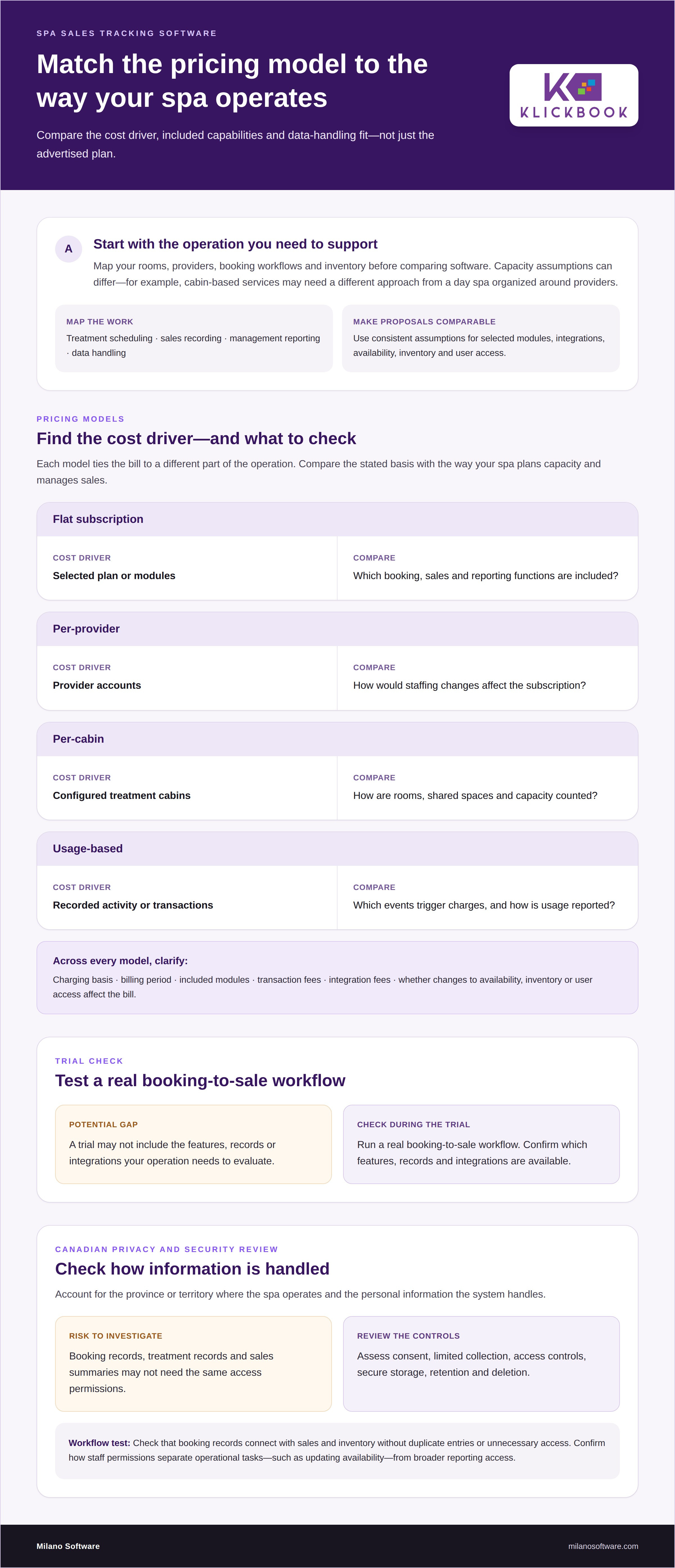
Evaluate pricing against your spa’s operations, not just the advertised plan. Map your rooms, providers, booking workflows and inventory needs before comparing options.
A useful review connects software costs to the work it supports: treatment scheduling, sales recording, management reporting and data handling. For example, a property with cabin-based services may need different capacity assumptions from a day spa organized around providers.
Pricing Models and Free Trials
Compare flat subscription, per-provider, per-room and usage-based models by their cost drivers. A per-room approach ties the charge to treatment-room capacity; a per-provider model follows staffing, while a flat subscription separates the bill from those counts. If a vendor offers a free trial, test a real booking-to-sale workflow and confirm which features, records and integrations are available during the trial.
Ask for the charging basis, billing period, included modules and any fees linked to transactions or integrations. Compare proposals using consistent assumptions, including selected modules, integration requirements and whether changes to availability, inventory or user access affect the bill.
| Pricing option | Cost driver | Best comparison point |
|---|---|---|
| Flat subscription | Selected plan or modules | Included booking, sales and reporting functions |
| Per-provider | Provider accounts | How staffing changes affect the subscription |
| Per-cabin | Configured treatment cabins | How rooms, shared spaces and capacity are counted |
| Usage-based | Recorded activity or transactions | Which events trigger charges and how usage is reported |
Choose a pricing model whose cost driver matches how the spa plans capacity and manages sales.
Privacy and Data Security Requirements
For Canadian spas, privacy and security reviews should account for the province or territory of operation and the personal information handled. Assess how the system supports consent, limited collection, access controls, secure storage, retention and deletion. For example, booking preferences and treatment records may require different access permissions from sales summaries. Document responsibility for managing user access and responding to data requests.
Test whether the software connects booking records with sales and inventory without creating duplicate entries or unnecessary access. Ask for a demonstration of how staff permissions can separate operational tasks, such as updating availability, from broader reporting access. Confirm that the proposal describes each selected module and its charging basis, then record the assumptions used for future capacity or staffing changes. A clear comparison reduces pricing surprises and exposes workflow gaps before implementation.
Sales reporting and business analytics
Useful reporting connects each appointment, payment and sale to an operational category. Start by defining the measures managers need for daily decisions and longer-term planning.
Daily Sales Registers and Reports
A daily register records completed transactions, payment methods, discounts, refunds and adjustments. Managers can reconcile its totals against payment settlements and investigate exceptions before closing the day.
Unlike trend reports, a register focuses on transaction-level activity for a selected business day. For example, filtering by location or provider can help explain a sales variance without relying on a monthly summary.
Service, Retail, Membership, and Gift Card Sales
Track service sales, retail items, memberships and gift cards as distinct categories. Record the sale date, associated client and transaction status. Separate a gift card purchase from its later redemption to keep sales activity clear.
For example, compare treatment revenue with retail sales, then review membership activity and gift card redemptions separately. A calendar view can connect appointments with completed services, while mobile access can help managers review the same reporting categories away from the front desk.
Commissions, Tips, and Staff Performance
To manage commissions and tips, define the calculation rules and keep them separate from service revenue. Reports should identify the provider, eligible service or retail sale, tip amount and any adjustment, so payroll review can follow a consistent record.
Assess staff performance in context, not just by total sales. Compare completed appointments, available time and sales mix. A provider with fewer scheduled hours may show lower totals despite strong utilization. This view supports fairer coaching and more informed staffing decisions.
For broader spa business analytics, review revenue by service category, provider, location and payment type. Compare periods using consistent date ranges, then investigate changes in average transaction value, appointment volume or retail mix. A wellness operator, for instance, could examine whether a period with more treatment appointments also produced higher retail sales. These comparisons show where managers need operational detail rather than another headline total.
Cloud-based reporting can give authorized managers access across locations and support shared, current records. Its trade-offs include reliance on network access and the need to understand vendor security, permissions and data-handling practices. A spa with multiple sites may value centralized visibility; a location with unstable connectivity should assess how essential workflows continue during an outage.
Use daily registers to reconcile transactions, category reports to understand sales mix, and performance analysis to guide staffing decisions. Together, these views connect payments and appointments to operational choices without treating every revenue figure as the same measure.
Sales-focused spa software selection criteria
Selection should test whether software supports sales decisions and the workflows that produce reliable records. Define requirements, map current operations, compare integrated capabilities, then configure and test the chosen system with representative transactions.
Integrations and Business Analytics
Integration connects booking, point of sale and accounting records; analytics turns those records into decision support. For example, a completed appointment can connect to its service sale, payment and accounting entry, while retail inventory changes can be reviewed alongside sales activity. Assess whether data transfers automatically, which fields synchronise, and how errors or duplicate records appear.
Transaction capture shows what happened; detailed analytics helps explain where and why sales changed. Compare reports by service, retail category, provider, location and date range. A spa with several service lines could use those dimensions to distinguish a shift in treatment demand from a change in retail performance. Confirm that managers can export or review the measures they use in regular operations.
Choosing and Implementing a Sales Tracking System
Implementation differs from feature comparison because it tests the system against actual operating procedures. Document required reports, user roles, sales categories and existing data sources first. Then configure a representative workflow, such as booking an appointment, recording payment, processing a retail sale and reconciling the accounting entry. Review exceptions before expanding use across the operation.
For a small spa, compare systems against the actual number of workflows and roles, not a long enterprise feature list. A single-location operation may prioritise clear sales categories and straightforward reporting; a multi-location group may need consolidated views and location-level access. In either case, test a sample day’s transactions and confirm totals can be traced back to individual records.
Software listings and ratings can help create an initial shortlist, but they measure different things. Separate user feedback about usability from evidence about integrations, reporting depth and operational fit. Check the review date, the reviewer’s business context and whether the cited capability matches the current product. A rating alone won’t show how a spa’s booking and accounting workflows connect.
Published comparisons also need a clear basis: one comparison of spa software brands used website information and third-party review sites in 2025. Treat that date and method as context, then evaluate each option against the same operational scenarios. Record unresolved integration or reporting requirements alongside the feature comparison, so decision-makers can distinguish a missing capability from a configuration question.
Sales follow-up can also be part of the selection test. Check whether the system can identify clients whose visit history meets a chosen re-engagement point and let staff review the audience and message before sending. Spa businesses can consider sending a re-engagement message 90 days after a client’s last visit. Test that the date is based on the last visit recorded, and that the workflow can be managed alongside ordinary booking and sales records rather than relying on separate manual tracking.
For Canadian spas using a spa sales tracking system, include data protection in the evaluation. Spa businesses in Canada should consider their applicable privacy obligations under PIPEDA and provincial legislation. Review how client information used for sales follow-up is accessed, maintained and handled, and confirm the selected Milano Software system fits the business’s procedures for meeting those obligations. Keep the final choice tied to operational needs, reporting and responsible use of client records.
Integrations with property management and CRM systems
For resort spas, integration connects treatment activity with hotel and client records. A property management system (PMS) typically manages guest and accommodation information; a customer relationship management (CRM) system organizes client profiles and communication preferences. A spa sales tracking system can provide clearer revenue visibility when those records connect through defined workflows.
Start with the hotel transaction. When a guest books a treatment, the spa platform needs to associate the appointment with the correct guest profile. If the guest charges the service to a room, the PMS workflow should carry the relevant charge details into the hotel account. Confirm which fields transfer, how corrections are handled, and where staff can see the transaction status.
CRM integration serves a different purpose: using client history and preferences to inform communications and service planning. For example, a client’s completed appointments and membership status can give staff relevant context during booking. Marketing tools may use preference data to segment communications, while appointment scheduling can update availability after a booking or cancellation. For small and medium-sized enterprises evaluating cloud software to coordinate customer relationships and sales pipelines, minicrm.ro illustrates how centralized contact tracking operates in practice.
Define record owners before connecting systems. The PMS may be the source for room and guest identifiers, while the spa platform manages treatment availability. The CRM may hold communication preferences. A field map should identify which system creates each record, which system updates it, and how duplicate profiles are resolved.
Notifications also need clear triggers. A confirmed online booking could prompt an appointment message; a room-charge exception could alert designated staff. Specify the event, recipient and action for each notification. This keeps operational messages connected to the transaction and directs them to teams responsible for resolving it.
For multi-property operations, document whether each location shares a CRM, PMS configuration or reporting structure. A resort group may need property-level revenue views alongside consolidated reporting. Integration design should preserve location identifiers, service categories and transaction references, allowing finance and operations teams to reconcile results without combining distinct properties.
Test the complete workflow with representative records before rollout: create a booking, associate a guest, process a charge, update the CRM record and review the resulting report. Include a cancellation, a changed appointment and a failed transfer. These cases reveal whether systems synchronize updates consistently, whether staff can identify exceptions, and whether revenue records remain traceable across the PMS, CRM and spa platform.
After testing, check whether each system shows the same booking, guest association and transaction outcome, and document how staff should respond when information is missing or inconsistent. Confirm authorized staff can identify the relevant record and follow the correction process without creating a duplicate. Keep the field map and notification rules available to teams responsible for bookings, charges and reporting, and revisit them when workflows change. Assigning an owner to each issue helps prevent unresolved exceptions from affecting later reconciliation.
Include the cost of the spa management system in the integration decision. Compare the plan’s included capabilities with the resort’s workflows, and confirm which integration requirements are supported before committing. Evaluate staff effort as well as subscription cost, so the selected setup can be maintained and used consistently across the operation.
How do spa sales tracking systems integrate with booking, POS, and accounting software?
Integration moves information between booking, point-of-sale (POS) and accounting systems. The objective is a traceable transaction, from appointment creation through payment recording and financial reconciliation.
In a booking workflow, an appointment creates a service record with a date, provider and service category. When the client changes or cancels the appointment, the booking record should reflect that status. At checkout, staff need to connect the completed service to its transaction rather than treating the original booking as a sale.
The POS workflow records what was purchased and how it was paid. A client may complete a treatment and buy a retail item in one visit. The transaction should preserve separate service and product lines, the applicable payment method, and any adjustment. Those details support later sales analysis and help staff resolve discrepancies.
Accounting integration transfers transaction data into the financial system using agreed categories. For example, service revenue, retail revenue, refunds and payment methods may require distinct classifications. Map each spa sales category to its accounting destination before data moves. That mapping reduces manual re-entry and makes transaction totals easier to reconcile.
Use a defined implementation sequence to test the connection:
- Map records: identify which system owns appointments, client profiles, products and payments.
- Match categories: align service and retail codes with accounting categories.
- Test transactions: process a booking, completed treatment, retail purchase and refund.
- Reconcile results: compare source records with POS totals and accounting entries.
Transaction timing matters. A booking is not necessarily completed revenue, and a refund should not remain recorded as an unchanged sale. Define how each system handles pending appointments, completed services, cancellations and reversals. For instance, a cancelled booking should not create a completed-service entry in the accounting record.
Exception handling is part of integration design. Decide where staff see failed transfers, duplicate records or mismatched categories. A daily reconciliation can identify a POS transaction without a matching appointment, while a transaction reference can help locate the corresponding entry across systems. Assign responsibility for reviewing exceptions rather than leaving unmatched records in a shared queue.
Before launch, test the full workflow with representative transactions and confirm that updates travel in the intended direction. Discuss your booking, POS and accounting workflows to plan a connected sales process.
Milano Software: Point of Sale
Klickbook by Milano Software provides an integrated point of sale for spa operators seeking to connect sales activity with daily management workflows. Its spa management platform combines POS capabilities with online booking and reporting, supporting visibility across appointments, retail sales and operational performance.
Consider this approach when separate booking and sales processes make it difficult to review activity in one operational context. Online booking lets clients schedule appointments and service packages around the clock from any device, while reporting helps managers assess business activity. The fit depends on the workflows and reporting requirements your spa needs to support.
For an operational discussion about your spa’s sales and management requirements, contact Milano Software.
Set the foundation for confident sales decisions
The right next step is to align system selection with the operating model you intend to sustain. Define who owns transaction categories, how managers use reporting, and where booking and sales records need to connect. That creates a practical basis for evaluating whether a spa sales tracking system can support your organization as its workflows evolve.
Milano Software offers spa management, online booking and reporting for spa operations. These capabilities bring appointment activity, sales processes and management visibility into a more coherent operational framework. The priority is fit: a platform should support the decisions your team makes without adding unnecessary complexity.
Use your requirements to start a focused discussion about the workflows that matter most to your spa. Contact Milano Software to discuss your needs, and take the next step toward a more deliberate approach to sales operations.
Frequently Asked Questions
What features should a spa sales tracking system include?
A spa sales tracking system should capture service and retail transactions, payment types, gift card activity, inventory changes and staff attribution. Look for configurable categories that match your menu, plus reporting that separates completed sales from refunds and adjustments. For example, managers should be able to trace a retail item from checkout to inventory movement, then review its sales contribution without combining it with treatment revenue.
What are the best spa sales tracking systems in Canada?
The best option depends on the spa’s operating model and required integrations. A day spa may prioritize appointment and checkout workflows; a resort spa may need connections to its property management environment. Before selecting a system, compare options against your service mix, reporting needs, locations and existing technology.
What sales reports and KPIs should spa owners track?
Track gross and net sales by category, refunds, payment mix, retail inventory movement and revenue by provider or location. Add appointment utilization and average transaction value to interpret sales alongside capacity. For example, if retail revenue declines while appointment volume remains stable, review product-category sales and inventory availability before changing service schedules. Consistent category definitions make comparisons between periods more useful.


