

Inventory control protects margins; it is more than a counting exercise. Day spa inventory control best practices start with matching stock to demand and service use, then tracking quantities, receipt dates and reorder points. The goal is to keep essential products available without tying up cash in stock that may go unused or expire.
That balance relies on accurate records and consistent processes, especially when retail products and back-bar supplies follow different workflows. This guide covers how to organize inventory, monitor stock and product use, limit waste, improve visibility with software, and plan for seasonal demand and supplier lead times. These controls link purchasing decisions to daily operations, helping spa leaders respond to shortages and excess stock with better information.
Key Takeaways
- Set stock levels around actual service use and demand, then investigate supplier or workflow problems before adding buffer stock.
- Record quantities, storage locations and receipt dates consistently so discrepancies and replenishment needs are easier to identify.
- Use rotation, expiry monitoring and clear handling procedures to reduce avoidable product waste.
- Connect stock records with sales and service activity to improve visibility into usage, purchasing and slow-moving items.
- Adjust ordering for seasonal demand and supplier lead times to maintain availability without holding excess inventory.
1. Why is a Spa Inventory Management System Essential?
A spa inventory management system links purchasing, storage, service use and retail sales in one process. For operators, day spa inventory control best practices start with recording stock levels and transactions, then investigating discrepancies before increasing safety stock. Without reliable records, teams may reorder to compensate for inaccurate counts or late deliveries. Those extra purchases tie up cash without resolving the underlying problem.
Start by separating stock into three operational categories: back-bar products, retail items and consumables. A cleanser used during facials is a back-bar supply; the same product sold to a guest is retail stock. Linens and disposable supplies belong in the consumables category. Separate records clarify how products are used and replenished, improve reporting, and prevent service use from being mistaken for a retail sale.
Point-of-sale technology can update retail quantities as transactions occur, while inventory software maintains a running stock record. A perpetual inventory system updates stock when a sale occurs or a treatment is completed. For example, recording a facial as completed can trigger a deduction for the configured serum quantity. Linking treatment records with inventory can reduce duplicate entry and connect service activity to stock movement.
Sell-through and stock-to-sales ratios help managers distinguish fast-moving products from slow-moving stock. Calculate sell-through by dividing units sold by units received, then multiplying by 100. If a spa receives 40 cleanser bottles and sells 10 in a month, its sell-through rate is 25% in a month. A stock-to-sales ratio compares the value of stock on hand with sales over a defined period. Review both measures by product category before adjusting reorder quantities.
Use alerts to flag stock below a defined reorder point, but treat each alert as a prompt to investigate, not simply to buy more. Check whether staff record treatment use consistently, transfers between storage areas are logged, and supplier delivery patterns have changed. If receipts regularly arrive later than expected, revise replenishment timing using actual lead-time records. If counts do not match, reconcile transactions and units before increasing safety stock.
Effective day spa inventory control best practices make stock decisions part of routine operations. Managers can compare treatment consumption, retail sales and incoming deliveries, then adjust stock levels to match demonstrated demand. A quarterly review of turnover and sales patterns can reveal recurring shortages or excess stock. Alerts prompt investigation, reports inform decisions, and documented transactions keep purchasing aligned with actual spa activity.
2. Tracking inventory quantities, locations and receipt dates
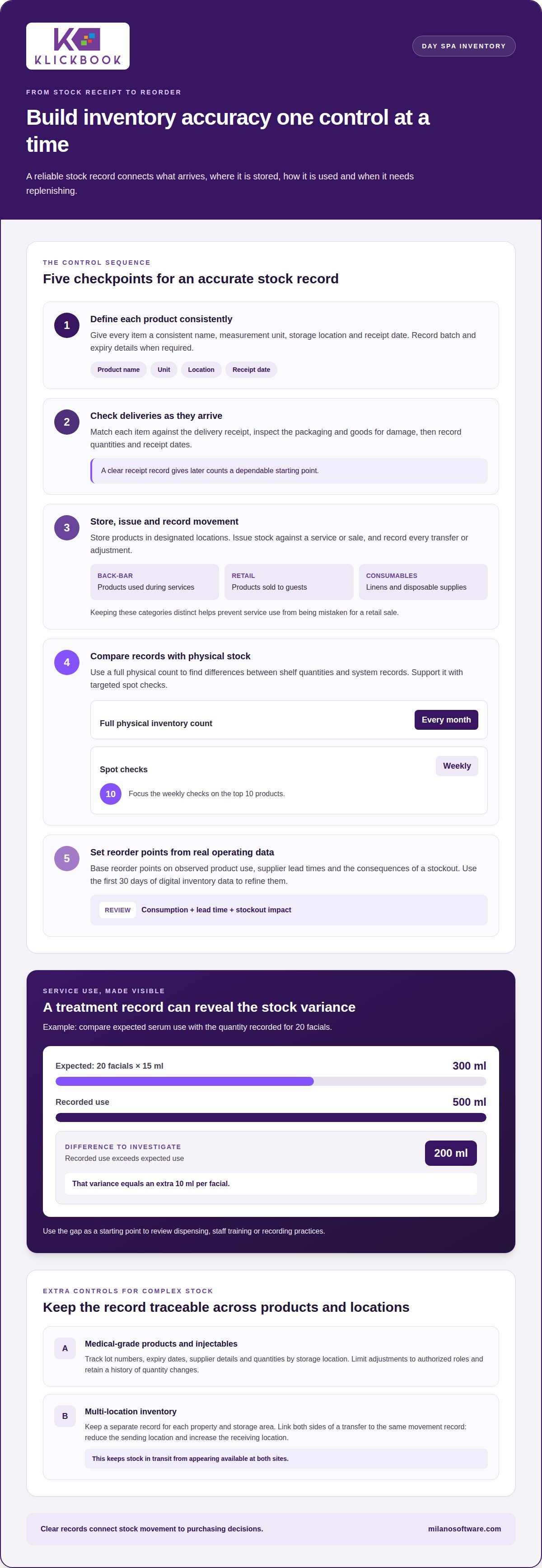
Accurate records show what arrived, where it is stored and how much remains. Give each product a consistent name, measurement unit, storage location and receipt date. Record batch and expiry details when required. Avoid duplicate product records: separate entries for the same serum can split quantities across reports and distort reorder decisions.
Staff should receive deliveries by matching each item against the delivery receipt, inspecting packaging and goods for damage, and recording quantities and receipt dates. They should then store products in designated locations, issue them against a service or sale, and record every transfer or adjustment. Regular physical counts compare shelf quantities with system records; a full physical inventory count every month, supported by weekly spot checks of the top 10 products, can expose discrepancies.
Link service usage to the treatment record, rather than relying on staff to remember product deductions later. A bill of materials defines the expected quantity for each service. For example, 20 facials using 15 ml of serum each should deduct 300 ml a month. If records show 500 ml used, the 200 ml a month variance equals an extra 10 ml per facial. That gap gives managers a specific starting point for reviewing dispensing, training or recording practices.
Medical-grade products and injectables require more than a general item count. Track lot numbers, expiry dates, supplier details and quantities by storage location. These records help identify products and prioritize stock approaching expiry. Limit adjustments to authorized roles and retain a history of quantity changes so discrepancies can be traced to a receipt, treatment, transfer or correction.
For multi-location operations, keep a separate inventory record for each property and storage area. A transfer should reduce the sending location’s quantity and increase the receiving location’s quantity, with both entries linked to the same movement record. This prevents stock in transit from appearing available at both sites. Shared naming conventions and measurement units also make location reports comparable.
Set reorder points using observed product use, supplier lead times and the consequences of a stockout. Par levels can trigger alerts when quantities fall below a defined minimum. After moving to digital tracking, use the first 30 days of inventory data to refine reorder points. Salons can then review actual consumption against recorded receipts, rather than relying on estimates alone. This approach gives managers clearer visibility into service continuity, product movement and stock accuracy.
3. Reducing waste and responsibly disposing of expired products
Expiry control starts with usable product records, not a pile of stock at the back of a cupboard. Record each item’s expiry and receipt dates, then arrange storage so staff can identify earlier-dated units first. A first-in, first-out process moves older stock forward before newer deliveries. During a monthly audit, flag expired, damaged and slow-moving products separately. Each status calls for a different action and an accurate adjustment to actual quantities.
Expiry alerts create time to act before products become unusable. A 30-day warning can flag salon treatments approaching expiry, while a 60-day alert can identify products such as shampoos and conditioners. For spa stock, align alerts with the product’s labelled shelf life and expected usage. Review the alert list against recent sales and service consumption, then transfer usable stock to a location with demand or reduce future reorder quantities.
Retail products and back-bar supplies need distinct records because they serve different business purposes. Professional supplies are recorded as an expense or Cost of Goods Sold, while retail items remain assets until sold. If one cleanser serves both purposes, use separate records or clear usage categories. Otherwise, treatment consumption can appear as missing retail stock, and sales reports may misstate what remains available for sale.
Discounted bulk purchasing can create waste when holding time and expiry risk outweigh the unit discount. Before accepting a large shipment, compare expected use with the product’s shelf life and current stock. If a line is moving slowly, pause reorders and review its sales history, placement and service relevance. Don’t use extra stock to compensate for weak demand; update purchasing quantities and document the decision in the inventory records.
Clean product data is essential for useful software reports. Standardize item names, units and identifiers, and remove duplicate entries that split counts or hide slow-moving stock. Record waste and expiry adjustments with a reason, date and quantity so reported stock matches the shelf count. A point-of-sale system can capture retail transactions as they happen, while staff record back-bar use and disposal through consistent inventory procedures.
For excess or expired products, review the manufacturer’s return procedures before disposal. Record the outcome, whether stock is returned, donated, liquidated or destroyed. Keep expensive or potentially hazardous products in secure storage, and monitor portable, high-value items more closely. These steps make losses visible, maintain reliable records and give managers a clear basis for future purchasing decisions.
4. Inventory management software and real-time visibility
An inventory management system should show stock movement clearly enough to support purchasing, service delivery and financial review. Compare platforms by how they record receipts, sales, service use, adjustments and waste. A dashboard is useful only when product records, units and transaction processes are consistent. Otherwise, real-time visibility can make inaccurate counts look current.
For injector-led practices, assess whether the system records product identifiers, lot numbers, expiry dates, suppliers and quantities used. These fields help staff connect products to their receipts and subsequent use. Reports should make it possible to review purchases, product movement, waste and remaining quantities without relying on disconnected spreadsheets. Keep inventory records aligned with the practice’s established clinical documentation processes.
When comparing medical spa inventory management software, prioritize operational fit over feature volume. Test a representative workflow: receive a product, assign its storage location, record use during a service, then review the resulting stock report. Milano Software offers spa management software with inventory management, Point of Sale and Reporting. Compare those capabilities with the workflows and records your staff need to manage.
Barcode labels can speed up receiving, transfers and counts when the inventory system supports barcode workflows. Use a consistent identifier for each item, and label storage locations where similar products could be confused. Scan received items into the correct location, then follow the same process for movements and adjustments. Scanning can reduce manual entry, but depends on clean product records and consistent staff procedures.
Canadian spas should configure GST/HST tax codes to reflect the applicable treatment of each sale, record collected tax separately from revenue, and reconcile sales reports with accounting records. Assign product costs consistently to retail inventory or professional-use expenses, then review them against purchases, usage and sales. Tax treatment and accounting entries depend on the transaction and the business’s circumstances, so use policies that reflect the spa’s actual operations.
Software pricing may include a base platform and optional features, but compare the total scope rather than a headline rate. List required functions first, then identify whether inventory, reporting, barcode workflows or integrations are included or priced separately. Request a quote based on the configuration you need; cost depends on selected capabilities and implementation scope. Include staff training and data cleanup in your operational assessment, since duplicate products and inconsistent units can undermine accurate reporting after launch.
Before selecting management software, run a sample reconciliation: compare a system count with the actual shelf quantity, then trace any difference to a receipt, sale, service use or adjustment. This reveals whether the platform supports the controls your spa needs in practice.
5. Accounting for seasonality and supplier lead times
Seasonal demand can change both the timing and mix of spa purchasing. Review sales and service trends across comparable periods, then adjust forecasts before ordering. A day spa in a dry-winter region might plan for greater demand for hydrating scalp serums. Base that decision on past product movement, scheduled services and current stock, rather than seasonality alone.
Supplier lead time determines how early to order to maintain service continuity. Record the time from submitting a purchase order to receiving usable goods, including delays or partial deliveries. Use that history alongside average product use to set minimum stock levels. If a frequently used treatment product takes longer to arrive, account for that interval in its reorder point.
Inventory management software can bring purchase history, receipts and sales trends together for review. Before approving another purchase, compare forecast demand with quantities on hand and orders in progress. This helps prevent duplicate orders and brings supplier delays to light. Record late deliveries and use actual supplier performance to adjust future ordering.
Purchase orders should specify the products, units, quantities, agreed delivery details and receiving location. Link each order to its eventual receipt so staff can identify partial shipments or substitutions. If a supplier replaces a product or changes its packaging, update product records and units before the next order. Consistent documentation makes invoice reconciliation and replenishment decisions more reliable.
Clear, practical communication helps maintain supplier relationships. Share forecasts for planned service changes, report recurring delivery issues promptly, and confirm order details in writing. For example, if a seasonal service menu increases demand for a product, an early forecast gives the supplier a clearer signal. Consider delivery consistency and product availability when setting future reorder schedules.
Storage layout also affects how efficiently seasonal stock moves through the spa. Keep frequently used products accessible and easy to inspect; organize reserve quantities by category and receipt date. This helps staff spot low stock during routine work without searching through boxes or cupboards. Review storage capacity before accepting bulk deliveries, since excess stock can limit access and take up space needed for active products.
Smaller, more frequent orders can reduce storage needs and protect cash flow, but they may increase dependence on supplier timing. Bulk purchasing can lower unit costs while increasing holding and expiry risks. Balance those trade-offs using product shelf life, demand patterns, available storage and lead-time reliability. For a coordinated approach to spa operations, explore spa management software that supports purchasing visibility and operational reporting.
Milano Software
Milano Software supports day spas looking to align inventory decisions with daily operations. Its spa management platform brings operational workflows together, while Point of Sale supports retail transactions and Reporting helps leaders review business activity. Online Booking lets clients schedule appointments and service packages, helping teams plan service delivery alongside product purchasing.
Consider Milano Software when disconnected booking, sales and reporting processes make it difficult to understand how operations affect stock decisions. A coordinated platform helps leaders review these workflows together, rather than treating inventory as a separate administrative task. The right configuration depends on your spa’s operational requirements and priorities.
Contact Milano Software to discuss how its spa management software, Point of Sale, Reporting and Online Booking can support your day spa’s operations.
Make inventory control part of the operating rhythm
Start by assigning clear ownership for inventory decisions. Define who reviews usage, approves replenishment and resolves discrepancies, then include those responsibilities in routine operational planning. This makes day spa inventory control best practices a repeatable management discipline, not a one-time cleanup.
Milano Software offers Spa Management, Online Booking and Reporting to support coordinated spa operations. These capabilities help leaders bring booking activity and operational reporting into the same planning conversation as stock decisions. This gives teams a clearer basis for aligning service demand, purchasing priorities and management oversight.
When your current processes make it difficult to connect daily activity with operational decisions, discuss your requirements with Milano Software. Contact Milano Software to explore a practical next step for your spa. Stronger inventory discipline starts with a clear operating model, and your team can build that foundation with confidence.
Frequently Asked Questions
What is a Spa Inventory Management System and Why is it Essential?
A spa inventory management system links stock records with purchasing, services and sales. Its practical value is helping managers identify whether a discrepancy came from a delivery, service, retail transaction or adjustment. For example, if a product’s recorded balance falls without matching activity, the transaction history can narrow the investigation. This supports informed purchasing decisions and helps protect service availability without relying on memory.
What inventory should a day spa track, including retail products, treatment supplies, and linens?
Track every item that supports service delivery or sale: retail products, treatment supplies, disposable consumables, linens, cleaning products and operational tools. Choose a consistent unit for linens, such as individual pieces or managed sets. Record damaged or retired linens separately from available stock. This helps managers plan replacements and prevents unusable items from inflating the count of service-ready inventory.
How often should a day spa count inventory and reconcile stock records?
Set a regular counting schedule, with more frequent checks for fast-moving or high-value items. Reconcile the full inventory during the monthly close, and investigate differences before finalizing purchasing or financial reports. After a delivery, product transfer or unusual adjustment, verify affected items promptly. These targeted checks help isolate discrepancies while transaction details are fresh, rather than letting small record errors accumulate.
What par levels, reorder points, and safety stock are recommended for spa products?
Set par levels based on expected use during replenishment, supplier lead time and the operational impact of a stockout. A reorder point should trigger action early enough for replacement stock to arrive before demand exceeds available quantities. Add safety stock only when demand variability or delivery inconsistency justifies it. Review each setting against actual usage and receipt history; one fixed threshold rarely suits every product category.
How can a day spa forecast demand for seasonal products and treatment supplies?
Build forecasts from comparable sales periods, upcoming service menus, appointment patterns and planned promotions. Separate retail demand from treatment consumption so a retail campaign does not distort estimates for back-bar products. For a new seasonal service, estimate requirements from its service formula and scheduled bookings, then adjust as completed appointments provide actual usage data. Record forecast assumptions so managers can distinguish seasonal effects from shifts in client demand.
What inventory management software works well for small day spas in Canada?
Choose a system that fits the spa’s workflows and connects inventory activity with relevant sales and operational records. Milano Software’s platform is designed for day spas and includes inventory management, Point of Sale and Reporting. These functions support product tracking and review of sales and inventory metrics. Evaluate the workflow using your spa’s product categories and transaction examples, rather than choosing software based on feature lists alone.
How should a day spa track product expiry dates, batches, and recalls?
Keep product records that link each batch to its supplier, receipt, expiry date and storage location. If a supplier issues a recall notice, use those records to identify affected stock, isolate it from usable inventory, and document its quantity and disposition. Include the batch reference in the adjustment record. This traceable history helps staff avoid issuing affected products while managers reconcile stock.
What are best practices for preventing spa inventory theft, waste, and shrinkage?
Reduce shrinkage through controlled access, documented product removal and review of adjustment histories. Assign responsibility for receiving and approving stock changes, and investigate recurring differences by item and location. Store portable, high-value products securely and record authorized transfers. For waste, record the reason and quantity of each write-off. These controls distinguish loss, damage, expiry and recording errors, helping managers address the cause.


