
A couples massage is a coordinated booking, not simply a longer appointment. Couples massage booking software should account for therapist availability, the service and the room together. Online booking lets clients schedule appointments and service packages from any device.
Effective scheduling also aligns room use, equipment, permissions and appointment duration. This guide explains how to structure those elements, coordinate group bookings and manage room turnover so availability reflects your spa’s operating capacity.
Key Takeaways
- Set advance-booking rules that give the team time to coordinate staffing and prepare the service.
- Match user permissions to operational responsibilities so booking and schedule changes follow a clear process.
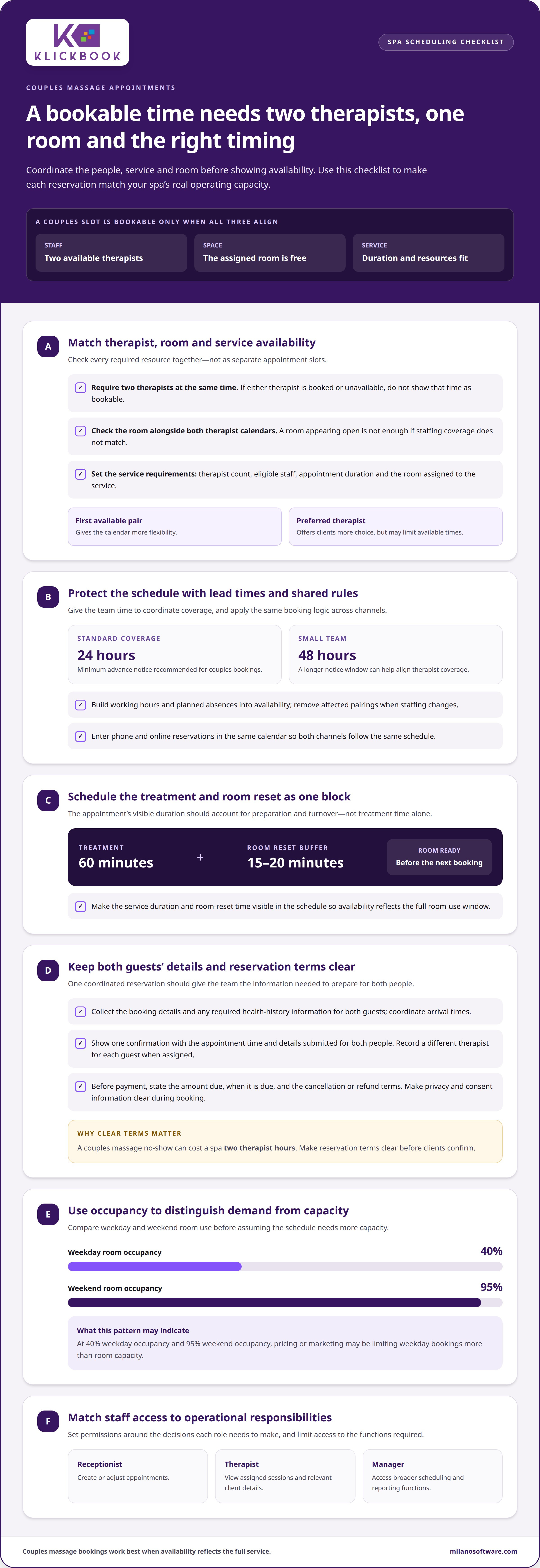
- Build service duration and room-reset time into the schedule; a 60-minute treatment has a recommended turnover buffer of 15 to 20 minutes.
- For couples and group reservations, plan for health-history information for both clients and coordinate arrival times.
- Compare weekday and weekend room utilization to identify when pricing or promotion, rather than capacity, may be limiting bookings.
Can clients book a couples massage online?
Yes. Clients can book a couples massage online when the booking flow checks two therapists’ availability at the same time. It should also account for the service, room and appointment duration, rather than treating the reservation as a standard massage with one therapist.
Online Couples Appointment Booking
A clear booking flow lets clients choose a couples service, select an available time and enter details for both guests. The system should confirm that two therapists can deliver the service together before it displays a time as bookable. A 60-minute couples massage, for example, needs a schedule that reflects the service duration and room preparation. The client should receive one confirmation showing the appointment time and the details submitted for both people.
When comparing platforms for Canadian spa operations, assess how easily you can configure, book and manage couples appointments, and whether the system supports the workflows your team needs. A platform that handles two therapists in one reservation is a closer fit than a calendar that treats each guest as a separate appointment.
Calendar and Scheduling Options
An online calendar should display appointment availability only when the required therapists and service resources align. Set the couples service to require two therapists at the same time, then account for room turnover after treatment. For a 60-minute service, a recommended room-reset buffer is 15 to 20 minutes. Advance booking rules can also protect staffing capacity: couples bookings should require at least 24 hours’ notice, or 48 hours for a small team.
Calendar controls should block unavailable periods and synchronize staff schedules with online availability. Integrations with Canadian payment processors, tax settings and accounting tools vary by platform. Check whether the specific connections support your payment flow, tax configuration and bookkeeping process.
Deposits, Payments, and Booking Channels
Online payments can be offered during booking, and deposit settings can define how clients secure a reservation. Before payment, clearly show the amount due, when it is due, and the cancellation or refund terms. Because a couples massage no-show can cost a spa two therapist hours, make the reservation terms clear before clients confirm.
Phone booking is useful when clients need help choosing a service or coordinating details. Staff can enter the appointment in the same calendar, keeping online and phone reservations on one schedule. Clearly present privacy, consent, cancellation and refund information during booking. Clients should provide any required consent and understand the stated terms before completing the reservation.
Massage therapist and service resource management
A couples appointment depends on therapist coverage, service configuration and room availability lining up at the same time. Booking rules should also distinguish between a client’s preferred therapist and the first available qualified team.
Therapist Selection and Assignment
For a couples appointment, the booking flow can offer a preferred therapist or assign the first available pair. First-available scheduling gives the calendar more flexibility; letting clients choose a preferred therapist offers more control but may limit available times. Assign a different therapist to each guest, and make both assignments clear in the booking record so staff can prepare accordingly.
Room and Therapist Availability
A couples massage booking needs two therapists available at the same time. Check both calendars alongside the room assigned to the service. If either therapist is already booked or the room is unavailable, that time should not be offered. Coordinated availability prevents scheduling conflicts and ensures the reservation reflects the resources needed to deliver the service.
Coverage and Booking Lead Times
Couples massage bookings should require at least 24 hours’ notice, or 48 hours for a small team. Those lead times give managers a defined window to align therapist coverage. Build the rule into the booking calendar, then review exceptions against the staffing plan. For example, a small team without two therapists scheduled together should not expose a couples time slot simply because a room appears open.
Service setup connects a treatment to its staffing requirements. In professional wellness and massage practices such as Body 'N' Balance, defining each service with its required therapist count, duration and eligible staff keeps the schedule aligned with working hours and planned absences. Reception staff can use these rules for phone bookings, while the online calendar applies the same availability.
Before publishing a service, map the booking logic in sequence:
- Set the service’s required therapist count to two.
- Identify which therapists can deliver the service and allow different assignments for each guest.
- Align therapist schedules with the designated room’s available appointment periods.
- Apply the appropriate advance-booking window for the team’s coverage model.
Review the schedule when staffing changes. If one therapist becomes unavailable, remove affected pairings from bookable times rather than leaving a partial match visible. A structured spa scheduling workflow can help keep service rules and resource availability aligned.
A spa may set lower weekday couples massage room rates than Friday and Saturday rates. At 40% weekday occupancy and 95% weekend occupancy, a pricing and marketing problem may exist rather than a capacity problem.
Assessing business needs and user permissions
Start by identifying the decisions each role needs to make during a couples massage session. A receptionist may need to create or adjust appointments; a therapist needs access to assigned sessions and relevant client details; and a manager may need broader scheduling and reporting access. Map tasks to roles before selecting software, then limit access to the functions each role requires.
General salon booking software can create operational risks if it treats every service as a single-provider appointment. A couples reservation might appear available even when therapist coverage or room capacity is insufficient. Poorly aligned permissions can also expose client information to staff who don’t need it. Define requirements for service resources, staff access and the information each role uses.
Business messaging and phone features should support the booking workflow, not create separate records. A confirmation, for example, should identify the reserved time and service, while staff-entered phone bookings should update the same calendar as online reservations. Review which notifications can be sent automatically, what they include, and how staff record changes or client requests.
Mobile access can help managers review schedules away from the front desk, but assess its specific functions rather than assuming an app supports every task. Test a typical workflow: view the day’s appointments, identify a staffing change and find the relevant booking. Reporting should help managers assess appointment volume, therapist utilization and booking-channel activity, connecting scheduling decisions with operational performance.
Software costs depend on the configuration and are provided after a quote request; relevant factors include selected functions, user access, locations and required integrations. Assess the cost against the operational risk of disconnected calendars, manual updates and unclear access controls. For example, a phone change that isn’t reflected online can leave an outdated appointment reserved, while broad permissions can make sensitive client records available beyond operational need.
Use a structured needs review before committing to a platform:
- List booking, scheduling, messaging and reporting tasks by role.
- Define which client and appointment details each role can access.
- Test how online and phone changes appear in the shared calendar.
- Review reports against the management decisions they must support.
- Compare the required configuration with the cost and risks of manual work.
This assessment gives spa leaders a practical way to match system access to staff responsibilities and identify gaps before they disrupt a booking session.
Coordinating rooms, equipment and appointment durations
A couples massage calendar must coordinate the treatment room, appointment time and any shared equipment. A designated couples room should hold only one appointment at a time. This prevents two reservations from competing for the same private space, even when separate therapists appear available.
Build each service entry around its actual duration and resource requirements. A 60-minute couples massage should include a room-turnover buffer because staff must reset the space between guests. A recommended buffer is 15 to 20 minutes. Include that interval in the calendar, rather than relying on staff to remember it after the appointment ends.
Include equipment in the scheduling model when items are shared between rooms or services. Identify the equipment required for a couples service, then determine whether it can be reserved elsewhere at the same time. For example, if equipment must stay in the couples room, scheduling another treatment that needs it can create a resource conflict.
Calendar management should show the complete appointment block, including treatment time and room reset. A booking for a 60-minute service therefore needs a visible schedule that protects the following turnover period. Review the calendar by room as well as therapist; a staff view alone may conceal a room conflict.
Mobile appointment management can help authorized staff review the daily schedule away from the front desk. Test it in practice: open a booking, identify its room and duration, then see whether a schedule change appears in the shared calendar. Mobile access should provide the same operational details, not create a separate version of the schedule.
Appointment reminders should match the confirmed booking details. A useful reminder includes the appointment time, service and arrival instructions, without conflicting information if the booking changes. Keep the room assignment visible to staff, even if clients don’t need that internal detail. Consistent arrival information helps couples begin their appointment together.
Use this sequence to configure each couples service:
- Assign one designated room and prevent overlapping appointments in that room.
- Enter the treatment duration and add the 15-to-20-minute turnover buffer.
- Record equipment requirements and prevent conflicting reservations for shared items.
- Check the booking in both room and staff calendar views.
- Review reminders against the final appointment details before sending them.
Review room utilization alongside appointment duration and turnover. If a couples room shows open time between services, determine whether it is a planned reset period or a scheduling rule that needs adjustment. This helps distinguish protected operating time from availability the spa can responsibly release.
Couples and group massage bookings
Group reservations require more coordination than matching an appointment to an open time. A couples booking involves two guests, a shared service window and a room reserved for their use. Keep these details together in the booking workflow so staff can see the reservation’s operational requirements.
Capture information for both guests in the booking record. A couples massage requires health history information for each person, so don’t treat one guest as a proxy for the other. Keep each person’s information linked to the correct appointment, and make it easy for staff to see whether both records are complete before the service begins.
Include arrival instructions in the group reservation. Couples massage guests should arrive together, not at staggered times. A confirmation can state this shared expectation alongside the appointment details, reducing uncertainty at check-in. If the reservation changes, update the shared booking record and communicate the revised details to both guests.
Group capacity should reflect the resources each reservation uses. For couples, consider the room’s exclusive use, therapist coverage and service schedule. If group size or service requirements change, review the rooms, staff and timing needed before accepting the booking. The calendar should show one complete reservation, not separate entries that obscure shared requirements.
Revenue rules can account for exclusive room use. A spa can charge a couples room fee or set a minimum service total to cover it. Show applicable terms before guests complete their reservation. For group bookings, explain how the reservation is structured and what it includes so the organizer can share accurate details with other participants.
Use a consistent process for group requests:
- Record each guest’s health history information separately.
- Reserve the room and coordinate the required therapist coverage.
- Communicate shared arrival instructions and the booking terms.
- Review the full resource plan before staff accept changes.
- Collect post-visit feedback to identify friction in the group booking experience.
Feedback can show whether guests found the booking steps clear, arrival coordination worked and the group’s expectations matched the service. Review comments alongside scheduling outcomes to identify practical improvements to booking instructions and operating rules, while keeping couples and group reservations aligned with available capacity.
Milano Software: Online Booking
Milano Software provides online booking for spa operators managing couples appointments and service packages. Clients can schedule online 24/7 from any device, giving them a direct booking option beyond phone reservations. For spa teams, online booking fits into a broader operational model that includes Spa Management, Reporting and Point of Sale.
Consider a coordinated spa platform when couples reservations need to work within a wider operating workflow, not just a standalone calendar. Clear service and availability settings help align online scheduling with room capacity and therapist coverage. Reporting can also help you review booking activity and daily operations.
To explore how online booking can support your couples massage operations, contact Milano Software to discuss your requirements.
Set the next operating standard
Treat the booking journey as an operating standard that can evolve with your spa. Define the experience you want clients and staff to have, then use it to guide process decisions. The right couples massage booking software should support your priorities without adding unnecessary complexity.
A focused discussion can help clarify how your requirements align with a suitable operational approach. Contact Milano Software to discuss your needs.
With a clear direction, your team can move ahead confidently.
Frequently Asked Questions
How do you identify your massage business's needs before comparing software?
Document the decisions your software needs to support, then rank them by operational importance. Separate essentials, such as accurate appointment records, from preferences, such as a particular reporting view. Include the people who handle bookings, payments and management reports. A written requirements list keeps demonstrations focused on real spa workflows, not simply the number of features.
How should I set up a couples massage room in my booking system?
Give the room a clear internal label that staff can recognize. Keep internal resource names distinct from client-facing service descriptions, so guests see understandable choices and staff see the correct room designation. Before launch, make a test booking from the client’s perspective and review the confirmation and staff record. This can reveal confusing labels or missing instructions without changing a live reservation.
What happens if one person in a couple cancels?
The spa’s cancellation policy should explain what happens to the remaining guest’s reservation. State whether the service can be changed, continued as a solo appointment or cancelled, and explain any applicable payment or refund terms before booking. If one guest cancels, staff can apply the published process consistently, update the booking record and clearly communicate the outcome to the other guest.
What should you assess when choosing massage booking software?
Assess implementation needs as well as day-to-day use. Consider how existing appointment information will be transferred, which integrations matter to the business and what training staff need to use the system consistently. Ask managers to assess reporting against the decisions they make, such as reviewing service demand. A realistic assessment covers both the transition to new software and the work needed to maintain reliable records afterward.
What features should couples massage booking software include?
Look beyond appointment entry. Depending on your workflow, useful capabilities may include client profiles, service-package scheduling, payment processing and operational reporting. Review how each connects to the booking record. Staff should be able to identify the reserved service and find relevant guest information without piecing together separate records.
Which booking software supports simultaneous couples massage appointments and room assignments?
When evaluating Klickbook by Milano Software, ask whether its resource scheduling can accommodate multiple venues and coordinate staff, rooms and other assets for a couples appointment. Confirm which capabilities are available for your configuration. During evaluation, use a representative reservation to see how staff can view and manage its booking record, and whether the system’s resource model fits your spa’s operations.
How much does couples massage booking software cost in Canada?
Pricing and terms can vary by provider and configuration. Contact Milano Software to request a written quotation that explains the costs for your spa, including any setup fees, data migration, training, selected plan, locations and integrations. Ask which services are included and whether any additional charges may apply. Reviewing these details before making a decision can help you compare proposals on a consistent basis.
How does couples massage scheduling handle two therapists, shared rooms, and service durations?
Evaluate the system with operational scenarios, not just a feature list. For example, test how a manager reviews a booking after a therapist’s schedule changes, or how staff find the right reservation during a busy check-in. These tests show whether the schedule is clear to the people using it and whether booking records support smooth handoffs across the team.