
A free spa staff scheduling system can suit a team with straightforward staffing needs, provided it can handle shift planning, staff availability and schedule changes without adding manual work. As the team, service mix or locations become more complex, gaps in those workflows can create avoidable scheduling friction.
Cost matters, especially when evaluating software for a single location or a new operation. The key question is whether the system supports how your spa assigns staff and responds to changes, not simply whether it has a zero-cost plan.
This guide explains where free spa scheduling software may be a practical fit and where its limits matter. It covers how scheduling tools coordinate shifts and availability, and how cancellation and no-show workflows help teams respond when appointments change. Use these points to assess what your team needs from a scheduling platform.
Key Takeaways
- Assess whether a free option can support your team’s scheduling workflow, rather than judging it by price alone.
- Map shift coverage by role so open shifts and staff availability are easier to coordinate.
- Review how scheduling tools handle cancellations and rescheduling, including the steps for making newly available appointment times visible.
- Use automation to reduce repetitive schedule administration and improve operational visibility.
- Milano Software combines spa management, online booking, reporting and point of sale capabilities for spa operations.
Cancellations, rescheduling, and no-show reduction
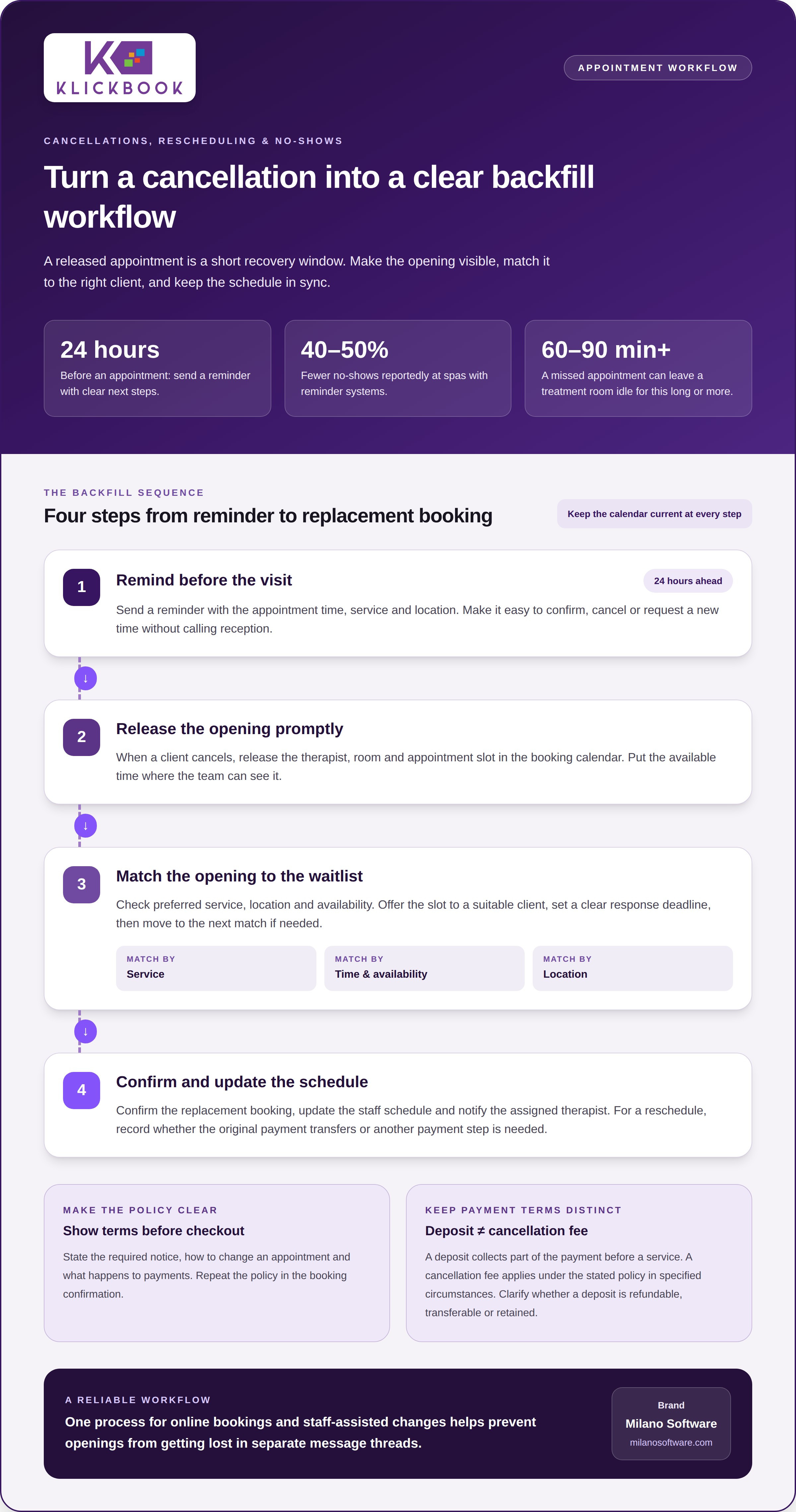
A cancelled booking creates a short recovery window, not simply an empty calendar cell. A missed appointment can leave a treatment room idle for 60-90 minutes or more. The spa loses service capacity, while the therapist and room may remain unavailable for other work. A cancellation workflow should make the opening visible quickly and assign responsibility for filling it.
Appointment reminders support attendance, particularly when clients book longer treatments weeks ahead. Send a reminder 24 hours before the appointment, with clear instructions for confirming, cancelling, or requesting a new time. Spas with reminder systems reportedly have 40-50% fewer no-shows. The reminder should show the appointment time, service, location, and cancellation route, so clients can act without calling reception.
When a client cancels, use a defined backfill sequence:
- Release the therapist, room, and appointment slot in the booking calendar.
- Offer the opening to waitlisted clients whose service and availability match.
- Give the first suitable client a clear response deadline, then move to the next match.
- Confirm the replacement booking and update the staff schedule.
For example, an afternoon massage opening should be offered to clients seeking that service and time. A waitlist is most useful when it records preferred services, locations and availability. Staff can then offer a relevant opening instead of sending a broad message to every client.
Cancellation policies connect appointment access with payment handling. State the policy during booking and repeat it in the confirmation, so clients see the terms before checkout. Explain the required notice, how to change an appointment and what happens to any payment already made. For a rescheduled booking, record whether the original payment transfers to the new appointment or requires another payment step.
Deposits and cancellation fees serve different purposes. A deposit collects part of the payment before a service; a cancellation fee applies under the stated policy when a client cancels in specified circumstances. Make the distinction clear in booking and intake communications. Avoid wording that leaves staff to interpret whether a deposit is refundable, transferable or retained after a late cancellation.
Use the same process for online bookings and staff-assisted changes. At checkout, confirm the appointment details and any applicable policy acknowledgement. If a client calls to reschedule, update the calendar immediately, notify the assigned therapist and return the released time to the waitlist workflow. These steps reduce duplicate bookings and prevent openings from being buried in separate message threads.
Is there a free version of the spa scheduling software?
A free version can suit a small spa with straightforward scheduling needs if one team can manage staff availability, appointments and schedule changes using its available tools. Before adopting free software, map a typical week: a therapist’s shift, a booked service and a change to that appointment. If the system handles each step clearly, it may meet the operation’s immediate needs.
Can spa staff scheduling software integrate with booking, payroll and point-of-sale systems? Integration depends on the software and its connections. Confirm whether appointment data, staff hours, payments and deposits transfer between systems or require manual entry.
“Free” describes the price, not the operational fit. Review the tasks the software supports, including staff access, schedule visibility and reporting. A single-location day spa may need a shared calendar and clear shift assignments; a resort spa may need coordination between treatment teams and other operating areas. Test a realistic scheduling scenario before moving live work into the system.
Multi-location teams need consistent records without losing site-level control. For example, a therapist working at two spa locations needs a schedule that identifies the correct site, shift and appointment allocation. Managers also need to distinguish location-specific availability from shared team capacity. If free software cannot separate these records clearly, staff may have to reconcile calendars manually.
Compare workflows across locations before selecting spa software. List the sites, staff roles, recurring shifts and booking channels. Then check whether the scheduling software can:
- Show each location’s staff schedule separately and in a consolidated view.
- Record availability and assigned shifts against the correct site.
- Keep booking changes visible to relevant staff and managers.
- Support consistent procedures while preserving location-level scheduling decisions.
Integration matters because repeated data entry increases the risk of mismatched records. Booking, payroll and point-of-sale systems may each hold different operational information. Confirm which records synchronize, how updates appear and who resolves exceptions. For instance, a changed shift should not leave payroll records showing the original hours.
Deposits create another reconciliation point. Determine whether the booking software records the deposit against the appointment and whether checkout reflects the same transaction. The workflow should make clear which system holds the current payment record. Keep manual reconciliation only where the software’s actual connections require it.
For a small spa, free spa scheduling software may be adequate when its core workflow matches daily operations. For multi-location spa management, assess consolidated visibility, location-specific schedules and integration needs together. Choose based on the work the software can reliably support, not its free label.
Role-based shifts and open-shift coverage
Role-based scheduling matches spa services with qualified staff and available rooms. A clear rota helps managers identify coverage gaps before they affect daily operations.
Role-Based Shifts and Staff Rotas
Organize the calendar around operational roles, such as therapists, reception staff and attendants. Assign shifts according to service demand, staff availability and the skills each appointment requires. A rota should show who is working, where they are assigned and which shifts remain open. Schedule recurring shifts consistently, then use reminders to communicate changes. Review a typical week to see whether peak booking periods have enough coverage.
Room Assignments and Shift Coverage
Room assignments connect staff coverage to the spa’s physical capacity. A therapist scheduled for a treatment needs an appropriate room available for the appointment. Use the platform to make room conflicts and uncovered shifts visible in one calendar view. For an appointment at a second location, include the site in the assignment so managers can distinguish local coverage from shared team availability.
Open-shift coverage works best with a defined approval process. Specify the role, location, shift hours and required qualifications before sharing an opening. Staff can respond based on their availability, while a manager confirms the assignment and updates the rota. This reduces ambiguity when a shift changes hands or several employees express interest.
Canadian employment standards vary by jurisdiction and by whether a workplace falls under federal or provincial regulation. Managers must apply the relevant rules for breaks, overtime, scheduling and rest periods, then configure shifts and records accordingly. Spa management software can organize the schedule, but applicable employment requirements determine how shifts are structured.
Staff schedules contain personal information, including availability and assigned work locations. Canadian privacy obligations depend on the organization and applicable jurisdiction. Limit access to employees who need scheduling data, collect only relevant information, and define retention and secure-disposal practices. Avoid putting sensitive personal details in open shift notes or broad team reminders.
For multi-location operations, separate location coverage from employee identity. A team member may be available at one site but not another, especially when travel time affects shift transitions. Include travel between locations in the rota; the scheduling guidance identifies 30-minute commute buffers as a consideration for therapists moving between spa sites. Managers should review these transitions before approving assignments.
- Match each shift to the role and service requirements.
- Show open shifts with location and hours clearly identified.
- Review room, staff, and location conflicts before publishing.
- Record shift changes and communicate them through the agreed process.
Scheduling software and automation
Automation moves schedule updates through a defined workflow instead of leaving them in separate spreadsheets. A booking system can connect appointment details with staff calendars, helping managers see assigned services and treatment rooms together. Its value depends on how reliably records update and which tasks still require manual entry.
Manual spreadsheets are said to cause 60% more scheduling conflicts than software systems. A spa can reduce conflicting records by setting one calendar as the operational reference, assigning staff access, and defining who approves changes. For example, when an appointment changes, the updated schedule should show the correct staff member, service, and room. Managers should also review exceptions that automation cannot resolve.
Automated workflows can handle recurring tasks, such as publishing approved shifts or sending schedule reminders. Before enabling them, define the event that triggers each action and who is responsible for exceptions. An instant confirmation can help staff see a change promptly, but the schedule is useful only when availability and assignments are accurate. Retention depends on dependable processes, not automation alone.
Packages and appointment types can affect how a booking system allocates time and staff. A multi-service package, for example, may involve separate appointments or staff roles. The platform should make those requirements visible before a manager publishes the schedule. Test a common package from booking through staff assignment, including room changes, to identify manual handoffs and duplicate entries.
Software pricing can depend on the billing model, team size, number of locations, selected modules and support requirements. A small day spa may need core scheduling, while a resort operation may require location-level access and consolidated reporting. Compare each plan’s features with actual workflows instead of assuming a lower-cost tier supports every process.
A free plan and a software trial are different evaluation paths. A free plan may have defined feature or user limits; a trial provides temporary access under the vendor’s terms. During either evaluation, test a representative week: create shifts, assign treatment rooms, change staff availability and review schedule visibility. Record which steps remain manual and whether the system handles the spa’s booking patterns.
Assess total operational fit alongside the subscription model. Include setup effort, staff training, data migration, and any separate tools needed for payments or reporting. A booking system that saves schedule administration but requires repeated entry elsewhere may shift work rather than remove it. Map each workflow before comparing spa software, then confirm the system supports the team’s required processes without relying on unsupported assumptions.
Managing therapist availability and staff schedules
Therapist availability should reflect booking demand, approved time off and service requirements. A reliable schedule connects those inputs before online booking displays appointment times. Without that alignment, a client may book a slot that conflicts with a therapist’s availability or the spa’s operating plan.
Start with booking history. Review 12 weeks of spa booking data to identify demand patterns, then compare them with current therapist availability. The typical peak hours identified for spas are 10am-12pm and 5pm-7pm. Use those periods to assess coverage, rather than applying the same staffing level across every shift.
Saturdays with 60% more bookings are associated with a recommendation to increase spa staffing by 40-50%. Treat that as a planning reference, not a fixed rota: actual staffing depends on the services booked, available therapists, and room capacity. A spa business should align the schedule to its own demand and operating constraints.
Publish schedules 2-3 weeks in advance so employees can plan around assigned shifts. Record vacation dates 6 weeks in advance where possible, then revise the rota when approved absences affect coverage. For therapists working between locations, include 30-minute commute buffers when scheduling the transition. These details help distinguish bookable availability from time that must remain protected.
Appointment spacing also affects daily capacity. A schedule should generally allow 5-10 minutes between appointments, depending on the service. Longer services such as couples’ massages and body treatments may need 10 minutes between bookings; quick services may need 5 minutes. Build the relevant buffer into the appointment template so online booking doesn’t assign back-to-back services without a transition.
To implement a spa staff scheduling system, define roles, locations, shift patterns and availability rules before importing schedules. Test a representative work week, including a therapist’s time off and a change to an assigned shift. Train employees to submit availability, review published schedules and report conflicts through the agreed process. Managers should practise approving changes and checking the updated calendar before putting it into operation.
Use the first scheduling cycle to identify practical gaps. Compare scheduled coverage with booked appointments, room assignments, and staff availability. A flexible schedule has been associated with 34% lower staff turnover, but flexibility still requires clear coverage standards. Managers can offer shift options while preserving the service and location requirements each shift must meet.
Track schedule changes and their reasons consistently. Reviewing those records alongside booking patterns helps managers distinguish recurring demand from one-off changes. This gives them a stronger basis for future rota decisions and helps maintain therapist availability without relying on informal messages or memory.
Milano Software
Klickbook by Milano Software includes spa management, online booking, reporting and point-of-sale capabilities. These tools bring appointment activity and daily workflows together, which may help spa teams review bookings and business performance in one place.
For a day spa, online booking can let clients schedule appointments and service packages 24/7 from any device, provided the spa’s booking setup supports those options. Reporting can help operators review activity, while point of sale supports retail transactions. Used together, these capabilities may help teams coordinate bookings with other business processes, though the benefits depend on how the spa configures and uses the system.
If your team is assessing how spa software fits its operating model, contact Milano Software to discuss your requirements.
Set the next stage of scheduling improvement
Turn your team’s operational issues into clear requirements. Note where schedule changes create extra administration, where availability is difficult to coordinate and which decisions need better visibility. This gives managers a practical basis for assessing whether a spa staff scheduling system fits the operation now and can support its future structure.
Prioritize workflows that affect staff coordination and service delivery, then align platform selection with those requirements. A defined scope keeps evaluation focused on the processes your team needs, rather than features that do not address its operating model.
Milano Software supports spa operations with software built around management workflows, online booking, and reporting. Contact Milano Software to discuss your scheduling needs and the operational requirements behind them. A more deliberate scheduling foundation can help your team move forward with clarity.
Frequently Asked Questions
What features should a spa staff scheduling system include?
Prioritize accurate role assignments, clear shift visibility, location-level controls and a reliable change-approval process. The system should make schedule ownership clear: employees submit availability, managers approve changes, and the current rota is easy to identify. For example, a supervisor should be able to distinguish a requested shift swap from an approved change. Assess how scheduling data connects with booking and payroll workflows.
What are the best spa staff scheduling software options in Canada?
The right fit depends on whether the operation is a day spa, resort, Nordic spa or multi-location group. Milano Software provides spa management software with online booking and reporting, alongside point-of-sale capabilities. Compare platforms by the operating model they support, including appointment coordination, staff scheduling and management visibility. A resort group should assess its portfolio needs differently from a single-location spa with a smaller team.
How much does spa employee scheduling software cost in Canada?
Pricing and available services vary by provider and operation. When requesting a quote, ask about per-location pricing, setup fees, setup services, data migration, training, plan names and limits, and any commissions or payroll capabilities. Compare written quotes to understand which features and services are included and what additional costs may apply.
How do spa scheduling systems handle staff availability, shift swaps, and time off?
Scheduling systems provide a shared process for recording availability, submitting time-off requests, and managing proposed shift swaps. A useful workflow separates a request from an approved schedule change. For example, a therapist can propose a swap, while a manager confirms that the replacement meets the role and location requirements. The updated schedule then becomes the reference for staff and managers, reducing reliance on informal messages.
How can a spa create schedules based on appointments, services, and employee skills?
Build the schedule around appointment demand, service requirements, employee qualifications and room availability. Map each service to the roles and resources it requires, then assign staff whose skills match those appointments. For example, do not assign a booking requiring a particular treatment qualification solely because a therapist has an open calendar slot. Review exceptions before publishing the schedule.
How does spa scheduling software manage commissions, tips, and variable pay?
Some software may support commission, tip and payroll workflows, but capabilities vary by provider. Confirm whether a platform supports the compensation structures your spa needs, such as multi-tier commissions or split-shift payroll. Treat tips as a separate pay component in the spa’s payroll process, with clear records of how amounts are attributed and reconciled. Ensure scheduling records, completed services and payroll calculations use consistent employee and service data.


