

Advance booking for non-members depends on the spa, not a universal Canadian rule. At Clear Nordic Spa in Calgary, non-members can book 3 days ahead. A Nordic spa booking system should make that booking window and the steps for managing a reservation clear before guests commit.
It’s reasonable to expect a reservation to remain manageable when plans change. The booking policy sets out your options, including how to amend a reservation, what payment flexibility applies, and when a cancellation is accepted.
This guide explains how non-members can plan ahead, what to check when changing a booking, and how payment and cancellation terms affect the process. It also covers how centralized online booking can make guest reservations clearer and easier to manage.
Key Takeaways
- Compare member and non-member booking windows before choosing a visit date; access to the calendar can differ by membership status.
- Review the reservation’s change and cancellation terms before completing a booking, so you understand the applicable process.
- Clear Nordic Spa members can book 30 days ahead, and memberships can be paused for up to 3 months per year.
- Online booking lets guests schedule appointments and service packages 24/7 from any device.
- For spa operators, centralized booking, reporting, and point of sale can support more coordinated reservation management.
Changing an existing booking
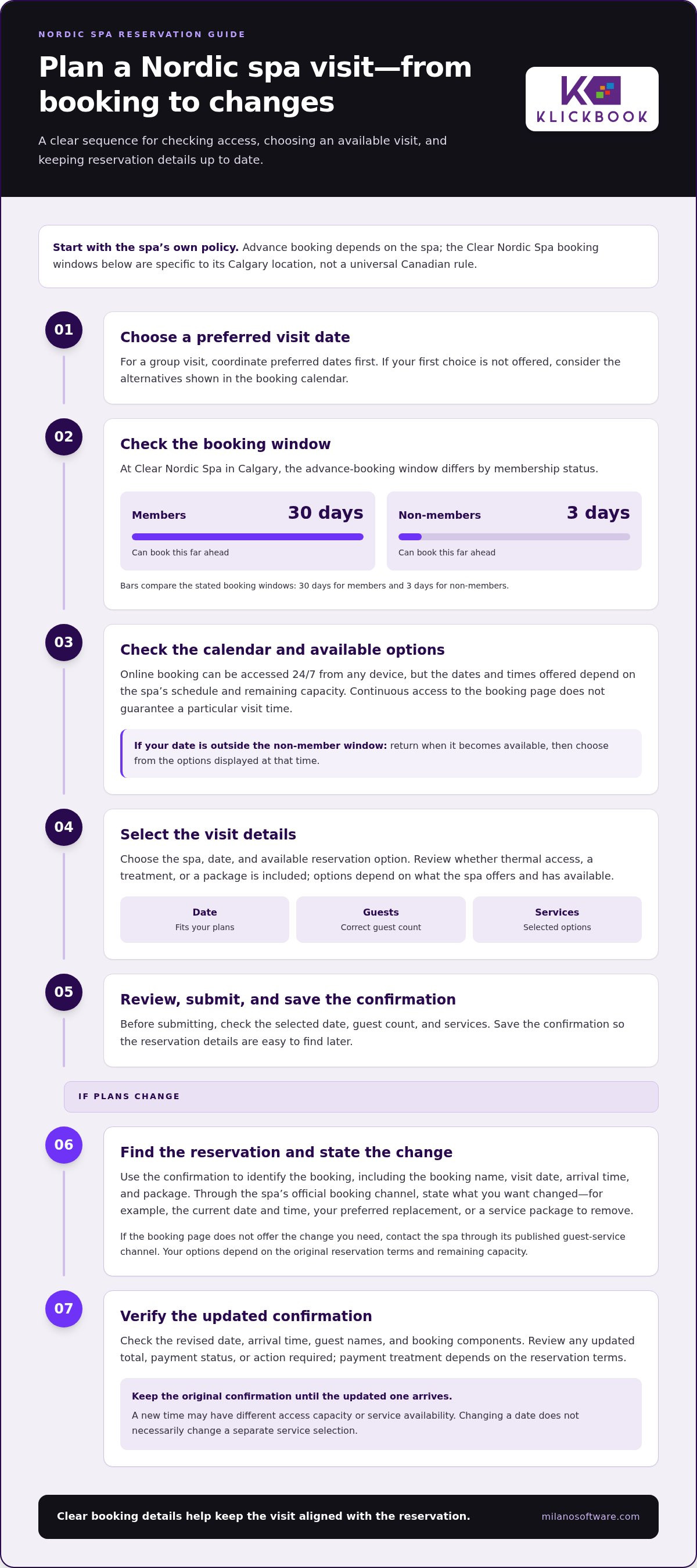
Start with the confirmation for your Nordic spa visit. It includes details staff need to find your reservation, such as the booking name, visit date, arrival time, and selected package. Compare these details with the change you want before using the spa’s booking channel. A specific request, such as moving your visit to another date or removing a service package, is easier to handle than a general request to “change the booking.”
Use the spa’s official booking channel to access your reservation. Follow the change or manage-booking instructions in your confirmation, then review the updated details before submitting. If the booking page doesn’t offer the change you need, contact the spa through its published guest-service channel. Your options depend on the original reservation terms and remaining capacity for your preferred visit.
- Locate the reservation. Use the confirmation details to identify the correct visit, especially when a group has several bookings.
- Specify the requested change. State the current date and time, then give the preferred replacement. Include any package or service affected.
- Review the updated confirmation. Check the date, arrival time, guest names, and booking components before treating the change as complete.
Availability is a key constraint. A new time may not have the same access capacity or service availability as your original booking. For example, changing a weekday visit to a weekend may require choosing a different entry time. If your preferred replacement isn’t offered, consider whether another time or date still works for your plans. Keep the original confirmation until you receive an updated one.
Payment treatment also depends on the booking terms. A change to a package or reservation component may affect the amount due. Read the updated summary for any revised total, payment status, or action required. Don’t assume that changing the date also changes a separate service selection. Review each reservation item before accepting the revision.
If the Nordic spa booking system is unavailable or a reservation fails, save the error message and note the details you entered. Report the issue through the spa’s official guest-service channel, and avoid submitting repeated transactions until you’ve checked whether a confirmation arrived.
Keep your confirmation and any change correspondence together. A clear record helps resolve mismatched dates, guest details, or package selections. Once the spa issues an updated confirmation, use it as the reference for your arrival and planned visit.
Advance booking for non-members
At Clear Nordic Spa in Calgary, non-members can book 3 days ahead. Online reservation tools can accept bookings 24/7 from any device, while visit availability follows each spa’s schedule.
Online Visit Reservations
To book online, select the spa, visit date, and available reservation option. Enter the required guest details, then review the booking summary before submitting. Check that the selected date and services suit your plans, whether you’re booking thermal access, a treatment, or a group visit. Options depend on the spa’s available reservation inventory.
At Clear Nordic Spa, a non-member should plan around the 3-day booking window. Decide on a preferred date first, then consider alternate dates if the desired visit isn’t available. Before completing the reservation, review the guest count and selected options. Save the confirmation so the booking details remain accessible.
Booking Hours and Availability
Online access and visit availability are separate. A booking page may accept reservations 24/7, but the dates and times offered depend on the spa’s schedule and remaining capacity. Clear Nordic Spa allows members to book 30 days ahead, compared with 3 days for non-members. This difference makes membership status a practical factor in advance planning.
For a specific visit date, open the booking calendar and review the available options. If your preferred date falls outside the non-member booking window, return when it becomes available. Availability can change as reservations are made, so choose from the options displayed when you book. Online access doesn’t guarantee a particular visit time.
Use this sequence to plan efficiently:
- Choose the date that fits your schedule and desired spa ritual.
- Check whether the date falls within the non-member booking window.
- Review the displayed options and select an available reservation.
- Save the confirmation and note the visit details.
For a group visit, coordinate preferred dates before booking. Each guest’s availability can affect which date works best, while the spa’s reservation inventory determines which options are available. If your first choice isn’t offered, compare the displayed alternatives before finalizing plans. This keeps the reservation aligned with the group’s plans rather than an assumed opening.
A 24/7 online booking module lets guests schedule appointments and service packages from any device. For spa operators, clear booking windows and visible availability help guests plan independently while keeping reservations organized. The distinction matters: access to the booking page may be continuous, but non-member advance access at Clear Nordic Spa remains 3 days.
Booking and payment flexibility
Combined visits depend on the options shown during booking. Select a package that includes thermal access and a treatment when offered. Otherwise, review the available reservation components separately. Before submitting, check that the booking summary lists the services and access periods you intend to book.
Yes, a visit can combine massage, other treatments, and thermal spa access when the spa offers them together in a package or as separate bookable components. Check the selected items and visit timing in the summary, as each component may have its own availability.
Have your key booking details ready: preferred visit date, arrival time, guest names, contact details, and chosen services. For example, a booking for two guests with thermal access and a massage requires you to verify both guests and the treatment selection. Enter each detail carefully so the confirmation reflects your plans.
Payment flexibility can mean different things. Distinguish the payment method for your visit from membership terms, then check the reservation summary for payment steps or terms. Don’t assume a membership benefit automatically changes the payment conditions for a treatment or admission.
At Clear Nordic Spa in Calgary, members can book 30 days in advance. Its memberships can be paused for up to 3 months per year. A pause is a membership-management option, not the same as changing payment timing for an individual reservation. Review the relevant membership and booking details independently.
Before submitting, use this review sequence:
- Confirm the visit date and available arrival time.
- Check that each guest and selected service appears correctly.
- Review the booking summary for included access and any payment step.
- Save the confirmation and use it as the record of the reservation.
For a treatment paired with thermal access, compare the treatment time with your visit schedule. If the booking flow offers separate components, make sure the selected access covers your planned visit. Use the summary to confirm that the reservation includes the components you intend to purchase.
Membership flexibility also affects planning. If a member pauses their Clear Nordic Spa membership, the pause can last up to 3 months per year. That option concerns the membership period; it does not by itself specify how an existing visit is paid or changed. Keep membership decisions and reservation decisions distinct.
After completing the payment step shown, keep your booking confirmation. It records the selected date, guests, and services. If the submitted details don’t match your plans, use the reservation’s management process rather than relying on an incomplete checkout screen.
Cancellation terms
Cancellation terms explain how to withdraw a Nordic spa reservation and what happens next. Read the terms for your specific booking before selecting a cancellation option. Check the deadline, required method, payment treatment, and whether each package component follows the same conditions. Thermal access and a massage may appear together, but their cancellation terms can differ.
Start with your booking confirmation. Find the reservation reference, guest name, visit date, and selected services. Open the spa’s official booking channel and follow its cancellation instructions. If the online reservation page doesn’t offer a cancellation option, use the spa’s published guest-service channel. Include your booking details so staff can find the right record.
Before submitting a cancellation, review these details in the reservation terms:
- Deadline: Identify the date or time by which the spa requires notice.
- Method: Follow the specified online or direct-contact process.
- Reservation scope: Check whether cancellation applies to the entire booking or selected components.
- Payment outcome: Read how the terms address payments, credits, or other adjustments.
For example, if you can’t attend a booked massage and thermal visit, check both selections before cancelling. For a booking with multiple guests, establish whether the request applies to everyone or just one person, and state that clearly. A general request to cancel “the visit” can be ambiguous when the reservation includes separate guests or services.
After submitting your request, keep the confirmation or other written acknowledgement. Check that it identifies the correct visit and reflects the cancellation you requested. If it refers to another date or omits a selected service, follow up through the same official channel. Keep the original confirmation with the cancellation record to maintain a clear reservation history.
A cancellation request and a completed cancellation aren’t necessarily the same step. Follow the spa’s stated process, then look for a status change or acknowledgement. A closed browser window or an unsubmitted form doesn’t confirm that the booking has been cancelled. If you speak with staff, note the conversation date and the reservation details discussed.
For a group visit, appoint one person to coordinate the cancellation request. They can confirm which guests are cancelling, identify shared services, and provide the exact booking reference. This helps prevent conflicting instructions, such as one guest requesting a full cancellation while another plans to keep their reservation. Clear details help the spa apply its terms to the right booking components.
Keep the final record with your original reservation details. The cancellation terms, submitted request, and acknowledgement together show what was requested and processed. For a later visit, make a new reservation rather than assuming the cancelled booking can be restored. Availability and applicable terms are set for the new booking.
How do I book a Nordic Spa visit online?
Start on the Nordic spa’s official website and open its booking page. Choose the visit type that matches your plans, then follow the displayed steps. Use the calendar and booking options to guide your selection. Review each screen, especially if your visit includes thermal access, a treatment, or multiple guests.
- Open the booking page. Use the spa’s official website, not an old saved checkout page.
- Select a visit date. Review the calendar and choose an available date that suits your schedule.
- Choose the booking components. Select admission, a service package, or treatment options shown for that date.
- Enter guest details. Provide the information requested for the reservation and each guest.
- Review the summary. Confirm the visit date, selections, guest count, and payment instructions.
- Submit and save. Complete the booking flow, then retain the confirmation for reference.
For example, if you’re planning thermal access and a massage, verify that both appear in the final summary. A selected date alone doesn’t confirm that every intended service is included. Check the timing for each component against your planned arrival. For a group booking, confirm the guest count before submitting.
Enter accurate contact details at checkout. A confirmation is useful only if it reaches the right inbox or phone. Check for spelling errors and complete any required fields before proceeding. If the page displays an error, record the message and booking details before trying again. This helps you distinguish an incomplete reservation from a submitted request.
Before final submission, scan the booking summary for these items:
- The selected spa location and visit date.
- The chosen access, package, or treatment components.
- The guest information entered in the reservation.
- The payment step and any booking terms displayed.
After submitting, look for a confirmation on screen or through the contact method you provided. Save it with your visit details. If no confirmation appears, don’t immediately submit the booking again. Check your inbox and reservation account first, then use the spa’s official contact channel if the booking status remains unclear.
A Nordic spa visit may involve shared access and separately selected services. Treat each selection as a distinct booking detail, even if checkout combines them. For a group, one person can coordinate the date and selections, then verify the final guest count before payment. The confirmation should reflect the plan you submitted.
Milano Software: Spa Management
Milano Software’s Klickbook platform supports Nordic spa operations with spa management tools for booking, reporting, and point of sale. Its online booking module lets guests schedule appointments and service packages from any device. For operators seeking a more coordinated reservation workflow, a spa management platform can connect guest scheduling with daily operational processes.
The fit depends on your spa’s services, booking workflow, and operational priorities. Review how those requirements map to the platform’s capabilities, then explore Milano Software’s spa management solutions.
Build a booking operation ready for change
A nordic spa booking system shapes both the guest experience and how staff handle exceptions. Treat booking changes and cancellations as operational workflows: define what information each request needs, how its status is recorded, and how teams maintain a clear reservation history. This connects the guest-facing process with the spa’s day-to-day operations.
For operators, start by mapping the reservation journey against service delivery. Identify where booking details, payments, and reporting need to align, then decide which workflows to manage centrally. Milano Software provides spa management, online booking, and reporting to support these operational needs.
Use that assessment to guide the conversation about your spa’s requirements and priorities. Contact Milano Software about booking systems and take the next step toward a more coordinated guest booking experience.
Frequently Asked Questions
Can I change or cancel a Nordic Spa booking online?
Yes, if the spa’s reservation portal offers self-service management for that booking. For a shared reservation, clarify whether you’re changing one guest’s attendance or cancelling the entire party. For example, if one person can’t attend, don’t select a full-booking cancellation if you only intend to update their place. After submitting, look for a status update that reflects the change you requested.


