

Property-wide payments are an operating systems issue, not just a checkout problem. A resort spa POS system brings spa transactions into a coordinated workflow, supporting card, cash, gift card, package, or on-account payments. It can connect service and retail sales at checkout while giving managers a clearer view of activity across locations.
For resort operators, a POS system needs to do more than process payments at the spa desk. It should support consistent operations across outlets, make staffing and inventory performance easier to review, and connect appointments with the guest’s payment journey. Online booking can also let guests schedule appointments and service packages from any device, at any time.
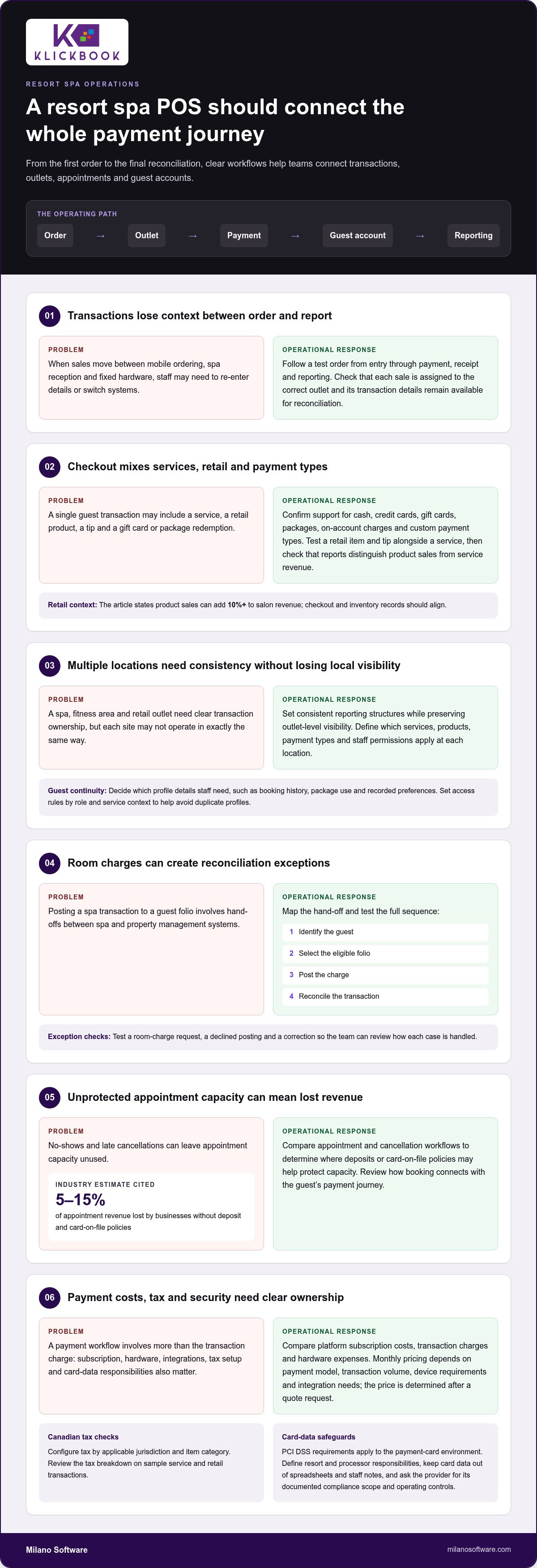
Protecting appointment capacity matters too: industry estimates put no-show and late-cancellation losses at 5-15% of appointment revenue for businesses without deposit and card-on-file policies. This guide explains how cloud-based POS supports property-wide payments, multi-location operations, reporting, appointment workflows, and practical no-show safeguards, so you can assess the operating model that fits your resort.
Key Takeaways
- Map spa payment workflows across the property to identify where disconnected processes create friction.
- Set consistent operating procedures across locations while preserving the visibility each site needs.
- Use staffing and inventory reports to identify utilization patterns and guide operational decisions.
- Assess how cloud-based point-of-sale tools can connect transactions, service activity, and retail at checkout.
- Compare appointment and cancellation workflows to determine where the right safeguards can protect capacity.
Mobile ordering and payments around the property
A resort spa POS system should connect guest purchases with the correct outlet, service, and payment method. Evaluate how mobile ordering, payment processing, tax configuration, and hardware work together across the property.
On-Property Orders and Payments
Mobile ordering lets guests initiate purchases beyond the spa reception desk, while staff record transactions at the point of service. For example, a guest can purchase a spa service package and settle the charge with an accepted payment method. Review whether the platform assigns each sale to the correct outlet and keeps transaction details available for reconciliation.
Test the complete workflow across mobile devices and fixed hardware. Follow an order from entry through payment, receipt, and reporting, and note where staff must re-enter details or switch systems. A seamless process depends on clear outlet assignment and reliable integration, not simply on accepting payment away from the desk.
Gift Cards, Tips, and Product Sales
Payment workflows should handle gift card sales and redemption, service packages, tips, and retail products. Confirm that staff can apply the right payment type to each transaction and distinguish service revenue from product sales in reports. Gift cards can be sold for future use, while a redeemed card can contribute to a guest’s current checkout.
Product sales can add 10%+ to salon revenue, so inventory and checkout records should align. For a practical test, add a retail item to a service transaction, record a tip separately, and review how each entry appears in the sales report. Check whether the system supports custom payment types alongside cash, credit cards, gift cards, packages, and on-account charges.
Payment Processing and Billing
Processing models commonly separate platform subscription costs from transaction charges and hardware expenses. Monthly pricing depends on the selected payment model, transaction volume, device requirements, and integration needs; the price is determined after a quote request. Compare the full billing structure, including how card, gift card, and on-account transactions are recorded.
For resort billing, define how each sale is attributed: to the spa outlet, service, product, or guest account. Confirm that invoices and receipts show the transaction details finance teams need for reconciliation. In Canada, configure tax treatment by applicable jurisdiction and item category, then review the tax breakdown on sample service and retail transactions before launch.
Payment Security and Compliance
Payment security depends on how card data is captured, transmitted, and stored. PCI DSS requirements apply to the payment-card environment. Define the resort’s and processor’s responsibilities, and keep card data out of informal records such as spreadsheets or staff notes. Ask the payment provider for its documented compliance scope and operating controls.
Test access permissions, payment-device handling, and the steps staff follow when a transaction fails. For Canadian guests, confirm support for cash, credit cards, gift cards, packages, on-account charges, and any custom payment types the resort uses. Review the end-to-end workflow before deployment, including a test sale, refund, receipt, and reconciliation record.
Multi-location management
At a resort with a spa, fitness area, and retail outlet, each location needs clear transaction ownership. Centralized software can organize locations within consistent reporting structures while preserving outlet-level visibility. Define which services, products, payment types, and staff permissions apply at each site before configuration. This gives managers comparable records without treating every outlet as operationally identical.
Client profiles support continuity across visits and locations. Decide which details staff need at checkout, such as booking history, package use, or recorded preferences. For example, a returning guest visiting a second spa location should be matched to the correct profile rather than entered as a duplicate. Set access rules so teams see information relevant to their role and service context.
Property management system integration can connect spa transactions with guest folios, depending on the systems and workflows involved. Map the required hand-offs: identify the guest, select the eligible folio, post the charge, and reconcile the transaction. Test scenarios such as a room-charge request, a declined posting, and a correction. Clear exception handling prevents unresolved charges from becoming end-of-shift surprises.
Integrated business management brings bookings, point-of-sale activity, and reporting into a coordinated operating view. Compare how a service sale, package redemption, and retail purchase appear by location and transaction type. A resort spa POS system should make these records useful for both site-level decisions and consolidated oversight. Review reporting permissions, naming conventions, and the process for correcting a misclassified sale.
Spa management software differs from a salon-focused POS when resort workflows involve guest accounts, multiple outlets, treatment scheduling, and property-wide reporting. Assess whether the system reflects your actual services and locations, rather than forcing resort operations into a single salon checkout workflow. For example, confirm that managers can distinguish spa services from retail sales in reports.
Implementation and staff training are more manageable when rollout follows defined workflows. Complexity depends on data quality, location setup, payment configuration, system integrations, and staff roles. Begin with a workflow map, prepare client and service records, then test representative transactions before launch. Train reception, practitioners, and managers on role-specific tasks, including checkout, profile lookup, and report review.
Real-time reporting for staffing and inventory
Useful operational reports connect staff deployment, service activity, retail sales, and stock movement. Define the decisions each report must support before selecting fields and filters.
Sales and Business Analytics
Compare sales by service, product, location, and time period to identify operational patterns. For example, review appointment demand alongside therapist schedules before adjusting shift coverage. POS software should make revenue categories clear enough to distinguish retail activity from service sales. Check whether managers can filter reports by outlet and export records for further analysis.
Use consistent service and product names across locations. Otherwise, reports may split the same item into separate categories and weaken comparisons. A shared naming structure helps teams interpret performance and assess efficiency without manually reconciling duplicate labels.
Retail and Consumable Inventory
Retail products and treatment consumables serve different operational purposes. Track products sold at checkout separately from supplies used during services. For example, a skincare item sold to a guest should reduce retail stock, while a product used during a treatment should be recorded against consumable inventory.
Set clear ownership for receiving, transfers, adjustments, and stock counts at each location. Reports become more useful when staff record these movements consistently. Compare sales with stock changes to identify discrepancies that need review before making replenishment decisions.
Inventory Tracking and Low-Stock Alerts
Inventory tracking starts with accurate item records, units, and location assignments. Set low-stock thresholds according to purchasing lead times and expected usage, rather than using the same threshold for every item. For example, a frequently used treatment supply may need a different reorder point from a slower-moving retail product.
Review alert ownership and follow-up steps. A notification should direct the responsible manager to the affected item and location, then support a documented stock review. Check whether adjustments, transfers, and receipts update the same inventory record used in sales reporting.
Inventory Data and Client CRM
Client CRM records and inventory data can inform different decisions, but teams should keep their purposes distinct. A client’s service history may help staff prepare for an appointment; aggregate product sales can guide purchasing. For example, managers can compare demand for a retail category with stock movement without exposing unnecessary client details.
Define which roles can view client profiles and which can manage inventory. Use consistent product identifiers between checkout and stock records, then review exceptions during routine reconciliation. This structure helps connect client service operations with inventory planning while maintaining clear access boundaries.
Staffing reports add another operational layer. Compare scheduled coverage with completed services and appointment demand, then investigate recurring gaps by role or location. For example, if an outlet records unserved demand during a shift, managers can review scheduling patterns before changing coverage. Use the findings to refine deployment, not as a substitute for operational context.
Establish a reporting cadence that fits each decision. Managers can review exceptions during daily operations, while purchasing teams assess stock movement during replenishment planning. A defined owner, consistent categories, and clear follow-up steps turn reporting into an operating control rather than a collection of dashboards.
Appointment booking and no-show protection
Appointment controls connect booking, therapist availability, guest communication, and checkout. Review each step from reservation through completed transaction.
Online Appointment Booking
Online booking lets guests reserve appointments and service packages without routing every request through the front desk. Check that the scheduling workflow shows accurate service availability, appointment duration, and therapist allocation before confirming a reservation. For example, a guest selecting a treatment should see only time slots that match its required duration and resources.
At the front desk, staff need a shared view of online and in-person appointments. Test a booking change, cancellation, and rescheduled appointment to see whether the schedule updates consistently. This reduces duplicate entry and helps teams coordinate arrivals, treatment rooms, and therapist workloads.
Automated Appointment Reminders
Reminder workflows support guest communication between booking and arrival. Define which appointment details appear, when messages are sent, and how a guest can respond. For example, a reminder can prompt a guest to review the appointment time or contact the spa about a change.
Review how staff identify delivery failures or guest replies. A clear exception process lets the front desk follow up on appointments needing attention, rather than treating every reservation as confirmed without review. Keep message content aligned with the resort’s communication practices.
No-Show Protection
Industry estimates put no-show and late-cancellation losses at 5-15% of appointment revenue for businesses without deposit and card-on-file policies. A resort can reduce exposure by defining consistent reservation terms, communicating them during booking, and recording guest acceptance. Apply the same process across online and staff-entered appointments.
Set procedures for deposits, card-on-file handling, cancellations, and exceptions. Staff should be able to see the applicable appointment terms before checkout and resolve disputed charges through a documented process. Clear rules protect capacity while keeping guest interactions consistent.
Therapist scheduling must account for service duration and actual availability. Map each service to qualified staff and required treatment resources, then review gaps before publishing appointment slots. For example, if a therapist’s shift ends before a service can finish, the booking interface should not offer that time.
Connect completed appointments to checkout records so staff can distinguish attended, cancelled, and missed bookings. Review these statuses by service and time period; recurring late cancellations may point to scheduling or communication issues. A consistent transaction trail also helps managers assess appointment utilization.
Use a defined operating sequence: publish availability, confirm the booking, send reminders, update appointment status, and reconcile checkout. Each step gives the front desk a clear action and helps managers identify where unfilled capacity enters the workflow.
Cloud-based spa point-of-sale software
Cloud deployment changes how resort teams access transaction records and coordinate operations. Evaluate access controls, connectivity procedures, reporting views, and the relationship between spa sales and guest accounts before selecting a platform.
Start by mapping the journey of one transaction. A guest books a treatment, purchases a package, and adds a retail product at checkout. The system should preserve distinct service and product entries, so managers can review revenue categories without reconstructing the transaction manually. Test the same workflow at each location and on every device staff use.
Cloud access can support management across locations, but access design still matters. Define which roles can view transactions, adjust records, or review reports. For example, a location manager may need outlet-level sales, while a regional manager needs consolidated reporting. Confirm that permissions reflect these responsibilities and that staff can identify the outlet associated with each transaction.
Assess integration as a set of defined data hand-offs, not a general promise of connectivity. Document which system owns guest identity, appointment status, payment records, and folio details. Then test a completed service sale, a correction, and a failed hand-off. Clear exception handling helps finance teams locate unresolved transactions and reconcile records.
Cloud-based workflows should also account for connectivity interruptions. Establish how staff record essential transaction details if a device cannot reach the platform, and how they reconcile those entries after service resumes. Test the procedure with a sample sale and refund. A documented process reduces duplicate entries and preserves a traceable record.
At checkout, service-to-retail transitions can keep related purchases within one transaction. Member discounts can also apply automatically when configured, helping staff follow consistent pricing rules. Validate the discount against the relevant membership conditions, then review the receipt and sales report. This links loyalty workflows with revenue reporting without relying on manual calculations.
Compare cloud options by operational fit, not by the label alone. Review implementation responsibilities, integration scope, device requirements, reporting access, and support for resort-specific checkout flows. A system designed around a single counter may not suit operations spanning a spa desk, treatment areas, and other outlets. Record each requirement and test it against a realistic guest journey.
Use a structured evaluation: document workflows, test representative transactions, check access permissions, and review exception handling. This makes operational gaps visible before rollout. For a closer assessment of resort spa point-of-sale workflows, explore Milano Software’s point-of-sale capabilities.
Milano Software: Spa Management
Milano Software supports resort spa operations with spa management, online booking, reporting, and point-of-sale capabilities. These tools address connected workflows, from appointment scheduling and package bookings to sales records and operational reporting.
Resort teams can use online booking to let guests schedule appointments and service packages from any device, at any time. Point-of-sale and reporting capabilities help organize transaction activity and review daily performance. This approach suits operators seeking coordinated spa workflows, rather than a standalone checkout tool or hotel property management software.
Consider Milano Software when you’re evaluating how to align booking, point of sale, and reporting within spa operations. To discuss your resort spa requirements, contact Milano Software or visit milanosoftware.com.
Set the operating criteria before your next decision
Before selecting a resort spa POS system, define what a successful guest-payment workflow must achieve across your property. Set operational criteria for transaction ownership, staff access, reporting, and exception handling. Then assess each requirement against a realistic guest journey, from booking through settlement. This gives decision-makers a shared basis for evaluating fit and identifying implementation priorities.
The next step is to connect those priorities to the workflows your spa team needs to manage. Milano Software can discuss how its spa management capabilities align with your operational requirements. Contact Milano Software to discuss your spa POS needs and define a practical direction for your resort.
A considered evaluation puts your team in a stronger position to make a clear, informed decision.
Frequently Asked Questions
What is a spa and salon POS system?
A spa and salon POS system records sales and settles charges at checkout. Its role extends beyond taking payment: it creates transaction records that support accounting, sales reconciliation, and service operations. For example, a manager can use transaction details to investigate a discrepancy between a receipt and a daily sales total. The right capabilities depend on the business’s service model and financial controls.
What are the best POS systems for spas?
The right system aligns with the spa’s operating requirements and control processes. Compare transaction correction procedures, role-based access, report detail, and audit-trail clarity. A resort should also evaluate how the system handles exceptions, such as a reversed charge or corrected sale, so managers can understand what changed and why.
Can it handle memberships and rewards programs?
Some platforms support memberships and rewards, but the available rules differ. Define how eligibility, earning, redemption, and adjustments should work before evaluating this feature. For example, test whether a reward applies to an eligible purchase and how staff can explain the resulting balance. Clear program rules reduce inconsistent treatment across staff shifts.
Does it support gift cards and series packages?
Many spa POS platforms can record gift cards and series packages, but their administration should match the spa’s policies. Evaluate how authorized staff correct an entry, review its history, and resolve a guest’s question about a balance or remaining service. A clear record of changes helps managers investigate an issue without relying on informal notes or memory.
How does the spa POS system handle therapist commissions?
Commission calculations depend on the compensation plan and transaction data used. Specify whether the calculation is based on completed services, eligible sales, or another documented rule. Then compare a sample calculation with its underlying transaction records. Managers should be able to identify the source entries behind a result and correct errors through a controlled process.
How flexible is it for different payment types?
Flexibility means the system can represent the resort’s actual payment arrangements and report them consistently. Ask how administrators add or restrict a payment category, and how staff distinguish similar options during entry. For example, an on-account charge and a package redemption should remain identifiable as different tender types when finance reviews transaction records.
Is this spa POS software easy for staff to learn and use?
Staff usability is best judged through the tasks employees perform most often. Observe whether a receptionist can locate a transaction, identify its status, and correct an entry using the system’s normal workflow. Clear labels and predictable navigation reduce reliance on informal workarounds. Role-specific screens can also help staff focus on relevant tasks without unnecessary access.
What features should a resort spa POS system include?
Prioritize transaction controls, clear audit records, access permissions, and reports that support financial review. The system should also fit the resort’s operating structure, including outlet responsibilities and escalation procedures. For example, finance staff should be able to trace an adjustment to its source entry, while managers review activity within their assigned remit.


