
A resort spa can deliver an exceptional guest experience while losing operational control behind the scenes. Resort spa software should connect bookings with staff schedules, service records, checkout and reporting. When those workflows sit in separate tools, teams can face conflicting information and managers may struggle to see how the spa is performing.
Spa operations extend beyond the treatment calendar. Guests, staff, services, transactions and retail activity all need to be coordinated, while managers need reliable information to guide daily decisions. Disconnected workflows can leave teams reconciling records instead of focusing on service delivery.
This guide explains how to map resort spa workflows before choosing or changing software. It covers booking and client records, staff scheduling, point-of-sale activity and reporting, with practical steps for deciding what your platform needs to support. The goal is to connect the guest journey to clear, manageable day-to-day operations.
Key Takeaways
- Map the guest journey from reservation through checkout to identify hand-offs that need clearer coordination.
- Assess resort spa software against the workflows it must support, not just its appointment calendar.
- Document staff, service and facility requirements before setting software priorities.
- Separate essential operating needs from optional enhancements to keep implementation scope focused.
- Compare booking, calendar synchronization, point of sale and reporting with the visibility managers need to run daily operations.
Why resort spa software must connect the guest journey to daily operations
A resort spa operates within a broader hospitality environment. A guest’s treatment booking is one part of a stay that may also involve accommodation, dining and resort facilities. Resort spa software supports the spa’s bookings, services, sales and management visibility, helping teams coordinate those activities through shared schedules and consistent records.
Resort spa software is an operating platform for spa services within a resort, not simply a calendar for appointments. A basic booking tool may record a time and service, but resort leaders also need to understand how bookings relate to staff availability, service delivery, checkout and sales records.
How resort spa operations differ from day spa workflows
A day spa can organize much of its work around appointments made directly with the spa. Resort teams also coordinate with guests whose plans may be shaped by their stay, along with the spa’s staff and facilities. Each model has distinct operating demands.
Clear schedules help staff see which services are booked and who is assigned. Consistent client records give teams useful information across reservation and service touchpoints, rather than leaving them to rely on fragmented notes or repeat data entry. For a closer look at the appointment-led model, the companion article, “Day Spa Software: A Guide to Booking, Packages and Gift Cards,” explores workflows that shape day spa operations.
The operating problems software should help control
Disconnected calendars can leave teams working from different versions of availability. An appointment may appear open in one view even though a staff member is committed elsewhere. Calendar synchronization gives staff a shared reference for appointment availability and helps prevent conflicting reservations.
Operational control also extends to checkout. Staff need accurate service and transaction records so spa sales are captured consistently. If client details, appointments and checkout records sit in separate workflows, teams may spend time reconciling information instead of managing the day’s service delivery.
Reliable operational and financial reporting gives managers a basis for reviewing capacity, service mix and staff performance. For example, leaders can compare booking activity with staffing information to assess whether schedules align with available team capacity. These insights support informed decisions, but don’t guarantee higher revenue or lower operating costs.
Resort teams should also define where spa workflows end and hotel-wide systems begin. A Property Management System (PMS) is a separate category of hotel operating system. Defining system boundaries and information hand-offs helps leaders plan coordination without confusing spa management with hotel property management.
How resort spa software coordinates bookings, service delivery, and reporting
A connected workflow gives spa teams a consistent record of each visit, from reservation to transaction and reporting. Staff can work from current appointment information, record sales at checkout and review activity captured during service delivery.
From online reservation to a usable spa schedule
Online booking lets guests reserve spa appointments at any time. Synchronization with the internal calendar places those reservations into the team’s scheduling workflow. Staff can use the shared view of availability to coordinate appointments with practitioners and service schedules, rather than reconciling separate records.
For example, a resort guest books a treatment online before arrival. Spa staff can see the appointment in the internal calendar and plan the day’s schedule. This booking workflow supports spa operations; hotel property management remains a separate system responsibility.
Booking, staffing and appointment availability are linked. A service can be scheduled only when the required time and staff capacity are available. Keeping these details organized helps the team spot conflicts and maintain a clear view of the day. For more on the reservation stage, the companion article “Spa Booking Software: Connect Guest Reservations to Spa Operations” explores how booking workflows support spa teams.
From checkout records to management reporting
At checkout, point-of-sale workflows record transactions for services, service charges, gift cards and retail purchases. Capturing these items consistently gives the spa a clearer transaction history than relying on separate notes or manual reconciliation. It also gives managers a more complete basis for reviewing sales activity.
Reporting can turn those records into operational and financial insight, including revenue, staff performance and inventory metrics. Managers can examine service mix, review recorded sales and assess team performance. Inventory measures can help identify patterns in retail records. The value of any report depends on the quality and consistency of the underlying information.
Operational reporting turns recorded bookings and transactions into management insight for capacity, service mix and staff-performance decisions. It doesn’t make decisions automatically, but gives leaders a more coherent basis for evaluating options.
Resort leaders assessing this workflow can review Klickbook by Milano Software, which brings online booking, calendar synchronization, point of sale and reporting into the spa management workflow.
What resort spa software must address beyond a standard booking calendar
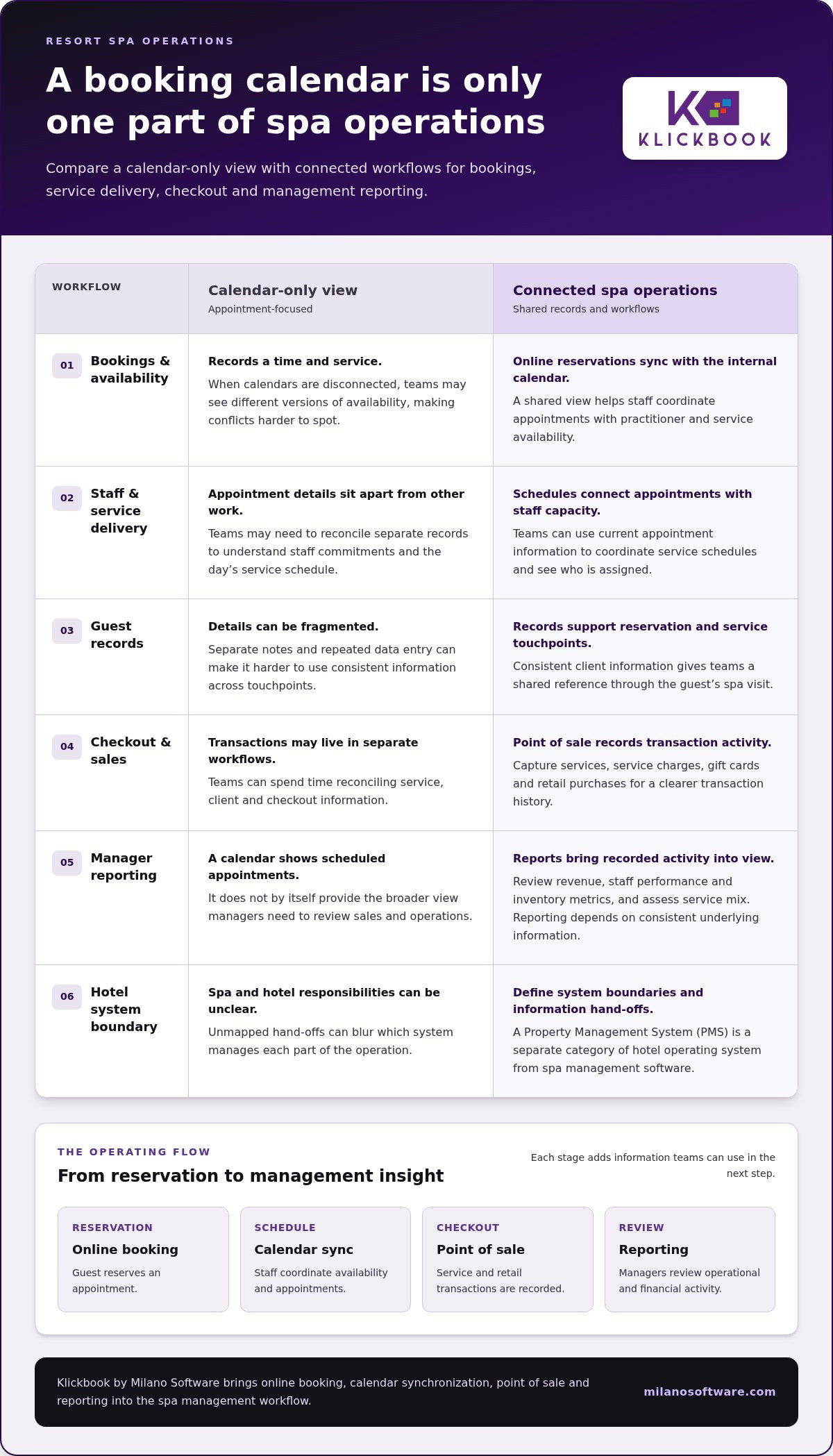
A calendar answers one question: when is an appointment scheduled? Resort spa software needs to support a wider operating model, including the records, sales workflows and reporting managers use to oversee spa activity. This matters when bookings depend on suitable staff and facilities, or when spa transactions must be handled separately from hotel billing.
Compare platforms against the work your team needs to coordinate, not simply the presence of a booking screen.
| Operational need | Basic appointment calendar | Resort operating platform |
|---|---|---|
| Bookings and schedules | Records appointment times | Connects reservations with staff and service schedules |
| Guest and service records | May centre on appointment details | Supports consistent records across spa service touchpoints |
| Sales activity | May sit outside the calendar workflow | Captures spa transactions through point of sale |
| Management visibility | Shows scheduled appointments | Uses recorded activity for operational and financial reporting |
Resort-specific requirements that shape the operating model
Map how treatment schedules relate to guest reservations, staff assignments and service packages. For example, a package may involve multiple appointments. Decide how each service should be recorded and what schedule details staff need to see. Identify the records managers need for daily oversight, such as assigned personnel, appointment status and the activity they expect to review.
Then identify room and facility dependencies. A schedule that lists the service but leaves out space or staffing constraints may not give coordinators enough information to plan the day. Define the workflow first, then assess software against that operating map.
How to assess billing hand-offs and platform boundaries
Spa point of sale and hotel property management have distinct responsibilities. A spa POS can record service charges and other spa transactions; hotel systems manage hotel accounts and room folios. If leaders want a spa charge transferred to a guest folio, treat that as a system-design and integration requirement, not an assumed feature of spa software.
Document the hand-off: what information moves, which system owns the transaction record and how staff handle exceptions. This keeps billing expectations precise and distinguishes spa checkout from hotel account management. The article “Spa Management Software: An Executive Guide to Connected Operations” provides broader context for evaluating platform architecture and workflow boundaries.
Use the resulting requirements to distinguish essential capabilities from preferences. A focused assessment makes gaps visible before implementation planning and keeps the evaluation anchored to actual resort workflows.
How resort leaders can map spa software requirements before implementation
Before selecting resort spa software, establish how the spa operates today and where a new platform needs to support the work. A shared requirements map gives front-desk, spa-management, finance and service teams a common basis for decisions. It also separates core operating needs from enhancements that can wait.
Start by documenting the current guest-to-checkout workflow. Record what happens, who updates each item, which system holds the information and where a hand-off occurs. Use this baseline to identify friction and define the future workflow.
Document the current guest and staff workflows
Map the journey in order, from reservation and arrival through scheduling, service, checkout and reporting. Include staff actions as well as guest touchpoints: who confirms appointment details, assigns service capacity, records a transaction and updates client or inventory information.
Include the teams responsible for those steps. Front-desk staff can describe reservation and arrival processes; service teams can identify scheduling and record needs; finance can clarify transaction review; and spa managers can explain daily oversight. Note hand-offs with wider resort operations, especially when information moves between separate systems.
Turn operating needs into measurable requirements
Once workflows are documented, define the records and management questions that matter. Specify what leaders need to review routinely, such as revenue by service, staff performance or inventory activity. Instead of writing “better reporting,” state which decision a report should support and what information managers need to make it.
Use a four-step sequence to keep the project disciplined:
- Map guest journeys: Document the reservation-to-checkout path and relevant resort hand-offs.
- Document workflows: Record team actions, current tools, information updates and exceptions.
- Identify records: Define the client, appointment, transaction, staff and inventory information needed for operations.
- Define reporting needs: State the questions leaders must answer and the records that support those answers.
Then classify each requirement as essential or optional. An essential requirement supports a necessary daily workflow or management decision. An optional enhancement may be useful, but shouldn’t expand the initial project scope unless it addresses a defined operating need. This distinction gives implementation planning a clear boundary and a practical way to set priorities.
For broader platform-evaluation context, the companion article “Spa Management Software: An Executive Guide to Connected Operations” examines how operating requirements relate to software architecture. Milano Software’s spa management platform supports resort spa workflows through online booking, point of sale and reporting.
How Milano Software supports resort spa management workflows
Once resort leaders have mapped the guest journey, team responsibilities and reporting needs, they can assess software against the work it needs to support. Klickbook by Milano Software is a spa-management platform for coordinating core spa workflows. It includes online booking, calendar synchronization, client profiles, point of sale and reporting. These capabilities support spa operations, while hotel property management remains a separate function.
This distinction is useful in system planning. Resort leaders can define which activities belong in spa operations and identify separately any information hand-offs with wider resort systems. That keeps requirements grounded in the spa’s responsibilities and avoids treating a booking, sales or reporting feature as a hotel-wide function.
Where booking, POS, and reporting fit resort operations
Online booking supports guest reservations, and synchronization with the internal calendar connects appointments to the spa’s working schedule. Client profiles give spa teams records to use alongside bookings. Together, these capabilities support appointment administration from reservation through service planning.
At checkout, point of sale manages transactions, service charges, gift cards and retail records. This gives the spa a defined workflow for recording its own sales activity. Resort leaders can keep spa transaction records distinct from hotel account or room-folio processes, which have separate system responsibilities.
Reporting provides operational and financial insight, including revenue, staff performance and inventory metrics. Managers can use those views to review recorded activity against the questions established during requirements planning. For example, a leader can consider revenue reporting alongside staff performance information when reviewing service operations. Reports inform management decisions; they don’t guarantee a particular business result.
A practical next step for resort spa leaders
Use the workflow map as the agenda for an internal software discussion. Bring the relevant teams together and resolve the operating questions before selecting or configuring a platform:
- Which spa activities and records must the platform support?
- How should bookings relate to staff schedules and service delivery?
- Which spa transactions must point of sale record, and where do hotel billing hand-offs begin?
- Which revenue, staff and inventory measures do managers need to review?
Clear answers give decision-makers a practical basis for separating essential requirements from optional enhancements. They also create a shared reference for evaluating booking, client-profile, sales and reporting workflows in context.
Explore Milano Software’s spa management platform against your documented operating needs. Matching platform capabilities to the workflow map keeps the evaluation focused on the spa’s day-to-day requirements and management priorities.
Make the next software decision operationally accountable
Turn your workflow map into a shared decision document. Assign an owner to each requirement, record how teams will judge whether it is being met and distinguish spa responsibilities from resort-wide system boundaries. This gives leaders a practical basis for aligning operational, financial and service priorities before committing to implementation.
Keep the evaluation anchored to the resort’s actual operating model. Define what the spa team needs to manage, what information must be available and where other systems take responsibility. Those details make discussions more focused and decisions easier to explain. They also help you select resort spa software that fits day-to-day operations rather than adapting operations around a generic feature list.
Explore Milano Software’s spa management platform and see how its booking, point-of-sale and reporting capabilities fit your requirements. Use your workflow map to guide the next step in your evaluation.
Frequently Asked Questions
What is resort spa software?
Resort spa software is a system for managing spa operations within a larger property. It can support reservations, service delivery, client information, sales records and management oversight. The setup should reflect how the resort serves guests: a spa with bundled experiences may organize information differently from one focused on standalone treatments. Define the spa’s responsibilities and management needs before comparing platforms.
How does resort spa software differ from day spa software?
The main distinction is the operating context. A day spa can organize around clients travelling specifically for appointments; a resort spa may need to account for guest itineraries, package components or access to facilities. For a focused discussion of day-spa booking, packages and gift cards, see “Day Spa Software: A Guide to Booking, Packages and Gift Cards.”
Can resort spa software integrate with a hotel PMS?
That depends on the spa platform and the resort’s system architecture. Before specifying an integration, identify the exact data required, such as a guest identifier or spa transaction, and establish which system is authoritative for each field. Include representative test cases, such as amended reservations and failed transfers, in the technical evaluation. This clarifies the intended integration behaviour and the requirements it needs to meet.
How can resort spa software help manage spa bookings?
It can provide an online reservation path and a staff-facing view of booked appointments. Assess the details collected during booking, such as the selected service and information staff need to prepare for the visit. A clear booking record helps teams resolve incomplete or changed reservations using a consistent process. Include an exception-handling process in your assessment rather than assuming software will eliminate booking issues.
What should resort leaders include in a spa software requirements plan?
In addition to listing capabilities, define decision ownership and acceptance criteria. For example, assign a business owner to approve how a booking change is handled, then specify how the team will test that workflow before launch. Include people who will use or review the resulting records, and document decisions that affect more than one department. This creates a basis for sign-off and limits ambiguity during configuration.
What reports should resort spa managers review?
Choose reporting views based on the management action they inform. Revenue, staff performance and inventory metrics are more useful when leaders define consistent reporting periods, categories and review responsibilities. For example, decide who investigates an unexpected change in a service category and how the finding is recorded. This turns routine reporting into a repeatable review process without relying on unsupported industry benchmarks.
Does spa management software replace hotel property management software?
No. The systems address different business functions. Accommodation teams may manage room reservations and guest stays in the hotel platform, while spa teams maintain service-related client and transaction records in their spa system. A resort’s system design should make these responsibilities clear, particularly when staff work across departments. Documenting record ownership helps prevent duplicate data entry and conflicting updates.


