

A spa checkout that ends at payment is an operational blind spot. Effective spa point of sale software connects transactions with retail sales, inventory records and daily reporting, so teams have a clearer picture of what was sold and managers can review the results without piecing together disconnected records.
Reliable checkout matters, but it’s only one part of the decision. Spa operators also need accurate sales and inventory records, plus a clear view of how transactions relate to bookings and client information. Generic salon POS comparisons may miss the distinct requirements of day spas, resort spas and Nordic spas.
This guide offers a practical framework for assessing operational fit, not just counting features. It covers checkout workflows, retail tracking, client records and reporting, then shows how to build a shortlist around your spa’s needs. That connected-platform approach underpins Klickbook by Milano Software, which brings POS capabilities together with online booking, client profiles and reporting.
Key Takeaways
- Assess spa point of sale software as part of your operating system, not just as a checkout terminal.
- Trace how service charges, gift cards and retail sales are recorded, then review how those records support inventory visibility and reporting.
- Compare standalone POS with integrated spa management software across workflow continuity, records, inventory visibility and reporting.
- Use realistic transaction scenarios during evaluation to expose gaps between checkout and the records managers rely on.
- Build a shortlist around operational fit for your spa, not the length of a feature list.
Spa point of sale software: why checkout is an operational decision
Spa point of sale software records transactions such as service charges, gift card activity and retail merchandise sales, along with the information managers need to track them. It captures what was sold and creates sales records for reviewing operations. Its role extends beyond accepting payment: checkout choices affect how easily transaction details connect with inventory visibility and management reporting.
A POS system is one part of a spa’s wider operating environment. Spa management software may also support online booking, client profiles and reporting. The distinction matters: a checkout terminal can process a sale, but its operational value depends on how that sale relates to the spa’s other records. A general overview of point-of-sale systems provides useful context. Spa operators also need to assess the service and retail workflows around each transaction.
Where spa checkout fits in daily operations
The transaction path begins when a service is completed or a retail item is selected. At checkout, the service charge, gift card activity or merchandise sale is recorded. That record should provide a usable account of sales. For retail, it should also support inventory visibility and sales tracking.
When these details sit in separate tools, staff may need to reconcile them manually. For example, gift card activity can be difficult to interpret in reports when it is detached from the checkout record. Separate retail and sales records can also make it harder to see what sold and what revenue was recorded. Disconnected workflows add administrative work and make the operational picture less clear.
Why spa operating models change POS requirements
A day spa may need checkout to account for a completed service and a retail purchase in the same workflow. A resort spa has its own service and retail processes, shaped by the wider resort environment. A Nordic spa has a distinct operating context as well. These differences affect which transactions staff process and which records managers need to review.
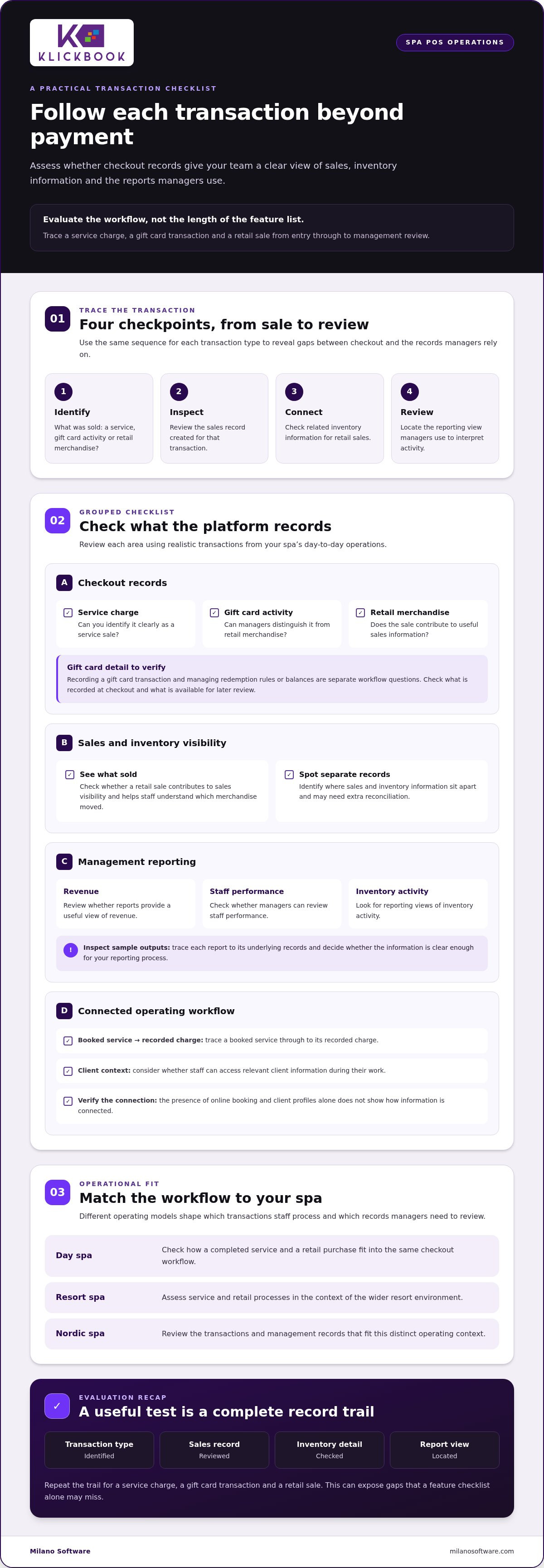
Evaluate the workflow, not the length of the feature list. Map how a service charge, gift card transaction and retail item move from selection to transaction record. Then review how sales and inventory information supports management decisions. A system that fits the operating model can keep checkout records useful for daily oversight. A broad catalogue of features without that continuity may leave reconciliation gaps in place.
How integrated spa POS software connects sales, inventory, and records
Integration is useful when a transaction remains clear beyond the moment of payment. With spa point of sale software, assess the record created for each service charge, gift card transaction and retail merchandise sale. Then trace how that record informs sales reporting and inventory visibility. The goal is a consistent operational view, not simply a faster checkout.
Service charges, gift cards, and retail checkout
Build your evaluation around the transaction types your spa processes. A service charge should be identifiable as a service sale, a gift card transaction should be distinguishable from retail merchandise, and a product sale should contribute to the sales information used for inventory oversight. Review each transaction separately, then see how they appear together in the day’s activity.
Give gift card handling specific attention. Check how the platform records gift card transactions and what managers can see when they review them. Recording a sale and managing redemption rules or balances are separate workflow questions. A useful demonstration shows what the system records at checkout and what information is available for later review.
Inventory and reporting as management controls
Sales and inventory records are most useful when managers can interpret them together. A retail sale should contribute to sales visibility and help staff understand which merchandise moved. When sales and inventory information are maintained separately, teams may need extra reconciliation before the figures can support an operating decision.
Reporting should answer the questions management uses to oversee the business. Review whether reports provide useful views of revenue, staff performance and inventory activity. Look at sample outputs, trace them to the underlying records, and decide whether the information is clear enough for your reporting process.
The broader workflow matters, too. Online booking and client profiles sit alongside POS within spa management software, but their presence alone doesn’t show how information is connected. Trace a booked service through to its recorded charge, and consider whether staff can access relevant client context during their work. Focus on what the platform records and presents, rather than assuming a particular synchronization or automated handoff.
Follow one transaction from entry to management review: identify its category, inspect the resulting sales record, review related inventory information, and locate the relevant reporting view. Repeat the process for a service charge, a gift card transaction and a retail sale. This exposes gaps that a feature checklist can miss, especially when individual components work but their records are difficult to interpret together.
Milano Software’s spa management platform, Klickbook, includes POS capabilities alongside online booking, client profiles and reporting. Assess those capabilities against the transactions and records your operation needs to manage.
Standalone spa POS or integrated spa management software?
The choice is architectural, not a simple comparison of feature totals. A standalone POS can address a focused checkout requirement. An integrated spa management platform places POS within a broader operating context that may include booking, client profiles and reporting. The right fit depends on how these workflows interact in your operation, not on an assumption that a larger business always needs a more complex system.
Use the comparison below to identify where each approach may fit, then validate the workflow in a product demonstration. Capabilities vary by system, so treat the table as an evaluation framework rather than a guarantee of a particular configuration.
| Evaluation area | Standalone POS | Integrated spa management platform |
|---|---|---|
| Workflow continuity | Checkout is handled in a dedicated tool. Assess how staff pass relevant information to other workflows. | POS sits alongside spa workflows such as booking and client profiles. Examine how each process relates in practice. |
| Records | Transaction records may be held separately. Determine whether staff need to re-enter or reconcile details. | Review how sales records are presented within the broader management context. |
| Inventory visibility | Establish how retail sales records relate to the inventory information managers review. | Assess whether sales and inventory records provide a coherent view for operational oversight. |
| Reporting | Check whether reports cover the information management needs across its tools. | Evaluate whether reporting brings relevant operating records into a useful management view. |
When a standalone POS may fit, and where it can fragment work
A separate checkout tool may suit an operation with a narrow transaction requirement and few handoffs between checkout and other systems. That simplicity can be useful when records remain clear. The risk to evaluate is fragmentation: staff might duplicate information, reconcile separate records or transfer details manually. Map the current flow from booking or service completion through checkout and reporting before selecting a system.
When a connected spa platform earns consideration
A connected platform merits consideration when checkout needs to sit alongside booking, client profiles and management reporting. A day spa may prioritize service and retail workflows; a resort spa may have different coordination needs; a Nordic spa has its own operating context. Document the transactions, staff handoffs and records your operation actually uses, then test those pathways with the spa point of sale software you are evaluating.
Complexity is defined by dependencies, not headcount. A smaller operation with multiple transaction paths may benefit from a connected workflow, while a larger spa with a tightly scoped checkout process may have different priorities. Examine how each option handles exceptions, record ownership and routine reporting, not only the standard sale.
For broader planning, connect this decision to an executive view of spa management: define the operating workflows first, then assess whether a standalone POS or an integrated platform supports them with less manual coordination.
How to evaluate spa POS software with real operating scenarios
A product demonstration should reproduce the work your team actually performs, not just a polished standard checkout. Use the same scenarios and evaluation criteria for every shortlisted platform. This makes it easier to compare spa point of sale software and see where records, inventory information or staff steps may break continuity.
Build a spa POS evaluation scorecard
Before demonstrations, separate essential requirements from desirable enhancements. Score each platform against the same criteria and record observable evidence rather than relying on general impressions. Note whether a transaction appears in the expected record, what inventory information is available, and how readily staff can find the relevant report.
- Transaction coverage: Can staff process the service charge, gift card activity and retail sale your operation needs to handle?
- Record continuity: Can evaluators trace each transaction from checkout to its resulting sales record?
- Inventory visibility: Is related merchandise information accessible for the operational review your team performs?
- Reporting: Can managers find and interpret the sales information needed for oversight?
- Operational fit: Can staff complete the workflow clearly, including a correction or exception relevant to your procedures?
Test the platform against your spa’s workflow
Run the evaluation in sequence. Keep a shared scorecard so reviewers can compare evidence across demonstrations instead of relying on memory or which interface felt most familiar.
- Map the workflow. Document how a completed service, gift card transaction and retail purchase move through checkout and into the records your team uses.
- Test each transaction. Ask the presenter to demonstrate a service charge, a gift card transaction and a retail merchandise sale using your defined scenarios.
- Inspect the resulting records. Trace each transaction to its sales record. For the retail scenario, examine how related inventory information is presented. A visible sale alone doesn’t show whether inventory records are aligned.
- Assess reporting and usability. Review the relevant management reports, then have staff follow the workflow. Include a realistic exception to understand the steps required and where staff need guidance.
Record what the platform demonstrates, what information remains separate and what requires a manual handoff. Apply the same process to day spa, resort spa or Nordic spa workflows that match your operation. This keeps the decision grounded in operational fit rather than feature volume. For a practical next step, explore Milano Software’s spa POS capabilities in the context of your transaction workflows.
Klickbook by Milano Software: connect spa POS to management workflows
Klickbook by Milano Software combines spa management software with integrated POS capabilities. For operators comparing spa point of sale software, it provides a platform to assess against the full transaction workflow, not checkout in isolation. The POS processes transactions, service charges, gift cards and retail merchandise, and maintains sales and inventory records for operational visibility.
A connected operating context for spa transactions
POS sits alongside other platform functions, including online booking, client profiles and reporting. This broader context matters when assessing how checkout fits into daily spa administration. For example, operators can consider a service booking, the resulting service charge and the sales information management reviews. Evaluate each step in the workflow rather than assuming information automatically synchronizes between functions.
Operating requirements vary by setting. A day spa may focus its evaluation on service charges and retail merchandise. A resort spa may assess those same transaction categories within its wider operating environment. A Nordic spa has a distinct operational context, so its team should document the workflows and records it needs rather than rely on assumptions based on another spa type.
Online booking and client profiles contribute to the management context around POS, while reporting supports review of business records. Include reservation processes in your platform evaluation, alongside checkout and reporting. Assess how each function serves your own operating requirements without treating the presence of multiple capabilities as proof of a specific integration or automated handoff.
Move from evaluation to an informed platform decision
Use the requirements from your assessment as the decision framework. Confirm that the platform handles the transaction categories your operation needs, that staff can identify the resulting sales records, that inventory information is useful for oversight, and that reporting supports management review. Consider workflow fit, too: the system should make sense within the work your team performs, not just offer an extensive feature list.
Klickbook by Milano Software is built to support these workflows. Its POS handles service charges, gift cards and retail merchandise, with sales and inventory records, online booking, client profiles and reporting as part of the management platform. Compare these capabilities with your mapped workflows and identify where staff processes remain necessary. A spa POS alternatives buying guide can provide additional comparison context; the final decision should reflect operational fit, record visibility and the reporting your management team uses.
Turn your evaluation into an operating decision
Make the next step a documented decision, not another feature review. Identify who owns the selection, which teams will use the system, and what evidence leadership needs before approving a change. This creates a shared basis for comparing options and keeps the discussion focused on operational priorities.
Set a baseline for the current workflow: where staff spend time moving between tools, which handoffs require manual attention, and what information managers need for routine decisions. Use that baseline to judge whether spa point of sale software supports the way your operation needs to work. Review the criteria with the people responsible for daily checkout and management oversight before finalizing a shortlist.
A considered platform decision gives your team a clearer path from requirements to implementation planning. Explore Milano Software’s spa management platform and assess how Klickbook fits your spa’s operating priorities.
Frequently Asked Questions
How much does spa point of sale software cost?
Costs vary by platform, configuration and operating requirements, so there isn’t one reliable price for every spa. Compare the full cost structure, including software subscriptions, transaction processing, hardware and any implementation or training charges that apply. For a useful comparison, define the number of locations and workflows in scope, then assess each proposal in Canadian dollars and distinguish recurring charges from one-time costs.
Does spa POS software require dedicated hardware?
Hardware requirements depend on the software and the spa’s checkout setup. Document the devices staff use at reception and any operational constraints at the checkout point, then compare those needs with the system’s stated requirements. Include device replacement and support in planning rather than assuming existing equipment will work or that a dedicated terminal is necessary.
Can spa POS software support more than one location?
Multi-location support varies by platform. Define what your organization needs to manage centrally, such as location-level sales reporting, consistent transaction categories or inventory visibility, and what should remain specific to each property. Use these requirements to assess the platform’s multi-location structure. A shared login or consolidated report alone doesn’t mean records are managed consistently across locations.
Can a spa use POS software without changing its booking process?
A spa can use a POS without replacing its booking process, but the practical effect depends on how the tools work together. Map what staff currently enter at booking, what they need at checkout and where they record the completed sale. If information must be re-entered, include that handoff in your workflow plan. A platform that includes booking and POS offers another workflow to assess against your requirements.
What should a spa prepare before evaluating POS software?
Prepare a short workflow inventory before demonstrations. Include who completes checkout, the transaction categories staff handle, the records managers review and the steps used to resolve a correction or discrepancy. Bring representative examples, such as a service charge, a gift card transaction and a retail sale. This gives evaluators a consistent test plan and helps distinguish essential operational needs from optional functionality.
How can a spa assess whether POS software is improving checkout operations?
Establish a baseline before rollout, then review the same measures after staff have adopted the new workflow. Useful indicators include time spent completing checkout, frequency of corrections, manual reconciliation effort and how quickly managers can retrieve sales information. Compare like periods and transaction types, and account for changes in staffing or operating volume. These measures help identify workflow effects without assuming the software alone caused them.
Can spa POS software support both service charges and retail sales?
Yes. Spa POS can handle both service charges and merchandise sales, though transaction records and inventory visibility vary by platform. During an evaluation, test a completed service charge and a retail purchase, then review how each appears in sales records. For merchandise, examine whether the inventory information supports your spa’s tracking process. This verifies practical fit beyond a general feature claim.


