

A spa calendar can look full while the operation behind it remains out of sync. A therapist may be available, but the right room may not be; a booking may fit the schedule, but not the service capacity. Spa scheduling software needs to coordinate these moving parts, not simply place appointments on a grid.
That distinction matters when double-bookings, calendar conflicts, and manual changes disrupt service delivery. Effective scheduling depends on clear visibility into staff availability, room allocation, appointment duration, and the capacity each service requires. Those needs differ across day spas, resort spas, and Nordic spas, but every operation relies on accurate coordination.
This article explains how spa scheduling software supports appointment and resource planning, what workflows and capacity constraints to assess, and how scheduling fits within wider spa management. You’ll see how online booking can synchronize with an internal calendar, how staff schedules support operational visibility, and how scheduling connects with point of sale and reporting. Use this practical framework to assess whether a scheduling tool fits the way your spa operates.
Key Takeaways
- Assess spa scheduling software by how well it reflects service availability and the resources required for each appointment, not just open time slots.
- Trace the booking workflow from appointment selection through staff scheduling to find where conflicts or manual changes arise.
- Start with recurring scheduling friction, then map the teams and operational steps affected before defining requirements.
- Compare day, resort, and Nordic spa priorities against your operating model instead of assuming one workflow fits every setting.
- Consider how scheduling connects with client profiles, point of sale, and reporting to support a coordinated management workflow.
Spa Scheduling Software: Why Appointment Calendars Need Operational Context
A spa appointment is more than a time entry. It represents a service commitment that depends on a suitable time slot, an available team member, and the operating conditions required to deliver the service. A calendar can display appointments, but it may not show whether those commitments align with the spa’s actual availability.
Spa scheduling software coordinates appointments with operating availability, giving teams a shared view of bookings, service timing, and staff schedules. Scheduling is not simply recording when a client plans to arrive. It means organizing appointment demand around the resources and work patterns that shape service delivery.
What does spa scheduling software coordinate?
At its core, scheduling connects appointment records with service timing, staff availability, and calendar visibility. Teams need to see what has been booked, when each service is expected to take place, and which staff schedules affect available appointment options. A shared view helps staff work from consistent booking information rather than reconciling separate calendars or records.
When assessing a system, map the information each appointment needs to carry. For example, note the service, its expected duration, the staff member assigned, and any room or operating requirements your team uses to plan delivery. Then check whether the scheduling workflow brings the relevant details together for the people who manage bookings and daily operations. Client profiles, point of sale, and operational or financial reporting support broader spa management, but they serve different purposes from the schedule itself.
The operating model also shapes what a schedule needs to represent. A treatment-focused spa and a facility with several wellness areas may organize availability differently. The history and types of spas provide useful context for the range of operating models, but each spa must translate its own services and working patterns into clear scheduling rules.
Why is a calendar alone not the whole scheduling system?
A digital calendar can show a time slot as occupied or open. It doesn’t necessarily keep appointment records, staff schedules, and the day-to-day operating view aligned. If booking information is maintained separately, staff may have to reconcile changes manually, check availability in more than one place, or resolve conflicting records before confirming the day’s work. Each hand-off creates another opportunity for information to become inconsistent.
Availability decisions also shape what clients can book and how teams plan their work. A service may be offered only when the relevant staff schedule supports it. If the booking view doesn’t reflect that availability, it can present options the team can’t deliver or hide capacity the spa could use. Evaluate scheduling as a connected operating workflow, not just a visual calendar.
This wider perspective is central to a spa management software guide: scheduling has greater operational value when it fits alongside the systems and processes that support the rest of the spa. A practical test is whether booking information and staff availability give the team a dependable view of planned service delivery.
How Spa Scheduling Software Connects Bookings, Staff, and Service Capacity
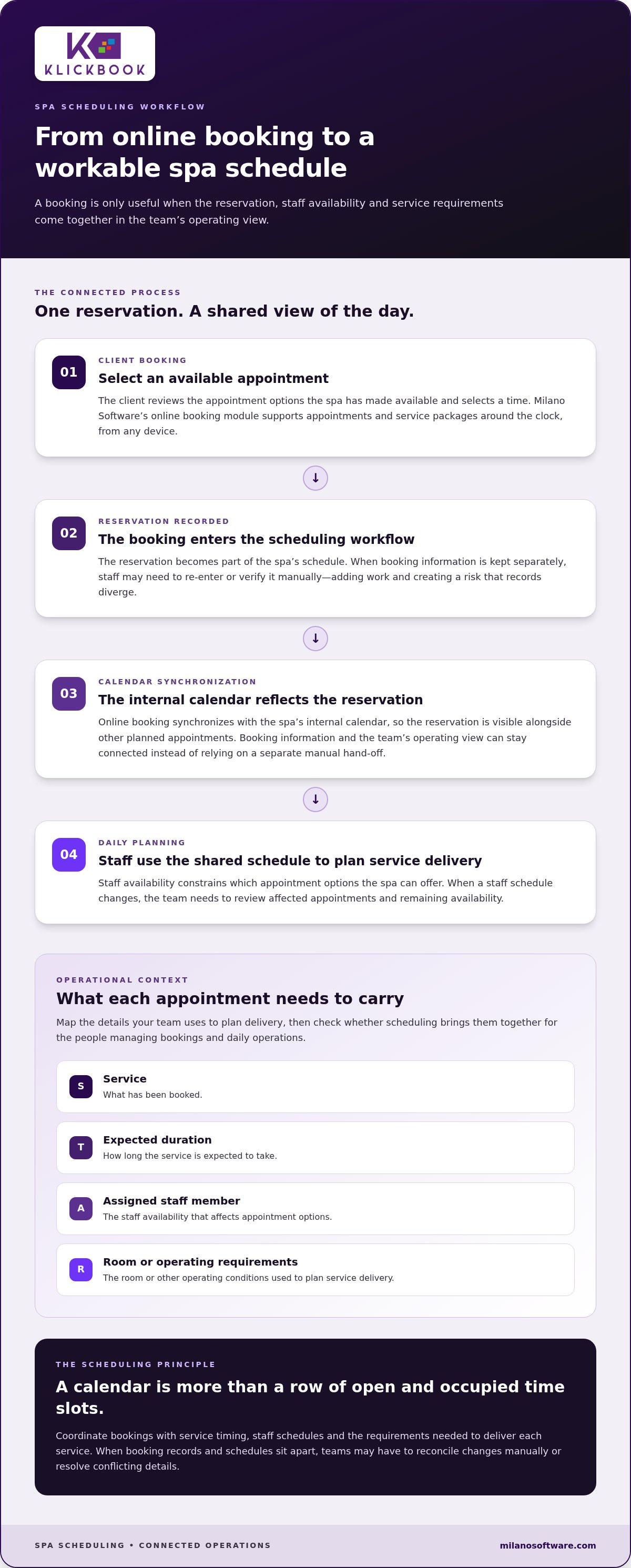
A booking moves through several operational stages: a client selects an available appointment, the reservation becomes part of the spa’s schedule, and staff use the shared calendar to plan the day. Each stage depends on the same underlying information. If a reservation sits in a separate record or a schedule change isn’t reflected in the booking view, teams can face duplicate entries, conflicting details, or avoidable follow-up.
How does an online booking enter the spa schedule?
In an online booking workflow, a client reviews appointment options and selects a time the spa has made available. The reservation needs to appear in the internal calendar so the team can see it alongside other planned appointments. Without synchronization, staff may need to re-enter or verify bookings manually, creating extra work and increasing the risk that the public booking view and internal schedule diverge.
Milano Software’s online booking module lets spa clients schedule appointments and service packages around the clock from any device, and synchronizes with the spa’s internal calendar. This connects the client’s reservation to the team’s operating view and reduces reliance on a separate manual hand-off. The sequence is direct: a client selects an appointment, the reservation is recorded, and the booking becomes visible in the spa’s scheduling workflow.
Accurate booking records matter across a varied sector. The Global Wellness Institute’s overview of the spa industry and its economic impact provides broader context for the range of spa operations. A scheduling process must reflect the services and operating availability of the individual spa, rather than assume every facility offers the same appointment structure.
How do staff schedules influence appointment availability?
Staff availability places a practical constraint on the appointment options a spa can offer. A service can only be scheduled when the relevant staff member is available to deliver it. When that schedule changes, the team needs a reliable way to review affected appointments and remaining availability. Otherwise, a time that appears open in one view may conflict with the staffing plan in another.
A shared calendar helps staff review the day’s appointments against staff schedules, identify gaps, and see where a change may affect the wider plan. For example, if a staff member’s availability changes, the team can review the appointments and open times affected by that change. A shared view doesn’t replace sound scheduling rules; it gives the team a consistent information base for applying them.
Synchronized booking records connect client-selected appointment times with internal calendar visibility and staff schedules, helping teams maintain an accurate view of planned service capacity. For more on how reservations fit into the broader operating workflow, the spa booking software guide extends the booking-to-operations perspective. Spa operators assessing this workflow can also review Milano Software’s spa management platform in the context of their scheduling requirements.
How to Assess Spa Scheduling Software Against Real Operational Needs
Start with the friction your team already experiences, not a feature list. Repeated double-bookings, manual calendar changes, mismatched booking records, and time spent checking staff availability point to different process gaps. Separate recurring patterns from one-off disruptions, such as an unexpected staff absence. This prevents a rare exception from shaping requirements for every operating day.
Use this sequence to turn those observations into operational requirements:
- Record the recurring friction. Note where conflicts occur, which records need correction, and how often staff adjust schedules manually. Include the affected service types and operating periods.
- Map the workflow and teams involved. Follow a booking from appointment selection through calendar review and daily schedule management. Identify where reception, spa managers, or service teams exchange information or re-enter details.
- Define essential requirements. Prioritize capabilities that address documented problems. If online reservations and the internal calendar drift out of sync, synchronized booking records may be essential. If staff availability determines which appointment times the spa can deliver, visibility into schedules is a core requirement.
- Separate optional capabilities. Consider additional functions only after the primary workflow is clear. Reporting can help managers review patterns, but it won’t resolve booking conflicts if the underlying schedule information remains fragmented.
- Set measures and a review period. Establish a consistent baseline, then review the same indicators after the scheduling process changes. This makes operational progress easier to assess without assuming a particular financial result.
Which measures can show whether scheduling is working?
Choose measures that reveal friction and capacity, and define each one consistently. Track booking conflicts over a set review period, count manual schedule adjustments, and record the time staff spend reconciling calendars or checking booking details. To assess capacity, compare scheduled service time with the staff availability designated for those services. This can show where availability is being used and where open appointment capacity remains.
Interpret those indicators together. Fewer calendar corrections may suggest cleaner information flow, while changes in staff schedule utilization may reflect updated availability, service demand, or operating patterns. The measures describe what is happening; they don’t, by themselves, prove that software caused a change. Keep service mix and staffing context in view during each review.
A disciplined assessment gives spa scheduling software a clear operational test: does it address repeated friction, support the teams involved, and make relevant capacity easier to review? Milano Software’s spa management platform brings scheduling into a broader operational context for spas assessing how booking and staff schedules should work together.
How Scheduling Requirements Differ Across Day, Resort, and Nordic Spas
Scheduling requirements follow the operating model. A day spa may centre its daily plan on treatment appointments and staff availability. A resort spa may coordinate spa bookings within a broader guest-service environment, while a Nordic spa may schedule appointments alongside a wider range of wellness spaces and services. These differences affect which information teams need to see together. They don’t mean every spa requires the same scheduling configuration.
Use the comparison below to identify where scheduling pressure originates and which workflow to map before setting system requirements.
| Operating model | Scheduling pressure | Workflow to map |
|---|---|---|
| Day spa | Appointment timing and staff availability shape the daily service plan. | Client reservation, staff schedule, and internal calendar review. |
| Resort spa | Spa appointments sit within a wider guest-service operation, creating coordination points across teams. | Booking intake, spa schedule review, and the operational hand-offs that affect delivery. |
| Nordic spa | Appointments may form only one part of a broader wellness operation. | Appointment planning alongside the spa’s own service and operating schedule. |
What scheduling priorities shape a day spa?
For a day spa, the core planning task is to maintain a clear view of treatment appointments against staff schedules. Managers need to know which appointments are planned, where staff availability constrains the schedule, and how changes affect the rest of the day. Online booking can connect client reservations with the internal schedule, giving the team a shared reference instead of a separate booking list to reconcile. The day spa booking guide offers related context on how bookings fit into day spa operations.
What changes for resort and Nordic spa operations?
Resort spa scheduling takes place within a broader hospitality setting. Map where spa bookings enter the operation, which teams review them, and what information is needed to manage the spa’s own calendar. This helps identify the hand-offs that matter to the property without assuming a particular connection with other hotel systems.
Nordic spa operations can involve a broader wellness environment than appointment-led scheduling alone captures. Map the services and operating periods that shape your schedule, then identify how appointment workflows fit alongside them. Make sure the scheduling requirements account for the facility’s own operating plan rather than treating an appointment calendar as a complete picture of capacity.
Assess spa scheduling software against these distinct operating requirements, not a generic feature list. Explore Milano Software’s spa management platform to see how scheduling can sit within a wider operating workflow.
Connect Spa Scheduling Software to the Wider Management Workflow
Scheduling data becomes more useful when considered alongside the records managers use to understand spa operations. Client profiles, point-of-sale transactions, and operational reporting each serve a different purpose. Together, they help teams connect planned activity with client information, completed transactions, and management review without treating those records as interchangeable.
Map how these records are used in practice. Identify which roles consult client profiles, who records transactions, and which reports managers review. Define responsibilities for maintaining information and resolving discrepancies. These procedures matter alongside the platform itself: software capabilities don’t replace clear ownership of business records.
How does scheduling relate to point of sale and reporting?
An appointment records planned service activity. A point-of-sale record documents a transaction, including service charges, gift cards, or retail merchandise. Keeping these purposes distinct gives managers a clearer basis for reviewing the operation. A booking alone doesn’t establish that a service was completed or that a transaction was processed.
Reporting offers another management perspective. Managers can review revenue, staff performance, and inventory metrics to assess activity across the business. Interpret those measures in context: scheduling describes planned appointments, while financial and operational reports address other dimensions of performance. A calendar cannot, by itself, establish a revenue outcome or explain every change in performance.
Where does Klickbook by Milano Software fit?
Klickbook by Milano Software is a spa management platform that coordinates staff schedules, client profiles, and day-to-day administrative tasks. Its point-of-sale capabilities support transactions, service charges, gift cards, and retail merchandise. The reporting tools provide insights into revenue, staff performance, and inventory metrics. These functions give managers distinct operational records to use in daily administration and business review.
Before changing workflows, decide how your team will use each record, who maintains it, and how managers will interpret the resulting information. This keeps system capabilities aligned with defined processes and makes the wider management workflow easier to assess.
Explore Milano Software’s spa management platform to consider how its capabilities align with your operation.
Make Scheduling a Deliberate Operating Decision
Set a clear ownership model before making further changes. Assign responsibility for maintaining scheduling rules, reviewing exceptions, and deciding when a recurring issue calls for a process adjustment. A consistent review cadence helps managers distinguish isolated disruptions from patterns that need action.
Use that operating discipline to guide your next evaluation of spa scheduling software. Define what a dependable schedule should enable, how you’ll assess whether the process is working, and who will act on the findings. Those decisions establish a practical foundation for ongoing improvement without assuming that a new system alone will resolve every workflow challenge.
Milano Software’s Klickbook platform is designed for spa operations. Explore Milano Software’s spa management platform to align your scheduling approach with your operating priorities.
Frequently Asked Questions
Can spa scheduling software manage multiple locations?
Multi-location use depends on how an organization structures its calendars, staff assignments, and reporting. Before assessing a system, document which records should be visible across properties and which should remain location-specific. For example, decide whether managers need a consolidated view of appointment activity while local teams maintain distinct service schedules and staffing information. Treat this as an operating-model requirement, not an assumed feature.
Can spa scheduling software handle group appointments?
Define the group-booking workflow before assessing a system. Specify whether participants book one shared time or staggered appointments, whether each person needs a separate staff assignment, and how the spa determines availability for the group. Group bookings differ from individual appointments because several people and schedules may need to align. Document exceptions, such as a participant changing their booking.
How should a spa prepare existing appointments before changing scheduling systems?
Map current booking records, staff schedules, service definitions, and who can change each schedule. Flag upcoming appointments that need to remain accessible during the transition, including their current status and relevant details. Establish a review process for records after they’re transferred or re-entered, including who checks them and how discrepancies are resolved. This preparation helps teams manage continuity during a system change.
Does spa scheduling software automatically prevent double-bookings?
No system should be treated as a guarantee against every scheduling conflict. Calendar synchronization can reduce the risk of conflicting records by giving staff a shared source of schedule information, but configuration and day-to-day practices matter. Define who can change appointments, how staff communicate schedule adjustments, and how the team verifies the calendar after a change. These procedures help address conflicts that software alone may not prevent.
Can spa scheduling software manage appointments and walk-ins together?
Start with the spa’s service model and the workflow the team needs. Appointments are planned in advance, while walk-ins require staff to assess current availability and record incoming demand as it occurs. Document how the front desk checks capacity, records each booking type, and communicates changes to the service team. This makes the operational requirement clear when evaluating scheduling workflows.
What information should spa managers review after changing scheduling workflows?
Review schedule conflicts, manual adjustments, appointment capacity, and staff schedule utilization against a baseline established before the change. Compare consistent periods and, where useful, separate patterns by service category or time of day. Note unusual events that may affect the figures, such as staffing changes, so managers don’t mistake a one-off disruption for a persistent trend. Operational reports can add context, but no particular result is guaranteed.


