
A full appointment book can still conceal operational gaps. When bookings, staff schedules and client information sit in separate processes, availability becomes harder to coordinate and sales performance harder to assess. Day spa software is most useful when it connects the client journey from booking through service, checkout and reporting.
Reliable booking is essential, but appointments also need to align with staff schedules and available resources. Transactions, gift cards, retail sales and inventory should be visible alongside performance data. This guide explains how day spa software can connect those workflows, what to consider when managing service packages and gift cards, and why operational fit matters more than a long feature list. It also outlines how booking, point of sale and reporting work together, so you can assess whether a platform supports your day spa’s operations rather than adding another disconnected tool.
Key Takeaways
- Assess day spa software by how well it connects booking, staff schedules, client records, checkout and reporting, not by feature count alone.
- Map the client cycle from appointment request through checkout to find conflicting records and handoffs that could disrupt operations.
- Compare platforms against specific workflow questions, then review how calendar synchronization, staff coordination and reporting work.
- Prepare for adoption by documenting current processes, assigning workflow ownership, organizing records and defining the reports managers need.
- Klickbook by Milano Software brings online booking, staff schedules, client profiles, point of sale and reporting into a connected operational platform.
Day spa software: what it does beyond online appointment booking
Online booking captures an appointment request. On its own, it does not coordinate what follows: matching availability, aligning staff schedules, maintaining client information, recording checkout transactions and reviewing operational results. A management platform connects these activities in a shared workflow, giving staff and managers a consistent view of relevant information.
Day spa software is a business platform that coordinates appointment booking with staff schedules, client records, point-of-sale activity and operational reporting. An appointment is part of a broader service cycle, not just a calendar entry. A spa’s operating model varies by setting and services, as the overview of Spa describes. The systems supporting a day spa should reflect its own services, staff and resource needs.
Which day spa workflows does the software connect?
The client journey begins when an appointment is requested and matched to the spa’s calendar and staff schedules. Online booking can also let clients schedule service packages. Staff use the appointment and client profile to coordinate the visit and refer to relevant records. At checkout, point-of-sale workflows record transactions, service charges, gift cards or retail merchandise. Inventory records and transaction details then contribute to the operational and financial information managers review.
Each stage depends on information established earlier. If bookings, staff schedules and client profiles are kept separately, employees may need to transfer or re-enter details as an appointment moves from one task to another. That creates administrative handoffs and makes it harder to know which record is current. A connected workflow gives the team a more consistent reference point, while staff remain responsible for the work and decisions each step requires.
Why a booking tool is not the whole operating system
A booking interface is designed to capture and display appointments. Management software has a wider role: it connects calendar availability with staff schedules, links client records to service activity, supports checkout and brings operational information into reporting. These functions help managers review the business across the client cycle instead of treating the appointment book as the complete picture.
Integration means relevant information is coordinated across workflows. It does not mean every action happens automatically or that software makes operational decisions for staff. For example, bookings can synchronize with the internal calendar while staff use their schedules to coordinate service delivery. Transaction and inventory records can provide context for later reporting. Assess whether those information flows match how your spa operates.
This broader view is central to connected spa management software, where the goal is to align daily processes, not simply add another way to accept appointments.
How day spa software coordinates appointments, staff and checkout
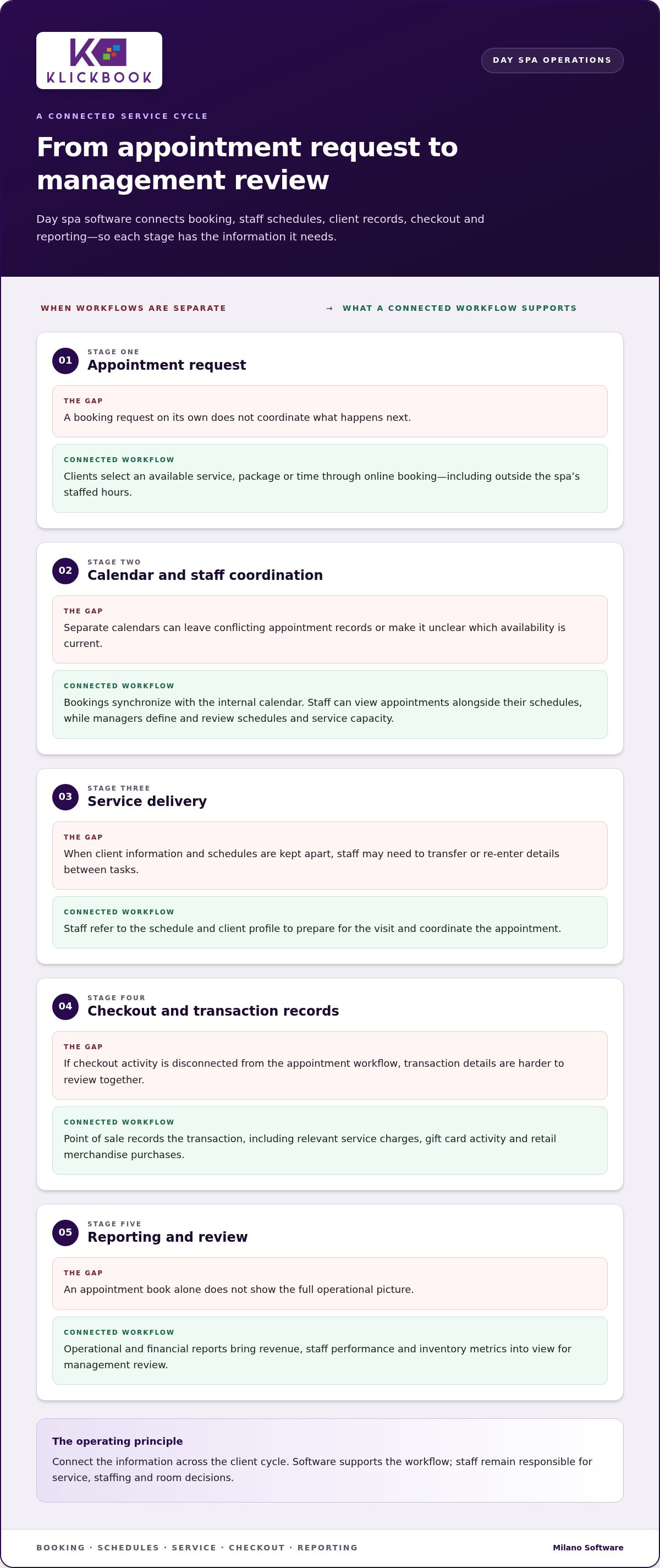
A connected operating cycle keeps each appointment linked to the information needed for service delivery and review. Day spa software supports that flow from the client’s initial request to the records managers use to assess activity. The steps are straightforward. The operational value comes from keeping them aligned.
- Appointment request: A client selects an available service, package or time through online booking. Online access lets clients make bookings outside the spa’s staffed hours.
- Calendar coordination: The booking synchronizes with the internal calendar, where staff can view appointments alongside their schedules. Availability should reflect appointments already recorded, so a time shown as open is not also represented as booked elsewhere.
- Service: Staff refer to the schedule and client profile to prepare for the visit and coordinate the appointment. The schedule shows who is working and when, while staffing and room decisions still require appropriate management.
- Checkout: The point-of-sale workflow records the transaction and relevant service charges, gift card activity or retail merchandise purchases.
- Reporting: Operational and financial reports bring information such as revenue, staff performance and inventory metrics into view for management review.
From online booking to the internal calendar
Online booking is a client access point, not a separate source of availability. When bookings synchronize with the spa’s internal calendar, staff have a shared view of scheduled appointments. This supports day-to-day coordination and reduces the risk of conflicting appointment records created by separate calendars. Clients can also schedule service packages online, connecting package bookings to the same calendar workflow.
Staff schedules and appointment availability are operationally linked: schedules help the team see which appointments align with working hours. Managers define and review the schedules and service capacity that shape availability. When evaluating spa booking software, trace a sample booking and any changes from the client-facing process to the internal calendar. Broader market context is available in the Spa and Salon Software Market Analysis.
From appointment completion to accurate sales records
Checkout closes the service transaction in the operating record. Point of sale connects service charges, gift card activity and retail transactions within a single checkout workflow. Recording these categories gives managers a clearer view of transactions, while inventory records add context about merchandise activity. Managers can review sales and inventory information alongside operational reporting instead of treating each as an isolated record.
For operators assessing connected workflows, Milano Software’s spa management platform brings booking, staff schedules, point of sale and reporting into the same operational picture.
How to assess day spa software by operational fit
Start by evaluating the operating model, not the feature list. Identify which records staff rely on at each stage, where information is re-entered and which management decisions depend on accurate reporting. For each workflow, identify its system of record, who owns it and how the information can be checked.
Use the comparison below to separate essential requirements from optional capabilities. A feature is useful when it supports a real process or decision in the spa.
| Workflow | Business question | Required capability | Evidence to review |
|---|---|---|---|
| Booking and calendar | Does client-facing availability align with the internal appointment record? | Online booking synchronized with the spa calendar | Trace a test booking from request to internal calendar and review how changes appear. |
| Staff schedules | Can the team see appointments in relation to staff working schedules? | Staff schedules coordinated with appointment information | Review a representative day and confirm the schedule is clear to the people who use it. |
| Checkout | Can staff record the transaction categories relevant to the spa? | Point of sale for transactions, service charges, gift cards and retail merchandise, as applicable | Walk through a typical checkout and inspect how each relevant item is represented. |
| Inventory and reporting | Can managers review the operational and financial information they need? | Inventory records and reporting on relevant measures, such as revenue, staff performance and inventory | Review sample reports and determine whether they answer defined management questions. |
Match capabilities to the spa’s operating model
Document how clients book, how staff schedules are maintained and how completed appointments are recorded at checkout. Include service packages, gift card and retail transactions, plus inventory visibility where those activities are part of the business. Then define the questions management needs reports to answer. For example, decide whether managers need to review revenue by period, staff performance or inventory metrics. This turns broad requirements into workflow tests the team can actually carry out.
Compare usability, data continuity and reporting
Trace a representative appointment from booking through service delivery and point of sale. Note each handoff: who updates the record, where client information is referenced and whether staff must enter the same details again elsewhere. Disconnected records can add administrative work and make it harder to identify the current source of information.
Assess reports against decisions, not appearance alone. A report is useful when managers can apply its information to a defined operational question. Separate essential capabilities, which support a core workflow, from optional ones that address a less frequent need. The best fit is not necessarily the platform with the longest feature list. It is the one whose workflows, records and reporting align with how the spa is managed.
How to prepare a day spa for software adoption
Successful adoption starts with operational clarity. Before selecting day spa software, document how information moves through the spa, who maintains it and which decisions depend on it. This preparation can reveal duplicate records, unclear ownership and reporting gaps before they carry over into new processes.
- Map the workflows. Record how appointments are requested and changed, how staff schedules are maintained, how client profiles are updated, and how checkout transactions and inventory records are handled. Note each handoff and the tools or records involved.
- Define ownership. Assign responsibility for booking administration, schedule updates, client-record maintenance, checkout records and report review. Clear ownership establishes who resolves inconsistencies and keeps information current.
- Organize existing records. Inventory where appointment details, staff schedules, client profiles, sales and inventory information are stored. Identify duplicate, incomplete or inconsistently maintained records, and determine which source should guide each workflow.
- Identify reporting needs. Specify the questions managers need answered, such as how to review revenue, staff performance or inventory. Connect each question to the underlying records needed to produce useful reports.
Map current processes before configuring a platform
Follow a typical appointment from initial booking through any changes, service delivery and checkout. Document where staff record each update, who receives the information and whether details are re-entered elsewhere. Include service packages, gift card and retail transactions where they apply, and note how inventory records are maintained. The aim is to map the process as it works today, not describe an ideal workflow.
Capture recurring management questions alongside the process map. If leaders review revenue or inventory, identify how those details are currently recorded and who is accountable for their accuracy. This connects reporting requirements to daily recordkeeping.
Set practical measures for ongoing use
Define how the team will maintain and review the platform after adoption. Specify who checks schedules, who maintains transaction records and who reviews operational reports. Set process measures that assess consistency rather than promise a particular financial result. Examples include whether appointment records are complete, whether staff use the shared calendar consistently and whether relevant checkout details are recorded.
These measures help managers identify process gaps and assign follow-up. Review them as part of regular operational oversight, adjusting responsibilities when workflows change. A clear adoption plan connects system use to accountable work instead of treating implementation as a one-time technology task.
To align software adoption with your day spa’s operating workflows, explore Milano Software’s spa management platform.
How Milano Software connects day spa operations with Klickbook
Once you have defined workflow requirements and prepared operational records, evaluate a platform against the processes your spa needs to support. Klickbook by Milano Software brings booking, staff schedules, client profiles, point of sale and reporting into a connected operating environment. Compare those capabilities with the requirements documented by your team.
Connect booking and day-to-day spa administration
Clients can book appointments and service packages online, with bookings synchronized to the spa’s internal calendar. Staff schedules and client profiles support the administration around appointments, giving the team relevant scheduling and client information within the operating workflow. This lets you assess booking alongside the records staff use to manage daily activity, rather than considering the online interface on its own.
Trace a representative appointment through Klickbook. Review how the booking appears in the internal calendar, how staff schedules relate to scheduled appointments and where client profile information is available to support administration. Compare each step with your spa’s process map. The goal is to determine whether the platform’s workflows fit your operating needs, while recognizing that software does not remove the need for staff oversight.
Bring point of sale and reporting into the operating picture
Klickbook’s point-of-sale capabilities support transactions, service charges, gift cards and retail merchandise. Inventory records add context to retail activity, while reporting covers operational and financial information, including revenue, staff performance and inventory metrics. Together, these records help managers review activity across service delivery, checkout and merchandise management.
Assess each capability against a defined responsibility or decision. Identify who maintains transaction records, who reviews inventory information and which leaders use revenue or staff performance reports. This makes the evaluation concrete: your team can determine whether relevant information is available in the workflow and whether reports answer the questions established during software planning.
For day spa operators comparing documented requirements with platform capabilities, Milano Software’s spa management platform is a useful reference point. Review Klickbook against your spa’s workflows, ownership model and reporting needs, then use that assessment to guide your decision.
Make operational fit the next decision
Use your documented workflows as the basis for evaluating day spa software. Identify which processes need a consistent system of record, who owns each one and what managers need to see in reports. This gives your team a practical way to assess a platform against daily operations rather than judging it by the breadth of its feature list.
Include the people responsible for booking administration, staff schedules, checkout and reporting in the assessment. Their day-to-day perspective can show whether a workflow is workable, where responsibilities need definition and which requirements matter most. A disciplined review aligns technology decisions with operational priorities before adoption begins.
See how Klickbook by Milano Software supports day spa operations. Explore Milano Software’s spa management platform and compare its booking, point-of-sale and reporting capabilities with your team’s requirements.
Frequently Asked Questions
What is day spa software?
Day spa software organizes the information and processes behind a spa’s daily services. Beyond recording appointments, it can support client profiles, staff schedules, checkout activity and management reporting. Managers can use appointment records to understand the day’s workload, while staff refer to consistent information when preparing for visits. Choose capabilities that match the spa’s operating model and management needs.
Is day spa software different from booking software?
Yes. Booking software primarily captures and manages appointment requests, while day spa software can also support staff schedules, client records, checkout and reporting. Consider a cancellation: the team needs to know how the appointment record is updated, whether the released time is reflected in availability and who is responsible for reviewing the schedule. Evaluating the whole process shows whether a tool supports operations beyond appointment entry.
Can day spa software manage gift cards and retail sales?
Software with point-of-sale capabilities can record gift card and retail transactions alongside service charges. Before adoption, define how staff record a gift card sale and its later use, and how retail purchases appear in transaction and inventory records. Clear procedures help managers interpret the records consistently. The workflow should reflect the spa’s policies for gift cards and merchandise.
How can day spa software help coordinate staff schedules?
It can give staff and managers a shared operational reference for working schedules and appointments. A manager reviewing an upcoming day can compare scheduled bookings with staff availability, then address gaps or changes using the spa’s established process. Assign responsibility for schedule updates, including who records changes and who reviews them. Software supports coordination, but staffing decisions remain an operational responsibility.
What reports should day spa software provide?
Choose reports that answer management questions rather than selecting a platform based on the number of report options. Useful categories include revenue, staff performance and inventory metrics. Specify the decisions each report should inform, such as reviewing sales activity or identifying inventory that needs attention. Also establish who reviews each report and how often, so reporting has a defined role in management.
How should a day spa prepare to use new software?
Start by documenting current procedures and identifying who owns each record. Then review sample appointment, client and transaction records for missing or inconsistent details. Agree on shared naming conventions for services and staff, and decide which existing records are authoritative. Finally, test representative scenarios with the people who will use the system, such as changing an appointment or recording a retail purchase, before making the workflow routine.
Can day spa software support multiple spa locations?
For a spa group, assess whether location-level schedules and records can be managed appropriately, and whether leadership can review information across sites consistently. Define which processes should be shared and which should remain specific to each location. These requirements help determine whether a platform’s operating model fits a single spa, a growing group or both.


