

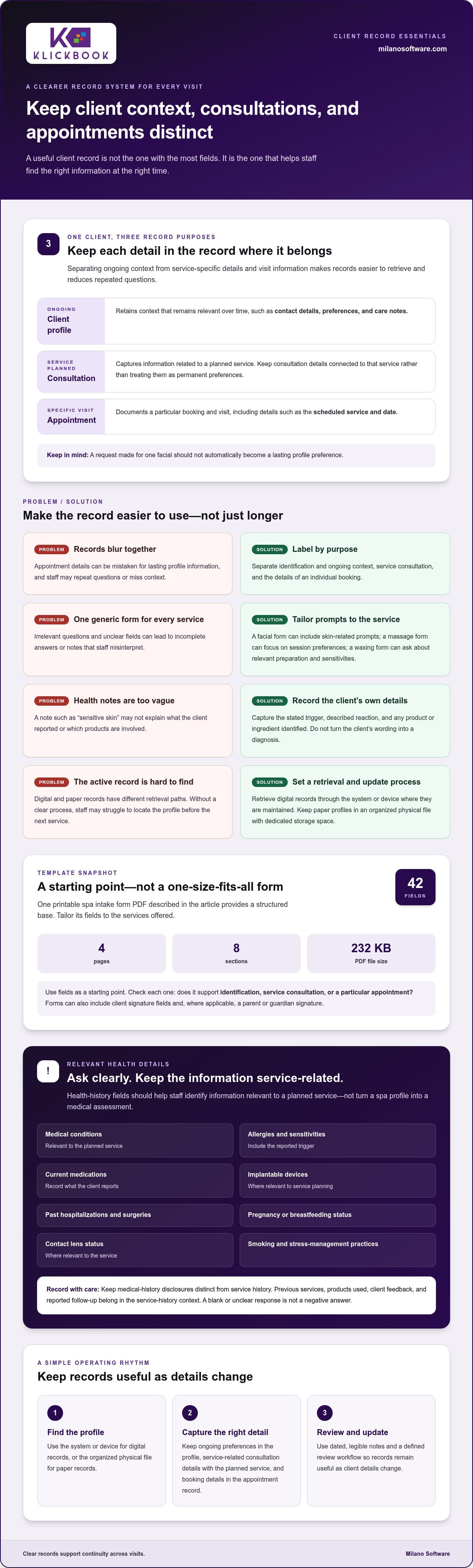
The most useful client record is not the one with the most fields. It is the one that separates ongoing context from decisions made for a specific visit. A spa client profile template organizes information that remains relevant over time, such as contact details, preferences and care notes. A consultation form captures information for a planned service, while an appointment record documents a particular booking and visit.
That distinction matters in daily operations. When records blur together, staff may miss important context, repeat questions or struggle to find details needed for a smooth check-in. A profile should support continuity without becoming an unstructured collection of sensitive information.
This guide explains what belongs in each record, which personal, emergency-contact and care details to consider, and how to keep notes clear and well managed. It also covers the workflows that keep profiles useful over time, including how digital and paper records are accessed and updated.
Key Takeaways
- Keep ongoing client context, service-specific consultation details and individual appointment records distinct so staff can retrieve the right information at the right time.
- Structure health and sensitivity notes around details relevant to the planned service, and keep sensitive information clear, current and appropriately managed.
- Capture reliable personal and emergency contact details to support efficient guest care and continuity across visits.
- Use dated, legible notes and a defined review workflow to keep paper or digital records useful as client details change.
- Align booking, point of sale and reporting workflows with record management so operational information supports consistent service delivery.
Client profile, consultation form, and appointment record: what is the difference?
Each record serves a different purpose: a profile retains client context, a consultation form captures service-related details, and an appointment record documents a specific booking. Keeping them separate helps staff find the right information without treating every visit as a new intake.
Digital intake forms and client records
A digital intake form collects client information electronically and stores the answers in a digital client record. Staff retrieve that profile through the system or device where records are maintained, rather than searching for a paper file. The form captures information for ongoing use; the appointment record remains tied to a particular booking. For example, a client’s stated preferences can stay in the profile, while the selected service belongs to the appointment.
A client profile is the continuing record; a consultation form relates information to a planned service. An appointment record captures the booking and visit details, such as the scheduled service and date. Keeping these purposes distinct reduces repeated data entry and prevents a service-specific note from being mistaken for a permanent preference. For example, a request made for one facial should not automatically define future appointments.
Digital and paper records have different retrieval paths. Staff access a digital profile through its record system or device, and retrieve a paper profile from its organized physical file. Paper records need dedicated storage space; digital records depend on access to the system that holds them. In either format, staff need a clear process for finding the active profile before the client’s next service.
Template content and common form mistakes
A spa client profile template is a structured starting point for collecting consistent client information. A downloadable, printable spa intake form PDF is four pages long, contains eight sections and 42 fields, and is 232 KB. For a free form, look for a downloadable intake PDF; use its fields as a starting point, then tailor the form to the services offered. Intake forms can also include client signature fields and, where applicable, a parent or guardian signature.
Common form risks include combining appointment details with lasting profile information, asking irrelevant questions, and leaving fields unclear. These design choices can produce incomplete answers or notes that staff misinterpret. Review each field against its purpose: does it support identification, service consultation, or a particular appointment? A form with 42 fields should still make those categories easy to distinguish.
For facials, massage and waxing, include contact details, relevant sensitivities, service preferences and consultation questions related to the treatment. Keep the appointment date and booked service in the appointment record, rather than treating them as permanent profile details. Tailoring questions to each service helps staff gather useful information without using one generic form for every visit.
Salon and beauty intake forms may share sections for contact details, preferences and service notes, but their questions should fit the service. A facial form can organize skin-related consultation prompts; a massage form can focus on session preferences; a waxing form can include relevant preparation and sensitivity prompts. Keep service-specific questions separate from the ongoing profile, then associate completed consultation details with the appropriate visit.
Medical history, allergies, and sensitivities
A health-history section helps staff identify information relevant to a planned service before it begins. It should capture the client’s own disclosures, not turn a spa profile into a medical assessment. For example, a medication entry can prompt a practitioner to clarify service suitability through the appropriate clinical process.
Use clear fields rather than one open-ended question. A spa intake form may ask about:
- Medical conditions relevant to the planned service.
- Allergies and known sensitivities, including the reported trigger.
- Medications the client currently takes.
- Implantable devices that may affect service planning.
- Past hospitalizations and surgeries.
- Pregnancy or breastfeeding status.
- Contact lens status, where relevant to the service.
- Smoking and stress-management practices.
These fields reflect information commonly collected on spa intake forms. Their relevance depends on the service: contact lens status may matter during a facial, while an implantable device may be pertinent to another service. Keep questions neutral and let clients describe their circumstances in their own words. Do not treat a blank or unclear response as a negative answer.
Allergy and sensitivity entries need enough detail to be useful. Record the client’s stated trigger, the reaction they describe and any product or ingredient they identify. “Sensitive skin” alone gives less context than “reports redness after fragranced products.” Do not turn a client’s wording into a diagnosis or assume everyone uses “allergy” and “sensitivity” to mean the same thing.
Keep medical history disclosures distinct from service history. The first records relevant health information; the second captures previous services, products used, client feedback and any follow-up the client reports. For example, a prior facial record may show which products were used and whether the client reported irritation afterward. That history can inform questions at the next consultation without replacing a current disclosure.
Use service-specific prompts to keep the record focused. For massage, a client may identify a recent surgery or a preference to avoid a particular area. For a facial, they may report a product sensitivity. For waxing, they may disclose a relevant skin concern. These examples help staff identify what needs clarification before proceeding, rather than treating a general profile field as sufficient context.
Record the date and source of an update, such as “client reported medication change at consultation.” Preserve the client’s exact details when they affect service planning, then document the agreed next step separately. If a disclosure needs further discussion, mark that discussion as pending instead of inferring a decision or recording an unverified conclusion.
Review health-related entries when a client reports a change and before relying on older information for a new service. Distinguishing client disclosures, practitioner notes and follow-up actions makes the record easier to interpret across visits.
Personal and emergency contact information
Accurate identity and contact fields link each spa record to the correct guest and booking. Separate routine contact details from emergency-contact information so staff can find each without confusing the two.
A spa client profile template should include the client’s full name, age, occupation, gender, phone number, email address and mailing address. Intake questions should also capture relevant service preferences and information needed for the planned visit.
Client identifying and contact details
Identity and contact details establish which client a record belongs to and how the spa can reach them. Use consistent fields for full name, age, occupation, gender, phone number, email and address. For example, a client who books under a shortened name can still be matched to their profile using the full name on file.
Keep each field distinct. Separate phone and email entries reduce errors when staff confirm a booking or communicate a change. The address field should capture the client’s stated address, not be merged with appointment notes. If a detail changes, update its designated field so a new email address does not remain buried in an earlier visit’s comments.
Contact and appointment fields serve different operational needs. The profile holds the client’s current contact details; the appointment record identifies the scheduled visit. For example, record the booking date and selected service with that appointment, while keeping the client’s phone number in the profile. This separation helps staff update contact information without rewriting past appointment details.
- Identity: full name, age, occupation and gender.
- Client contact: phone number, email and address.
- Appointment: scheduled date and selected service.
- Emergency contact: name, phone number and relationship.
Make intake questions direct and specific to each field. Ask, “What phone number should we use for appointment updates?” rather than combining several requests in one open text box. Confirm the selected service and booking details separately. Clear prompts help clients provide usable information and make incomplete entries easier for staff to spot.
Emergency contact information
An emergency contact entry identifies a person the spa can reach if an urgent situation arises during a visit. Capture that person’s name, phone number and relationship to the client. For example, “Jordan Lee, 555-0142, sibling” gives staff a name, contact route and relationship in one structured record.
Keep emergency-contact fields separate from the client’s own phone and email. Otherwise, staff could mistake an alternate contact for the guest’s number when confirming an appointment. Label fields clearly and record the relationship as the client states it, such as “friend” or “parent.”
Check that each emergency-contact entry includes a name, phone number and relationship. If the phone field is blank, staff have a contact name but no usable way to reach that person. If the relationship is missing, the record gives less context about who the person is to the client.
Review contact details when a client reports a change, such as a new phone number or emergency contact. Update the relevant field instead of adding the change to an unrelated appointment note. This keeps future bookings and guest interactions tied to the current record.
Clear notes and sensitive information
Client records work best when staff can distinguish a reported detail from an observation or an action taken. A consistent note format helps the spa interpret sensitive information without adding assumptions. For example, record “client requested unscented products” as a preference, not a medical conclusion.
Consent and privacy statements should explain in plain language what information the form collects, why the spa asks for it, how staff will use it and who may access it. Separate service-related information from optional communications, such as promotional messages. Clear wording helps clients understand the request and decide what details to provide.
For Canadian spa operations, make these statements part of a transparent record-management process. Give clients a way to ask questions or correct information, and explain the intended use of each field. For instance, label a field “service preferences” rather than using a broad prompt that could invite unrelated personal details.
Keep notes specific, dated and attributable. Identify whether a detail came from the client, a staff observation or a follow-up conversation. A note such as “client asked to avoid pressure on left shoulder during today’s massage” gives context for that visit. It does not present a one-time request as a permanent health condition or general preference.
Use consistent labels for common operational notes. Staff can distinguish preferences, reported concerns and follow-up actions without relying on compressed shorthand. For example, “follow up on product choice at next facial” identifies an action, while “client prefers unscented cleanser” records a preference. Separate entries make later review more precise.
Limit access to staff whose responsibilities require the information. Front-desk staff may need contact and booking details, while a practitioner may need service-related notes. Avoid displaying a sensitive profile on a shared reception screen or discussing personal details within other guests’ hearing. These practices reduce unnecessary exposure during routine spa operations.
For paper files, use a designated storage area and return each record after use. For digital records, use the system where profiles are maintained and avoid leaving them open on unattended devices. If a printed page is needed for a task, keep it with the responsible staff member and return it to the appropriate file afterward.
When correcting an entry, make clear what changed and why. Replace vague wording with the client’s specific statement, and distinguish a correction from a new update. A consistent approach helps colleagues interpret the record accurately without treating an old note as current or making assumptions about sensitive details.
Client management workflows
A client profile stays useful when staff follow a defined process for reviewing and updating it. That process should connect intake, booking and service delivery, with clear responsibility at each handoff.
Review the spa intake form at least once a year. Check whether each question still serves a real operational need. For example, if staff routinely skip a field because its purpose is unclear, clarify the prompt or remove it from the form.
Update digital profiles electronically when clients provide new details. If a guest reports a new email address during check-in, update the profile field and use the current record for subsequent communication. Do not leave the change only in an appointment note, where staff may miss it on a later visit.
Paper records need an established retrieval and return routine. Staff locate the relevant profile before the appointment, keep it available to colleagues who need it, then return it to the designated filing location. For example, alphabetical filing by surname gives reception staff a consistent way to find a record.
Assign ownership at each workflow stage. Reception staff can identify updates shared during booking or check-in; practitioners can document service-related changes after the consultation. A manager can periodically review whether staff entered updates in the right record rather than leaving them in informal messages or unfiled paperwork.
Digital intake can move some information collection earlier in the guest journey. Clients can submit details before arrival, giving staff an opportunity to review the record before check-in. The benefit depends on linking the submission to the correct profile and ensuring the relevant team can retrieve it when preparing for the appointment.
Use a consistent update sequence: identify the changed information, enter it in the correct field, update the maintained profile and make it available to staff who need it. For example, reflect a revised communication preference in the relevant profile setting, not just in a verbal message to one colleague.
During the annual review, compare the form with how staff actually use it. Look for duplicate questions, unclear field labels and steps that require staff to copy information between records. Addressing these workflow gaps can make intake more consistent and reduce avoidable rework.
For a spa refining how guest information supports daily operations, explore spa operations workflows.
Salon colleagues need access to the relevant paper client profile so they can support the same handoffs and avoid relying on informal updates. A medical director quoted on the page reports a 70% reduction in check-in time after switching to digital forms, illustrating how earlier collection can ease arrival workflows.
Milano Software: Spa Management
Milano Software provides spa management software for operators coordinating guest services with daily business workflows. Online booking lets clients schedule appointments and service packages from any device, while reporting and point of sale tools support operational oversight and transactions.
For spas assessing how client records fit into wider operations, Milano Software’s platform brings together online booking, point of sale and reporting. Consider whether connecting booking activity with day-to-day management would improve your current workflow.
Contact Milano Software to discuss your spa management needs.
Make profile design part of operational planning
Turn the record structure into a consistent operating standard. Assign responsibility for reviewing fields, handling updates and orienting staff, then test the process with realistic guest scenarios. A new client, a returning guest with changed details and a service requiring consultation should each lead staff to the right record and next action.
A spa client profile template can anchor that standard, but its value depends on consistent use. Document how staff find the current profile, record changes and distinguish client-provided information from service notes. Revisit the process when services or guest workflows change so the form and daily practice remain aligned.
Milano Software offers Spa Management, Online Booking and Reporting to support spa operations. These capabilities may suit operators looking to connect booking activity with broader management and reporting workflows.
Contact Milano Software to discuss your needs. A deliberate operating standard is a strong foundation for more consistent guest care.
Frequently Asked Questions
What Is a Spa Intake Form?
A spa intake form gathers information from a guest before or during a service consultation. It helps staff prepare relevant questions, understand the guest’s stated preferences and document service-related disclosures. For example, a guest booking a facial can note product concerns before arrival. The completed form supports the consultation; it does not replace the conversation needed to clarify an answer.
What medical history and contraindications should spas document?
Document client-reported health details that could affect the planned service, such as a relevant condition, medication, allergy, sensitivity, recent surgery or implantable device. A contraindication is a reported circumstance that may mean a service should be paused, adapted or discussed further. For example, record the guest’s own description and the service involved, then follow the spa’s established review process rather than entering an unsupported diagnosis.


