

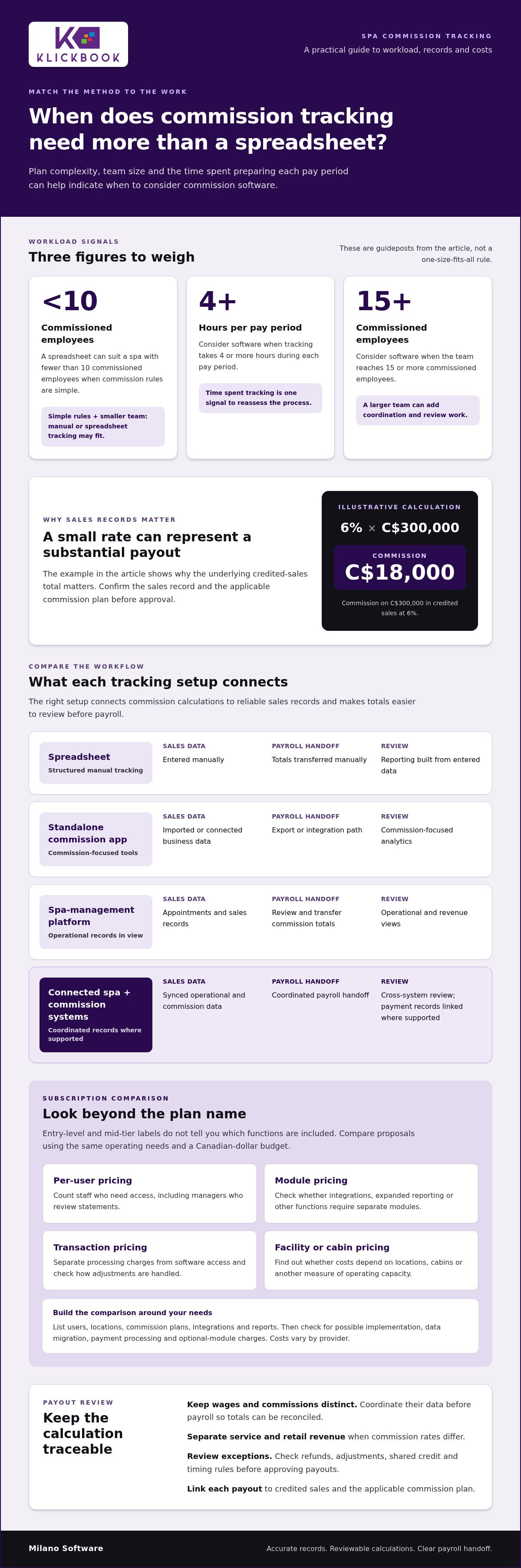
The right payout method depends on plan complexity and administrative workload. Spreadsheets can suit a spa with fewer than 10 commissioned employees and simple commission rules; consider software when tracking takes 4 or more hours per pay period or the team reaches 15 or more commissioned employees. Choosing spa commission tracking software is less about replacing payroll than making commission calculations accurate, reviewable and easier to coordinate with it.
Manual tracking can work when payouts are straightforward, and spreadsheets add structure without requiring a new system. The pressure grows when service and retail sales have different rates, staff share credit, or plan changes make calculations more error-prone. The answer isn’t automatically a more complex platform; it’s a method that fits how your spa pays its team.
This guide compares manual processes, spreadsheets and software, then explains how to assess pricing tiers, payout workflows and spa-specific features. You’ll learn how to keep hourly wages separate from commissions while bringing the relevant records together before payroll, and how to choose an approach that supports clear, consistent payout decisions.
Key Takeaways
- Keep hourly wages and commission payouts distinct, then coordinate their data before payroll to support accurate reconciliation.
- Compare manual tracking, spreadsheets and dedicated software against plan complexity, team size and the time required to prepare each pay period.
- Assess pricing tiers by user limits, calculation rules, integrations and reporting capabilities, not by headline cost alone.
- Track service revenue separately from retail sales when commission rates differ, so payout calculations and margin analysis use the right categories.
- Use booking, point-of-sale and reporting data as the operational foundation for clearer commission oversight and payout review.
What is the best commission tracking software?
The right fit connects commission calculations to reliable sales records and produces figures payroll can reconcile. Keep hourly wages and commissions distinct, then combine or sync their data before payroll.
Start by tracing the data. A service sale may begin as an appointment, appear at checkout and later show up on a commission statement. When the service menu connects with point-of-sale records, the booked service’s price and estimated duration can carry through to checkout. Staff assignments based on schedules and specialties also help identify who performed the service. For retail, record product revenue separately when its commission rate differs from the service rate.
Commission software can connect with business data to support accurate calculations. Reporting adds another layer: analytics can help spa operators assess existing plans and inform new ones. For example, a report separating service and retail sales shows which revenue categories contribute to payouts, while a payroll-ready statement makes totals easier to review.
Integrated credit-card processing can connect payment records with the sale used in a commission calculation. Compare the system’s record of a completed transaction with the credited service or product sale; investigate refunds, adjustments, shared credit, and timing rules before approval. A 6% commission on C$300,000 in credited sales equals C$18,000, illustrating why the underlying sales total matters.
| Option | Sales data | Payroll workflow | Reporting | Processing records |
|---|---|---|---|---|
| Spreadsheet | Entered manually | Totals transferred manually | Built from entered data | Reconciled against payment records |
| Standalone commission application | Imported or connected business data | Export or integration path | Commission-focused analytics | Depends on connected payment data |
| Spa-management platform | Appointments and sales records | Review and transfer commission totals | Operational and revenue views | Depends on point-of-sale configuration |
| Connected spa and commission systems | Synced operational and commission data | Coordinated payroll handoff | Cross-system review | Payment records linked where supported |
Choose a setup that connects actual sales records to commission rules and makes payroll review straightforward.
Payroll and Commission Tracking
Payroll integration coordinates approved commission totals with wage data, but it shouldn’t obscure how either amount was calculated. Compare direct integration with a controlled export by checking which fields transfer, how corrections are recorded and whether managers can review commissions before payroll processing. The key is traceability: each payout should link to credited sales and the applicable plan.
Canadian Availability and Cloud Considerations
Canadian spas can compare spa management platforms with commission-related reporting and standalone commission applications connected to business records. Features and integrations differ by product. Calculation errors can lead to incorrect payouts and disputes, while employee sales and compensation data need careful access management. For cloud-based software, assess access controls, audit records, backup practices, support channels and how corrections are documented before choosing a platform.
Commission software pricing tiers
Commission software plans are often grouped into entry-level and mid-tier subscriptions. Use these ranges as a starting point for comparison, not a complete cost estimate. The included calculation rules, integrations, reporting and access limits determine whether a tier suits your operating needs.
For an entry-level plan, check whether its features match your current commission process. A lower subscription can still add administrative work if managers have to transfer appointment records, maintain separate sales files or resolve corrections manually. Mid-tier plans may support more involved workflows, but the tier name alone doesn’t tell you which functions are included. Compare features and processes, not labels.
Build a consistent cost model before reviewing proposals. List the users, locations, commission plans, integrations and reports you need. Then identify possible charges for implementation, data migration, payment processing or optional modules. Costs vary by provider, so compare proposals using the same assumptions and a Canadian-dollar budget.
- Per-user pricing: include staff who need access, including managers responsible for reviewing statements.
- Module pricing: identify whether integrations, expanded reporting or other functions require separate modules.
- Transaction pricing: distinguish processing charges from software access and examine how adjustments are handled.
- Facility or cabin pricing: determine whether costs depend on locations, cabins or another measure of operating capacity.
Spa packages and service pricing shape the sales records a commission workflow needs to handle. A package may include several services or visits, so define how revenue is allocated and which event triggers the commission calculation. Ask whether the system records the package sale, service redemption and any adjustment as separate events. This gives managers a clearer history to review when checking payouts.
Cabin-based spa software pricing differs from commission software priced per user. If a provider prices by cabins or facilities, compare that basis with the functions and areas your spa needs to manage. Shared spaces, multiple service zones and changing operating capacity may mean a cabin count doesn’t fully reflect system use.
Compare each plan against the same operational requirements, then identify which pricing model best fits your workflows. A spa management platform can connect operational functions such as point of sale with broader daily processes; Milano Software’s spa management workflows provide one example to consider as you map those requirements.
Commission-tracking features in spa management platforms
Commission controls work best when each payout can be traced to a specific sale, employee and compensation rule. For a massage appointment, the record should distinguish the scheduled service, the employee who delivered it, the amount collected and any adjustment. That transaction history gives managers a clear basis for reviewing commission calculations before approval.
Employee commission management should reflect the rules your spa actually uses. A plan might set one rate for services and another for retail products, or split credit when two employees contribute. Configure eligible sale categories, credited staff and the adjustment process. Then test representative transactions, including a refund or corrected sale, before applying the rules to live records.
Timesheets and clock-in and clock-out records provide a separate view of labour. Compare scheduled shifts with recorded working time, and keep wage calculations distinct from commissions tied to sales. For example, a therapist’s shift record shows hours worked, while the completed appointment record identifies a service sale. Reviewing both can support payroll reconciliation without treating hours as commissionable revenue.
Booking and client management systems add useful context to transactions. Appointment history can show which service was booked, who was assigned and whether the appointment was completed or changed. A client profile can help staff understand service history, while reporting can group completed sales by employee or category. Base commission decisions on transaction records, not assumptions drawn from a client’s profile.
Spa software increasingly connects operational records, including booking, point of sale, employee activity and reporting. The value lies not just in connecting them, but in following a completed appointment from booking through checkout, identifying the credited employee and reviewing the resulting commission entry. Managers can then spot missing records or inconsistent categories before payout review.
- Employee rules: document eligible services, retail categories, shared credit and adjustments in one plan.
- Time records: compare clock-in and clock-out data with scheduled shifts, separately from sales-based commission.
- Booking records: trace completed appointments to assigned staff and checkout transactions.
- Reporting: review commissions by employee, service category and adjustment status before approving totals.
To assess accuracy, test the workflow with a completed appointment, a retail purchase and a corrected transaction. Confirm that each record retains its sales category, employee credit and adjustment history. Reporting should make exceptions visible, and access controls should limit compensation data to appropriate users. These checks show whether a platform supports your compensation plan and daily spa workflows.
How do many of today's businesses track payouts?
Spas often separate service commissions from retail product commissions when the rates differ. That distinction affects payout calculations and performance analysis. A facial service and a skincare product purchased at checkout are separate revenue categories, even if the appointment prompted both sales. Record each category distinctly, then apply the relevant plan rule to its credited sale.
Use a consistent transaction path: classify the sale, assign employee credit, record adjustments, then review the payout. For example, a therapist may receive service credit while another employee completes the product transaction. The system or worksheet must preserve each sale’s category and credited employee. Otherwise, attribution can become unclear or the wrong rate may be applied.
Retail tracking also affects inventory. A product sale should reduce recorded stock and create a sales record that can be reconciled with payments. Compare the point-of-sale receipt, product category and inventory movement. If the receipt shows a cleanser sale but inventory records no change, investigate the transaction before using it in commission reporting.
Restaurants use a related model when employees earn commissions on specified products or sales. The useful comparison is how a sale is attributed: a restaurant may credit it to the employee who entered it, while a spa may connect service revenue to the assigned practitioner. In either case, define who receives credit for shared transactions, discounts, refunds and later corrections.
Payment integration can help reconcile the amount collected with the sale recorded for commission, but it doesn’t determine who gets credit or which rate applies. Managers still need clear rules for deposits, package redemptions, partial payments and refunds. For example, if a guest buys a service package before using an appointment, the plan must define whether commission follows the package sale, the redeemed service or another event.
- Separate categories: distinguish treatment revenue, retail products and package transactions in sales records.
- Assign credit: define the employee tied to each sale, including shared service and checkout scenarios.
- Reconcile payments: compare transaction totals with payment records and document refunds or adjustments.
- Review inventory: match product sales against stock movement to identify missing or misclassified transactions.
Consistent records give managers a clear payout trail and improve visibility into retail performance. Review commission rules alongside inventory and payment reports: a product category with frequent corrections may need clearer checkout procedures. A sales statement should show the credited transaction, category, applied plan rule and adjustment history so staff can understand how the payout was calculated.
Manual, spreadsheet, and software commission tracking
Choose a method based on plan complexity, team size and the work required to prepare payouts. Manual tracking can suit a small team with straightforward rules, as long as every sale and adjustment is recorded consistently. It becomes harder to manage when staff share credit or transactions need correction. Record the reason for each change and link it to the original sale.
A spreadsheet gives managers a repeatable structure. Businesses with fewer than 10 commissioned employees and simple plans can use a template to record sales, credited staff and calculations. Update it weekly rather than waiting until month-end. The Corporate Financial Institute states that 88% of spreadsheets contain errors, making controls such as protected formulas, revision history and a named reviewer important.
Software becomes relevant as administration or plan complexity grows. Consider upgrading when manual tracking takes 4 or more hours per pay period, or when the business has 15 or more commissioned employees. Spreadsheets become harder to manage once a business has 15-20 sales representatives. These thresholds are practical signals; the decision also depends on how often transactions need review or correction.
Compare methods using the same workflow before changing systems. Follow a transaction from appointment completion to statement review. Note where someone enters data, checks the calculation and records an adjustment. This reveals duplicate entry and unclear ownership without assuming automation will solve every process gap.
- Manual: log each eligible transaction, credited employee and adjustment in a controlled record.
- Spreadsheet: use consistent fields, protect formulas and preserve dated versions.
- Software: configure plan rules, assign review responsibilities and examine exceptions before approval.
A spreadsheet can support flat-rate and percentage-based plans, but managers must maintain its inputs and formulas. Software can automate calculations and accommodate plan changes, but its workflow still needs to fit your spa’s operations. Confirm that scheduling and checkout records can be reconciled with commission statements, and decide who handles exceptions before a pay period closes.
Track preparation time, correction patterns and employee count to identify when the current method creates operational friction. If manual administration reaches 4 or more hours per pay period, or the team reaches 15 or more commissioned employees, assess whether a software workflow is warranted. To align operational records with payout administration, review spa management workflows.
Milano Software: Spa Management
Milano Software supports spa operations through Spa Management, Online Booking, Point of Sale and Reporting. For teams comparing payout methods, connected appointment and checkout records can provide an operational context for reviewing service and retail revenue. Reporting helps managers examine business activity, while booking and point-of-sale capabilities support core scheduling and sales workflows. This is a natural next step when disconnected records make it harder to understand how daily appointments and transactions move through the spa. The platform is designed for spa operations, not as a payroll system or a substitute for defining commission rules. To discuss how Milano Software can support your spa’s management workflows, visit milanosoftware.com.
Put a clearer payout workflow in place
Choosing spa commission tracking software is an operating-model decision: define how a sale becomes credited revenue, how exceptions are reviewed and how approved totals move into payroll. Before changing systems, document the rules your team follows at booking, checkout and payout review. That process map gives managers a practical basis for assessing whether a new setup supports consistent decisions across employees and locations.
Milano Software’s spa management tools support operational workflows with online booking, point of sale and reporting. To align those workflows with the way your spa records sales, start a focused discussion about your current process and requirements. Clear operational inputs make a software evaluation more useful and keep the decision grounded in how your business runs.
Contact Milano Software to discuss your spa’s needs and identify a suitable next step for your operations.
Frequently Asked Questions
What are the shortcomings of manual tracking with Excel or Google Sheets?
Manual files can lose their audit trail when copies circulate by email or shared drives. A formula may also fail to include new rows when a template is extended. Keep one controlled master file, record each revision and retain the approved statement for every pay period. These steps make it easier to reconstruct how a past total was calculated.
What is the key to fast, accurate commission statements?
Set a clear pay-period cut-off and send exceptions to a reviewer before finalizing statements. For example, flag a transaction entered after the cut-off instead of silently moving it to another period. A consistent close process gives managers time to resolve exceptions and gives employees statements based on a defined reporting window.
What features should spa commission tracking software include?
Look for employee access controls, records of plan changes, statement approval and an audit trail for adjustments. These controls help answer who changed a rule, who approved a statement and when the change took effect. Managers should also be able to correct a disputed entry without erasing the original record.
How do spa commission tracking systems calculate commissions for services, retail products, tips, and packages?
The system applies the compensation policy configured by the spa, so that policy must define how each transaction type is treated. Specify whether tips are excluded or included, and define which event earns package-related commission. Document how discounts, refunds and partial redemptions affect the eligible amount. Test these cases with sample transactions before adopting the rules.
What are the prices and subscription plans for spa commission tracking software in Canada?
Plans differ in billing basis, included access and contract terms. For a Canadian budget review, compare the total commitment over the proposed term, the renewal process and any charges for added users or modules. Request the same scope in each proposal, then assess whether the included functions match the workflow your team plans to use.
How do leading spa commission software options compare for salons, day spas, and multi-location businesses?
Compare options based on your operating model, not just the business label. A single-site day spa may prioritize straightforward employee statements, while a group may need consistent configuration across locations and consolidated oversight. Salons may need more employee-specific handling of different sale types. Assess how each platform manages permissions, plan governance and reporting for your structure.
Does spa commission tracking software integrate with Canadian payroll, POS, booking, and accounting systems?
Integration methods vary, so map the required data fields before selecting a workflow. Identify which system is the source of truth for employee records, transactions and approved payout totals. During implementation, test representative records, check for duplicates and compare an export with its source. This can expose mapping issues before they affect payroll or accounting.
How can a spa set up staff roles, commission rates, and payout schedules in commission tracking software?
Build a role matrix before configuring the system. For each role, record who can view statements, approve changes and manage compensation rules. Set an effective date for each approved plan revision, then review sample statements in parallel before staff rely on the new process. Keep the approval record with the plan version so future reviews have clear context.


