
A retail sale shouldn’t end at the payment terminal. When merchandise, service charges and gift cards are recorded separately from appointments and inventory, small checkout inconsistencies can create extra work during reconciliation. Spa software for retail checkout should connect each transaction to the sales and inventory records staff and managers use to run the business.
Checkout asks staff to process purchases accurately while keeping the guest experience moving. A reliable workflow does more than process a payment: it records product sales against the right items, keeps service charges and gift card transactions identifiable, and gives managers useful information for review. When those records are maintained in separate systems, staff may need to enter or compare the same activity manually.
This guide explains how to organize spa retail checkout around practical recordkeeping needs. You’ll learn how to distinguish merchandise sales from service charges, review sales alongside inventory, and assess how checkout fits with bookings and other spa operations. It also covers Klickbook by Milano Software, a division of Milano Computer Systems Inc., as an example of a platform that brings spa point of sale, online booking and reporting together. The aim is a checkout process that supports accurate records and coordinated daily operations.
Key Takeaways
- Record merchandise, service charges and gift card transactions as distinct categories within the spa’s checkout workflow.
- Choose spa software for retail checkout that connects product transactions with inventory and sales records.
- Use a consistent sequence from selecting an item to recording the completed transaction.
- Review revenue, staff performance and inventory metrics to see what sales and stock records show.
- Assess how point of sale, online booking and reporting fit together in the spa’s daily operations.
Spa software for retail checkout: what the workflow needs to handle
Spa retail checkout is where merchandise transactions are recorded, payments are processed and sales are added to business records. It’s more than a terminal interaction: a completed product purchase should be associated with the correct item and reflected in sales and inventory records. That gives staff a consistent record to work from and helps managers review retail activity.
Checkout also handles transactions related to services. A booked service charge and a retail product purchase are different entries, even when staff process them during the same visit. Keeping them distinct preserves useful sales records; handling them in a coordinated point-of-sale workflow gives staff one place to complete the guest’s checkout.
How retail purchases differ from spa service charges
A retail purchase starts with merchandise selection. Staff record the product sold, while a service charge relates to a booked service delivered by the spa. The records serve different purposes: a product sale contributes to merchandise sales and inventory records, while a service charge records revenue associated with the service.
Both transaction types can be handled through spa point-of-sale workflows without being treated as the same sale. For example, a guest may have a booked service charge and buy a retail product at checkout. Staff should enter each under the appropriate category. Self-checkout systems offer a general retail example of transaction processing, but spa checkout also needs to account for service charges and the records associated with merchandise.
Why a connected checkout record matters
A completed merchandise transaction should flow into sales and inventory records, so the product sale appears as sales activity and is reflected in recorded stock. When checkout and inventory are maintained separately, staff may need to reconcile them manually, adding work and increasing the risk of inconsistent records.
Spa software for retail checkout records merchandise sales and service charges through a spa point-of-sale workflow, with connected sales and inventory records. Centralized records make operational reviews more consistent: managers can examine sales and inventory metrics using information captured through routine transactions. Accurate entries also give managers a clearer starting point for reviewing daily activity and deciding where closer attention is needed.
Managing Spa Retail Checkout: Selection to Sale
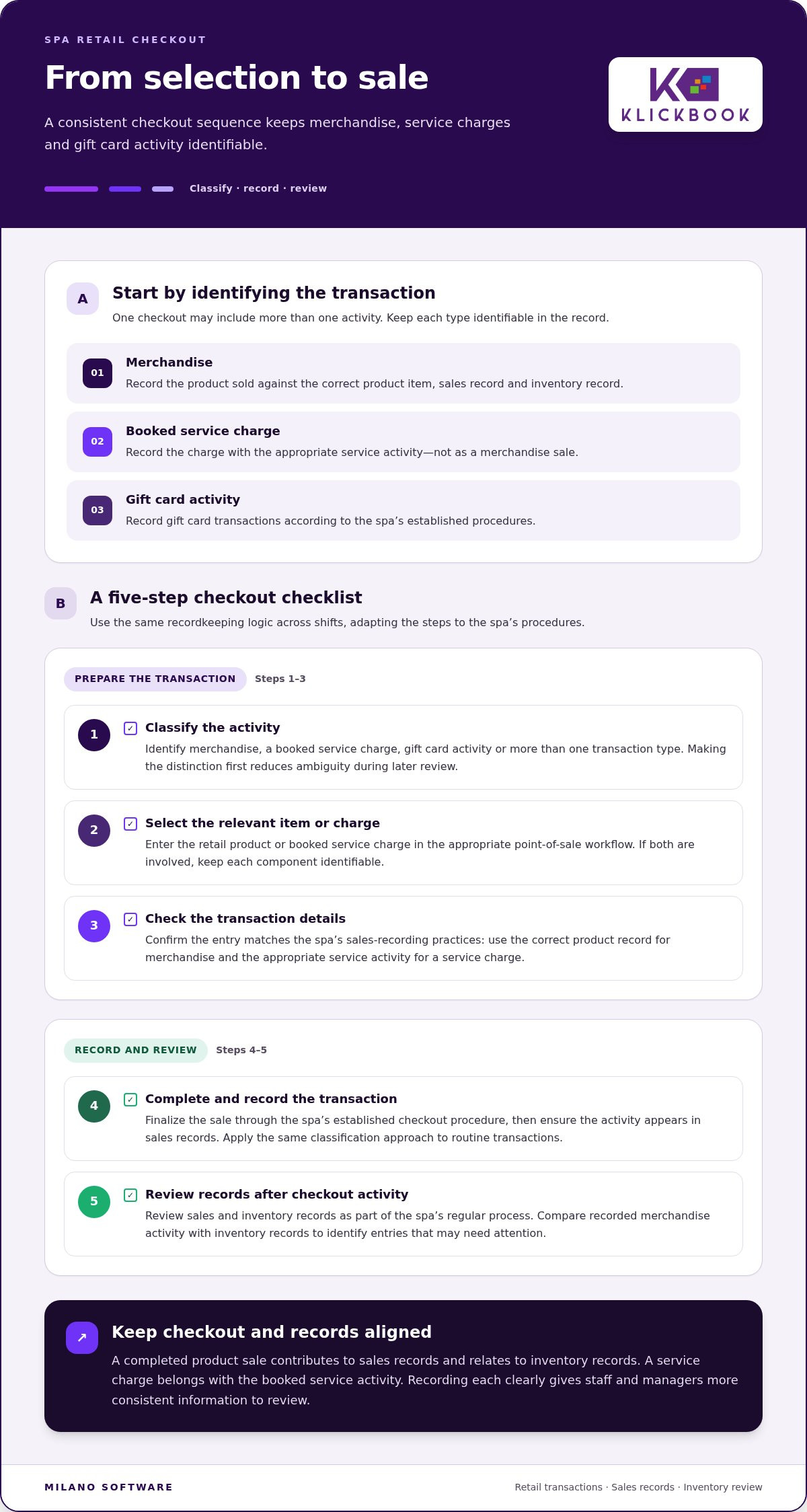
A consistent checkout sequence helps staff classify each transaction, enter it accurately and distinguish the completed sale from later operational review. Adapt the steps to the spa’s procedures, but keep the recordkeeping logic consistent across shifts. One point-of-sale workflow can accommodate merchandise, service charges and gift card transactions while keeping them identifiable as separate transaction types.
Prepare the transaction record
First identify what the checkout involves: a retail item, a charge for a booked service, a gift card transaction or a combination. This classification determines how the activity should appear in sales records. For a product purchase, select or record the merchandise item. For a booked service, record the relevant service charge. Record gift card activity according to the spa’s established procedures.
- Classify the activity. Decide whether staff are recording merchandise, a service charge, gift card activity or more than one transaction type. Making this distinction first reduces ambiguity when the transaction is reviewed later.
- Select the relevant item or charge. Enter the retail product or booked service charge in the appropriate point-of-sale workflow. If the checkout includes both, keep each component identifiable rather than combining them in an unclear entry.
- Check the transaction details. Confirm that the selected item or charge matches the spa’s sales-recording practices. For merchandise, use the correct product record. For a service, associate the charge with the appropriate service activity.
- Complete and record the transaction. Finalize it through the spa’s established checkout procedure, then ensure the activity appears in sales records. Staff should apply the same classification approach to routine transactions.
- Review records after checkout activity. Complete the sale first, then review sales and inventory records as part of the spa’s regular process. This helps identify whether recorded merchandise activity and inventory records remain aligned.
Complete and review the sale
Completing a transaction and reviewing records are separate steps. The first captures the sale; a later review looks at the accumulated entries. A recorded product sale contributes to sales records and relates to inventory records. Reviewing both can help identify entries that need attention without requiring staff to reconcile every transaction before serving the next guest.
Booking context matters too: a service charge is part of an operational sequence that begins before checkout. The article “Spa Booking Software: Connect Guest Reservations to Spa Operations” explains how reservations relate to spa operations. Linking the charge to the booked service helps staff distinguish service revenue from merchandise sales within the checkout process.
A reliable spa software for retail checkout workflow gives staff a repeatable path from classifying a transaction to recording the sale, while preserving the distinction between merchandise, service charges and gift card activity. For an example of spa point-of-sale and management capabilities, explore Milano Software’s spa management platform.
Retail POS or general checkout tools: what spa operators should assess
Evaluate checkout tools against the records and decisions they need to support, not just the length of a feature list. For spa operators, the key questions are whether merchandise transactions remain identifiable in sales records and connect to inventory, and whether service charges and gift card activity can be handled in the same operating context. The best fit depends on how the spa sells products and coordinates daily work.
A standalone checkout process may record sales at one point of sale. A connected spa workflow places transactions alongside bookings and service activity, giving staff a shared operating context and managers a clearer basis for reviewing records. Compare the two approaches against the spa’s actual procedures: how staff enter sales, where they review inventory, and whether they need to maintain separate records.
Checkout criteria for day, resort and Nordic spas
For a day spa, assess whether staff can consistently record merchandise sales during guest checkout and whether those entries relate to inventory records. Resort and Nordic spa operators may coordinate retail activity with a broader mix of spa operations. In each setting, consider whether the team can maintain a coherent record of retail sales, service charges and gift card transactions across the activities it manages.
Use the comparison below to clarify the operational differences:
Standalone checkout focus: Record the immediate sale and review its sales entry separately. Consider how merchandise records are maintained alongside the checkout process.
Connected spa workflow focus: Assess checkout in relation to bookings, service charges and gift card activity, and check how merchandise sales connect to inventory and sales records.
Evaluation outcome: Decide which approach better supports the spa’s procedures, staff coordination and management review. The key distinction is workflow fit, not a blanket judgement about general-purpose tools.
Questions that expose workflow gaps
Use practical questions to test whether spa software for retail checkout fits the operation. Focus on what staff record and what managers can review:
- Can staff distinguish merchandise sales from service charges and gift card transactions using consistent categories?
- Do merchandise sales appear in inventory records in a way that supports the spa’s review process?
- Can managers examine sales information alongside revenue, staff performance and inventory metrics?
- Does checkout fit the spa’s booking and service operations, or must staff maintain separate records?
The answers should show where records are created, how they are reviewed and which tasks remain separate. For a broader view of how operational functions relate across a spa, the companion guide “Spa Management Software: An Executive Guide to Connected Operations” covers the platform perspective. Use that context to assess whether checkout supports a coherent management workflow or operates as an isolated transaction point.
How to keep spa retail sales, inventory and reporting aligned
Checkout records become useful management information when staff enter transactions consistently and operators review them alongside inventory records. A repeatable review process helps distinguish a stock discrepancy from an incomplete or inconsistent entry. It also gives managers a clearer basis for operational decisions, while recognizing that a report may identify a difference without explaining its cause.
Review sales and inventory records together
Set a regular review point that fits the spa’s operating procedures. Compare merchandise sales records with inventory records for the same period, then flag items or entries that do not appear to align. The goal is to identify records for internal follow-up, not to assign a cause before checking the transaction details.
- Confirm the records being reviewed. Use sales and inventory records for a consistent period, and ensure they cover the same merchandise activity.
- Compare product entries. Check whether recorded sales correspond with inventory records for the products sold. Note gaps, unexpected differences or entries that appear incomplete.
- Follow up on exceptions. Review the relevant transaction details using the spa’s internal procedures, then correct or clarify records as appropriate.
- Keep the review consistent. Apply the same approach each time so changes in sales and stock records can be considered against a dependable process.
Accurate source records are the foundation of useful reporting: inconsistent transaction entries weaken the reliability of the operational picture.
Use reporting to guide operational review
When transaction records are maintained consistently, reporting can support a structured review of business activity. Milano Software’s reporting tools cover revenue, staff performance and inventory metrics. Operators can use these views to frame questions, compare activity within the reports available and identify where further investigation is warranted. Treat reports as operational references, not automatic explanations of why a result occurred.
- Revenue: Review reported revenue to understand recorded sales activity across the periods or categories available in the report.
- Staff performance: Use staff performance reporting as one input to operational review, interpreted in the context of the spa’s procedures and responsibilities.
- Inventory metrics: Examine inventory reporting alongside merchandise sales records to identify items or patterns that merit follow-up.
Separate evidence from interpretation. A metric can reveal a difference or pattern; managers determine its operational significance using the underlying records and business context. Spa software for retail checkout supports this process when it maintains sales and inventory records that operators can review through reporting. Explore Milano Software’s spa management platform to see how point-of-sale and reporting capabilities support spa operations.
How connected spa software supports retail checkout operations
Retail checkout is one part of a broader spa management environment. Point of sale records transactions for service charges, gift cards and retail merchandise. Online booking supports reservations and synchronizes with the spa’s internal calendar. Reporting gives operators information on revenue, staff performance and inventory metrics. Together, these functions help teams manage checkout alongside the workflows that shape the spa’s day.
Keeping records useful after a transaction is complete is the practical benefit of a connected approach. A product sale should appear in sales and inventory records, while service charges and gift card activity remain identifiable in the point-of-sale workflow. Booking provides context for service activity, and reporting supports later review. Each function has a distinct role, but together they contribute to a more coordinated management process.
Where Klickbook fits in the checkout workflow
Klickbook by Milano Software, a division of Milano Computer Systems Inc., provides spa point-of-sale capabilities within a spa management platform. Its POS manages transactions, service charges, gift cards and retail merchandise while maintaining inventory and sales records. Online booking and reporting are also part of the platform. This gives spa operators an example of how spa-specific tools can handle checkout as part of daily operations, rather than as an isolated register.
The practical value comes from using those capabilities consistently within the spa’s procedures. Teams can record the transaction categories they handle, maintain merchandise records and use reporting to review operational measures. Spa software for retail checkout is most useful when its transaction records support the operational review that follows each sale.
Plan the next operational step
Before changing a workflow, document how checkout currently operates. A concise process map can show which records staff create, which entries need review and where information is kept. This gives the team a clear starting point and makes it easier to identify where consistent staff practices or connected software could help.
- Map transaction types. Record how staff handle merchandise purchases, service charges and gift card activity.
- Identify key records. Note which sales and inventory records track merchandise activity and how service charges are distinguished.
- Define the review. Specify which available reports operators use to assess revenue, staff performance and inventory metrics, and how exceptions are followed up internally.
- Consider booking context. Include how online reservations and the internal calendar fit the spa’s broader operating workflow.
This assessment gives operators a clear basis for evaluating connected checkout workflows and the records they need to manage. Explore the Milano Software spa management platform to see how point of sale, online booking and reporting fit within spa operations.
Make connected checkout the operating standard
Turn checkout expectations into a shared operating standard. Define how staff classify transactions, who reviews exceptions and how managers use the resulting records. Clear ownership helps keep the process consistent as teams, product ranges and daily activity change. It also gives spa leaders a practical way to assess whether their current systems support the workflow or leave gaps between checkout and operational oversight.
Evaluate spa software for retail checkout as part of the whole operation, not as a standalone register decision. A platform should support how your spa coordinates its work and maintains the records leaders rely on. Start by documenting the workflow you need, then assess how the system fits those requirements.
Explore Milano Software’s spa management platform to see how point of sale, online booking and reporting can support a connected checkout workflow.
Frequently Asked Questions
What does spa software for retail checkout manage?
Spa software for retail checkout supports the recording of merchandise sales, service charges and gift card transactions. These categories can be handled in the spa’s point-of-sale workflow while remaining distinct in business records. For example, a guest’s product purchase and booked service charge should be recorded as the appropriate transaction types, so managers can review retail and service activity separately.
Can spa software track retail inventory at checkout?
Milano Software’s POS maintains inventory and sales records, giving operators information to use when reviewing merchandise activity. Consistent transaction entry matters: selecting the correct product record makes sales information more useful when compared with inventory records. This doesn’t replace physical counts or the spa’s stock-control procedures, and checkout alone can’t guarantee that every discrepancy will be prevented or explained.
How should a spa handle retail products and service charges at checkout?
Record each item or charge under the transaction type that reflects what occurred. Enter a product purchase as merchandise and a charge for a completed booked service as a service charge. If both occur during one checkout, keep their records distinct according to the spa’s procedures. Consistent entries make later review more useful, and each spa can define internal steps that fit its operations.
Is spa-specific checkout software different from a general POS system?
The useful distinction is workflow fit, not an assumption that a general POS cannot support spa transactions. Assess whether the system accommodates merchandise, service charges and gift card transactions, and how those entries relate to inventory records and reporting. Consider how checkout fits alongside booking and other spa management activity. Map the requirements your team handles, then evaluate systems against those operational needs.
Can spa software connect retail checkout with online bookings?
Milano Software provides point-of-sale and online booking capabilities, with booking synchronized to the spa’s internal calendar. These are capabilities within the broader platform. Operators can map where booking and checkout records intersect in their workflow, such as identifying which service charge relates to a booked appointment while keeping merchandise activity separately recorded.
What reports should spa operators review after retail checkout?
Milano Software reporting covers revenue, staff performance and inventory metrics. Operators can use these reporting areas to review activity against their objectives, such as examining inventory metrics when assessing merchandise records or revenue when reviewing recorded sales. The value of that review depends on consistent transaction entry and the context managers bring to the information.
Does spa checkout software support gift card transactions?
Yes. Milano Software’s POS supports gift card transactions alongside service charges and retail merchandise transactions. To keep internal records clear, define how staff classify gift card activity in the spa’s checkout procedures and apply that approach consistently. The stated capability is transaction support; specific rules for redemption, balances, expiry, online sales or accounting should be defined within the spa’s own procedures.


