

An easier checkout can create a harder operation. Spa POS software alternatives may process payments efficiently yet leave appointments, guest records, retail sales and reporting split across separate systems. That gap matters when checkout needs to reflect the visit, inventory and business performance, not just the transaction.
A POS decision affects more than the front desk. A day spa, Nordic spa, resort spa or multi-location group has distinct workflows, and a generic retail setup may not support them. Start by comparing how bookings connect to checkout, how service charges and retail merchandise are recorded, and how managers review revenue, staff performance and inventory.
This guide compares standalone payment tools, spa-focused POS options and integrated management platforms against practical operating criteria. It covers service and retail workflows, plus the PMS integration and room-folio billing questions hotel and resort spas can include in their assessment. It also explains how Klickbook by Milano Software brings online booking, POS and reporting into spa operations, so decision-makers can assess an integrated approach alongside other options.
Key Takeaways
- Choose spa POS software alternatives by how well they fit service, retail and guest workflows, not checkout alone.
- Compare booking, client records, inventory and reporting, then prioritize the capabilities your operating model requires.
- Use consistent test scenarios, including service checkout, retail sales, gift cards and appointment changes, to expose workflow gaps.
- For hotel and resort spas, include PMS and room-folio workflows in the assessment alongside everyday POS requirements.
- Klickbook by Milano Software connects online booking with POS transactions, retail, gift cards and operational reporting.
Why spa POS software alternatives need to fit more than checkout
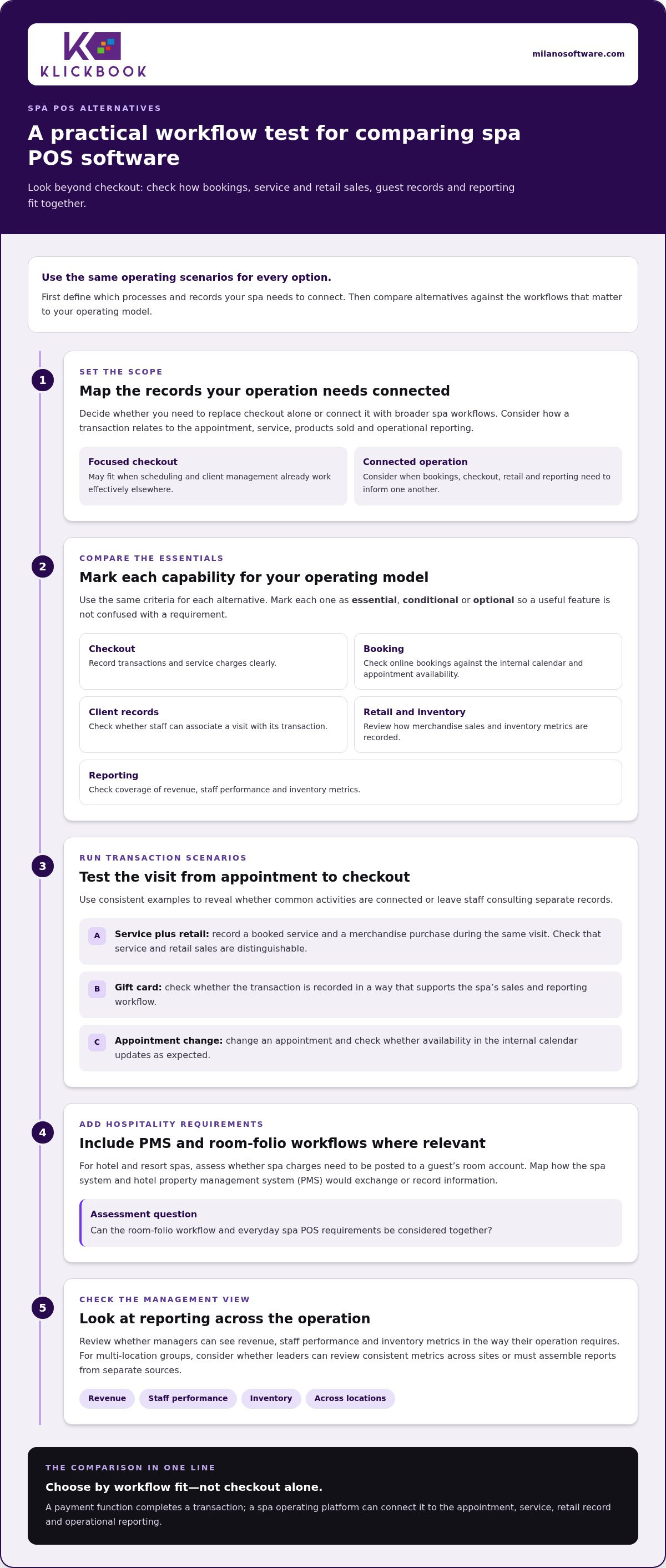
The first decision is whether to replace checkout alone or connect it with other spa workflows. A spa POS handles transactions within a broader service and retail operation. A payment record has limited value if it remains separate from the appointment, products sold and reporting used to review performance. Start by defining which records and processes your system needs to connect.
A Point of Sale (POS) system can include the tools and processes used to complete a sale. In a spa, that sale may include a service charge, retail merchandise or a gift card. If checkout, booking, inventory and reporting operate independently, staff may need to reconcile several records to understand a visit or compare sales with stock activity. Managers can also be left with an incomplete operational picture.
A payment function completes a transaction. A spa operating platform can connect that transaction to the appointment, service, retail record and operational reporting.
When a standalone POS alternative is sufficient
A standalone POS may suit a spa with a narrow checkout requirement, such as recording transactions and retail sales while scheduling and client management work effectively elsewhere. In that case, the priority is straightforward: process the sale and maintain the transaction record the business needs.
Separate payment processing from broader operational requirements when comparing options. A checkout tool may handle how a guest pays without managing appointment changes, client records or the relationship between a booked service and the final charge. The trade-off is scope: a focused replacement may solve a checkout problem, while booking, retail and performance information remains distributed across existing tools.
When spa operations require connected software
Connected workflows matter when an appointment informs checkout, checkout includes retail, and sales and inventory records contribute to management reporting. Consider a guest who has a booked service and buys a product during the same visit. If those activities are captured in separate systems, staff may need to consult multiple records to understand the full transaction. Connected booking and POS workflows can keep these steps together.
Resort operations add coordination requirements when spa activity intersects with hotel workflows. Room-folio billing and PMS integration may be relevant for posting charges to a guest’s room account. When assessing this workflow, map how the spa system and hotel property management system would exchange or record information. Multi-location groups face a related question: can leaders review consistent revenue, staff performance and inventory metrics across sites, or must they assemble reports from separate sources?
For a day spa, Nordic spa or resort, the right scope depends on how services, retail and reporting interact. Define that operating model before treating checkout as an isolated technology decision.
Which spa POS software features should alternatives be compared on?
Compare spa POS software alternatives against the same workflow criteria, not a vendor’s longest feature list. Separate essential capabilities from optional ones. Essentials are needed to complete and record regular transactions; optional capabilities support workflows specific to certain operating models. An independent day spa and a hotel spa, for example, may share checkout needs but have different booking and hospitality requirements.
Use this feature matrix to organize the comparison:
- Checkout: Can the system record transactions and service charges clearly?
- Booking: Do online bookings synchronize with the internal calendar and reflect appointment availability?
- Client records: Can staff access the information needed to associate a visit with its transaction?
- Retail: Can checkout record merchandise separately from services?
- Inventory: Can managers review inventory metrics alongside sales activity?
- Reporting: Does reporting cover revenue, staff performance and inventory metrics?
Mark each criterion as essential, conditional or optional for your operation. This prevents a useful capability from being mistaken for a requirement and makes genuine workflow gaps easier to spot.
Checkout, gift cards, and spa retail
Test service charges, retail transactions and gift cards as distinct transaction types. A clear sales record should show whether revenue came from a service or merchandise, rather than leaving managers to interpret one undifferentiated total. Include a scenario where a guest pays for a service and buys retail merchandise during the same visit. Consider the separate retail workflow guidance in Spa Software for Retail Checkout: A Practical Guide when defining the merchandise criteria for your matrix.
For gift cards, assess whether checkout records the transaction in a way that supports the spa’s sales and reporting workflow. The priority is accurate categorization, not simply the presence of a payment screen.
Booking, reporting, and hospitality integration
Test an online booking against the internal calendar. Then change the appointment and check whether availability updates as expected. This shows whether booking and checkout work as connected steps or as separate tools. Reporting should let managers review revenue, staff performance and inventory metrics clearly enough to support operational decisions.
For a hotel spa, make PMS integration and guest room-folio charge posting explicit evaluation criteria. Trace how an eligible spa charge would move from checkout to the guest’s room account, and identify the systems and staff involved. An integrated spa POS connects booking, service checkout, retail transactions and reporting, with hospitality billing workflows assessed separately where the operating model requires them.
Use these criteria to evaluate the spa management platform from Milano Software against your operational requirements. Applying the same matrix to each option keeps the comparison grounded in the workflows staff perform and the records managers need to review.
How spa POS alternatives differ across operating models
POS categories describe scope, not suitability. A standalone checkout tool focuses on completing and recording sales. A spa management platform places checkout within a wider spa operating model. A hospitality-connected approach considers how spa processes relate to the property’s systems and teams. The practical question is how much coordination the operation needs and which responsibilities remain outside the platform.
Use this framework to compare approaches, rather than assuming specific product capabilities. Treat each entry as a point to investigate during evaluation.
| Approach | Operating fit | Booking connection | Retail handling | Reporting | Hospitality workflow |
|---|---|---|---|---|---|
| Standalone POS | Checkout-centred operations | May be managed separately | Assess sales categories and stock record needs | Define the management view required | Assess alongside property systems |
| Spa management platform | Operations spanning spa services | Assess the relationship between reservations and checkout | Assess merchandise records and responsibilities | Define which teams need access to results | Assess any hotel dependencies |
| Hospitality-connected system | Spa activity coordinated with property operations | Clarify ownership of the reservation handoff | Define how spa retail fits property processes | Set expectations for spa and property review | Map system and team boundaries |
Standalone checkout versus spa management platforms
A standalone POS can work when a spa has a focused checkout need and established processes for the work around it. A broader platform merits consideration when spa leaders want operational responsibilities organized in one management environment. Compare who maintains service and merchandise records, how staff handle exceptions, and which teams rely on the information. These ownership questions often reveal workflow fit more clearly than a feature count.
Hotel, resort, Nordic, and multi-location requirements
Hotel and resort spas operate within a larger property environment. Map the teams involved in spa transactions and identify where spa and hotel responsibilities meet. This clarifies the system boundaries an approach needs to support.
For Nordic or thermal spas, define how the operation organizes its services and facilities, then assess whether the software’s scope reflects that structure. Multi-location groups should establish what information leaders need to compare across sites and who is responsible for consistent definitions. Evaluate centralized oversight and reporting requirements directly rather than assuming they come with a product category.
Checkout capability alone does not establish suitability. Compare each approach with the spa’s operating structure, responsibility boundaries and management needs, then investigate product-specific details during evaluation.
How to evaluate and shortlist spa POS software alternatives
Make the selection process consistent and easy to review. Apply the same sequence to every candidate: document workflows, rank requirements, run agreed tests, assess the results, then shortlist. This gives decision-makers a fair basis for comparing spa POS software alternatives and makes the reasoning behind the final choice easier to communicate.
Create a weighted comparison scorecard
Separate mandatory requirements from preferences before scoring. Assign weights according to operational importance, not the number of features presented. For each criterion, record the expected result, what happened during the test and the evidence supporting the score. A simple scale such as meets, partly meets or does not meet can expose gaps without implying false precision. Keep assumptions and unresolved dependencies visible instead of treating them as capabilities.
Map who performs each step and who uses the resulting record. This can reveal an issue a feature checklist misses, such as a handoff that requires staff to enter information again. Milano Software’s guide to connected spa operations offers further context for considering these interdependencies.
Test real operating scenarios before selecting
Agree on a practical set of test cases and use them consistently across evaluations. Include an exception, such as correcting a transaction record, and observe the steps required, the roles involved and the resulting documentation. For retail, test how staff handle a discrepancy between a product record and a physical count. These cases show how a system behaves when routine processing needs review, not just how it performs in an ideal demonstration.
Capture results immediately. Note where the process is clear, where staff need a workaround and what evidence is available for later review. Keep test results distinct from vendor assurances so the shortlist reflects observed workflow fit. Then document why each finalist meets the operation’s mandatory requirements and which trade-offs decision-makers accept.
Use the same shortlist criteria to assess an integrated option. Explore Milano Software’s spa management platform as part of your evaluation of connected spa workflows.
Klickbook by Milano Software as an integrated spa POS alternative
Klickbook by Milano Software is an option for operators assessing an integrated approach rather than checkout in isolation. Place it on the shortlist according to the operating model established earlier: identify which teams will use the platform, which decisions it needs to inform and which existing processes remain outside its scope. This keeps the evaluation specific to the spa instead of relying on broad platform labels.
Connect booking, checkout, and operating visibility
Use the same scorecard and test cases for Klickbook as for other candidates. Focus on how the platform fits the staff’s working sequence, which records managers can use to review activity and whether operational responsibilities are clear. For retail, establish how the spa wants product information and sales activity organized before comparing workflow fit. The guide Spa Software for Retail Checkout: A Practical Guide can help frame those retail requirements.
Match the platform to the spa’s environment
Day spas, resort spas, Nordic spas and multi-location groups have different operating structures. Define the decision rights, staff responsibilities and management views that matter in your environment, then assess Klickbook against those priorities. For a hotel spa, include the property’s existing system boundaries and guest billing process in the evaluation, and assess how the spa platform fits that context.
This approach helps leaders judge operational alignment, identify trade-offs and establish a clear basis for selection. Explore Milano Software’s spa management platform as you assess Klickbook against your organization’s requirements.
Set a clear operating standard for your next POS decision
Your selection should establish more than a preferred checkout tool. It should give spa leaders a shared standard for how guest activity is recorded, reviewed and managed as services and business needs evolve. Before committing, align decision-makers on essential workflows, acceptable trade-offs and the evidence behind the final choice. That clarity keeps future system decisions anchored to operational priorities rather than feature volume.
The right spa POS software alternative is the one that fits your operation and supports a deliberate path forward. Use your evaluation to identify where connected management workflows can strengthen day-to-day oversight, then assess a platform against those priorities. Milano Software provides an integrated option for day spas, resort spas and Nordic spas.
Explore Milano Software’s spa management platform to evaluate an integrated approach against your spa’s operating model.
Frequently Asked Questions
What is spa POS software, and how is it different from spa management software?
Spa POS software records purchases and service charges; spa management software addresses a broader set of day-to-day operational requirements. The distinction is scope, not necessarily separate systems. A POS may capture a retail sale, while a management platform can also support appointment and administrative workflows. Before comparing products, identify which records staff need to access together during a guest visit and after checkout.
What should I compare when evaluating spa POS software alternatives?
Compare spa POS software alternatives using the same real transaction cases, then document what each system records and where staff must take additional steps. For a retail purchase, note whether the sales category and inventory record align with the way managers review merchandise activity. For a service charge, consider how the transaction relates to the appointment. This makes workflow and record-keeping differences easier to assess than feature names alone.
Can spa POS software connect checkout with online booking?
Yes, if the platform links its booking and checkout workflows. A useful test is to book an appointment online, change its time, and follow the updated booking through the internal calendar and service checkout. Check that the appointment details staff rely on remain consistent during the handoff. Milano Software’s online booking synchronizes with the internal calendar, helping minimize double-bookings and optimize appointment availability.
Can a spa POS system post charges to a hotel guest’s room folio?
Room-folio posting depends on the spa POS workflow and its integration with the hotel’s property management system (PMS). For a hotel spa, trace a service charge from checkout to the guest’s room account and identify how the spa and hotel records correspond. Treat this as a specific hospitality integration requirement, not a capability to assume from a POS label.
Is an integrated spa management platform better than a standalone POS?
Not for every operating model. A standalone POS may suit a spa that needs checkout for a limited workflow and manages appointments elsewhere. An integrated platform is more relevant when staff need booking and transaction activity to work together, or managers need broader operational reporting. Decide based on the handoffs your team performs and the records leaders review, rather than assuming a wider feature set is automatically a better fit.
How much does spa POS software cost?
Pricing varies by provider and software scope, so there is no single figure that applies to every spa. Compare proposals against the same operating requirements, and separate subscription charges from any other quoted costs. Review what the proposal includes, such as software access and related services, so you can compare options on a like-for-like basis.
What happens to retail inventory and sales reporting when changing spa POS systems?
A system change needs a deliberate transition plan for product records and sales information. Before moving, organize the retail catalogue, confirm product categories and reconcile inventory records against current stock. Decide which historical sales information managers need to retain, then define how the new system’s categories will support future comparisons. Treat reconciliation as a business control, not simply a technical transfer.


