
A multi-location spa group needs a consistent operating view across every site, not another layer of administration. Spa software for managing multiple locations can bring bookings, point-of-sale activity and reporting into one coordinated management environment. Leaders can review performance across locations while teams retain the detail they need to run daily operations.
The challenge is more than keeping calendars full. Different staffing patterns, service menus and site-level workflows can make it difficult to coordinate teams, maintain visibility and compare results. Centralized management gives leaders a clearer basis for coordinating activity and reviewing performance across the group.
This guide explains what spa management software does, how centralized systems support multi-location teams, and which capabilities to assess when evaluating a solution in Canada. It also explores how online booking, point of sale and reporting connect daily operations, helping decision-makers determine whether their current systems support growth or create avoidable friction.
Key Takeaways
- Use consistent reporting definitions across locations to make performance comparisons more useful for operational decisions.
- Assess how website, online-store and booking workflows connect, and where manual handoffs create friction for guests and teams.
- Set clear rules for shared client records and data synchronization so location teams work from consistent information.
- Evaluate staff scheduling, permissions and time-tracking needs alongside the workflows required to manage teams across sites.
- Centralize the processes that benefit from group-wide oversight while preserving the location-level flexibility each spa requires.
Cross-location reporting and business analytics
Cross-location reports help leaders compare operating results and identify where closer review is needed. Their usefulness depends on consistent categories and meaningful location-level detail.
Group and Location-Level Reports
Group reports show shared measures across locations; site reports provide local context. Review both before acting on a difference.
Financial Controls Across Locations
Use consistent transaction categories to compare sales and payment records. Review adjustments and reconciliation details by location to pinpoint discrepancies.
Inventory and Performance Tracking
Compare inventory movement with recorded retail sales at each site. To assess marketing ROI, connect campaign activity to attributable bookings or sales using consistent tracking rules.
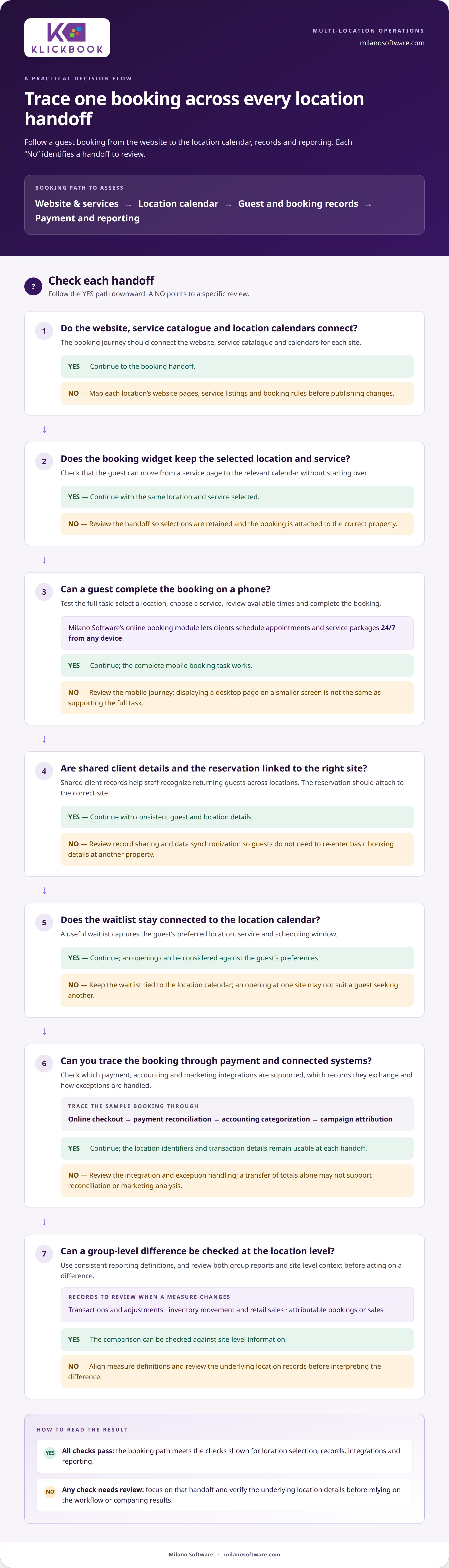
A useful reporting routine turns comparisons into questions that can be checked at the location level. When a group measure changes, review the contributing sites, then trace the result to underlying transactions, adjustments, inventory movement or campaign records. Keep measure definitions consistent across reports so differences reflect operating activity, not changes in categorization. Record the reason for a material variance and the evidence behind the explanation. This gives teams a practical basis for follow-up and helps leaders distinguish a local issue from a group-wide pattern.
The amount of detail should suit the organisation’s operating structure. Sugar Culture Salon Group has over 100 staff. For a group of that scale, managers can use shared reporting conventions while preserving enough location-level information to understand local results. Assign responsibility for reviewing the report, checking unusual entries, and documenting any correction. Keep commentary specific: identify which measure needs attention, what records support the finding, and what action is proposed. A consistent review process makes the report useful for both routine oversight and decisions about where to investigate more closely.
External comparisons can provide context, but they should be interpreted within their stated scope rather than treated as a substitute for internal reporting. Hotel Tech Report's spa software rankings include 152 hoteliers for large hotels with 100-499 rooms. When considering that information, compare the relevant operating needs with the reporting and tracking requirements used across your own locations. Confirm that the categories being compared are meaningful for the business, and keep internal definitions consistent when assessing options. Use the comparison as a prompt for questions, then rely on location-level transaction, inventory, and booking information to assess how a choice fits the organisation’s operations. Clear source context and careful internal measurement help leaders make comparisons without confusing external rankings with their own results.
Website, online store, and booking integration
For a multi-location spa group, the booking journey should connect the website, service catalogue and location calendars. Integration quality is evident in how accurately availability, booking details and transaction information carry from one step to the next.
Shared client records help staff recognize a returning guest across locations. For example, a guest who books a treatment at one property should not need to re-enter basic booking details at another. Online booking should show location-specific services and availability, then attach the reservation to the correct site. Milano Software’s online booking module lets clients schedule appointments and service packages 24/7 from any device.
Mobile access should support the complete booking task, not simply display a desktop page on a smaller screen. Test the guest journey on a phone: select a location, choose a service, review available times and complete the booking. If branded booking apps are part of the operating model, assess how their location information, service descriptions and booking records stay aligned with the main website.
A booking widget can display availability directly on a location or service page. For example, a guest browsing a resort spa’s treatment menu can move from a selected service to the relevant calendar without starting over. Check that the widget retains the selected location and service. This small handoff detail avoids repeated selections and helps attach bookings to the correct property.
Waitlist management should be part of the same booking workflow. If a requested time is unavailable, capture the guest’s preferred location, service and scheduling window. When an opening appears, staff can use those details to contact a suitable guest. Keep the waitlist connected to the location calendar: an opening at one site may not suit someone seeking another property.
When assessing connections to Canadian payment processors, accounting and marketing systems, review which integrations are supported, what records they exchange and how exceptions are handled. Trace a sample booking from online checkout through payment reconciliation, accounting categorization and campaign attribution. Confirm that location identifiers and transaction details remain usable at every handoff. A connection that transfers only totals may not support the reconciliation or marketing analysis your teams need.
During onboarding, map each location’s website pages, service listings, booking rules and payment workflow before publishing changes. Place a test booking for each location, then confirm the selected service, calendar, confirmation details and resulting transaction record. This can reveal mismatched location names or outdated service information before guests encounter them.
For executive oversight, define which booking and sales records belong in group reporting and which remain specific to each property. This distinction supports a consistent digital booking experience while preserving location-level differences in services and availability.
Centralized services, client records, and data syncing across locations
Shared records let authorized teams coordinate appointments, client preferences and program balances across locations. Clear access rules and consistent data practices determine how safely that information can support daily operations.
For Canadian spas, include PIPEDA and applicable provincial privacy rules in the system’s privacy review. Define what client data is collected, why teams use it, who can access it and how it is retained. Controls should reflect the organization’s actual obligations.
For migration, prepare client profiles, appointment records, service history, gift card and membership balances, and transaction records. Map fields before transfer, identify duplicates and reconcile outstanding balances. Handle stored payment credentials only through an approved secure process.
Shared Client Records Across Locations
A shared profile can give staff at another location useful context, such as a guest’s preferred services or previous appointments. Set permissions by role and location, then distinguish information available group-wide from notes restricted to specific teams. For example, reception staff may need booking details, while clinical notes require more controlled access. Review access logs and update permissions when responsibilities change.
Client Profiles and Repeat Appointments
Profiles support repeat appointments by keeping contact details, service preferences and booking history in one record. A returning guest can book at another location without creating an unnecessary duplicate profile. Use consistent matching fields, such as the same contact details, and establish a process for merging duplicates. Marketing segments can then use defined criteria, such as visit history or preferred location, rather than inconsistent local lists.
Programs Across Branches
Gift cards, memberships, loyalty programs and packages need clear group rules. Define where each can be purchased and redeemed, how balances are recorded and whether branch-specific restrictions apply. A shared balance ledger helps staff confirm remaining value at checkout. Test a purchase and redemption across locations before launch, then reconcile program transactions against each branch’s records.
Shared forms and SOAP notes need structure as well as access controls. Keep forms attached to the correct client profile and separate clinical documentation from general service preferences. Standardized fields make records easier to interpret across teams, while location-specific workflows can determine who completes or reviews each form. During migration, identify which forms and notes should transfer, preserve their association with the right profile, and restrict access according to assigned responsibilities.
Marketing segmentation should use consistent group definitions across locations. For example, decide whether a repeat-visit segment includes activity at any location or only at the guest’s preferred branch. Aligned criteria help prevent duplicate campaigns and give teams a clearer basis for coordinating client communications.
Staff management, payroll, permissions, and time tracking
Multi-location staffing relies on accurate schedules, clear role assignments and dependable time records. Assess how each function supports daily operations while preserving accountability at the location level.
Cross-Location Staff Scheduling
A shared scheduling view can show where therapists and service rooms are assigned across locations. For example, a group manager can identify an uncovered shift at one spa while another site has available staff. Scheduling rules should account for each location’s service hours, staff qualifications and availability. Review how the system prevents overlapping assignments and records changes, particularly when employees work at another branch.
Staff Performance Tracking
Performance reports help managers compare operational measures across locations when those measures use consistent definitions. Appointment volume, completed services and utilization can inform staffing decisions. For instance, when comparing two locations, distinguish differences in service mix from differences in staff activity. Use reports to identify questions for review, not to treat unlike roles or schedules as directly comparable.
Permissions and Activity Tracking
Role-based permissions should reflect staff responsibilities at each location. A front-desk employee may need booking and payment access, while a manager may need broader reporting access. Activity records can show who changed a booking, adjusted a transaction or updated a staff schedule. Define access by role, review it when responsibilities change and restrict sensitive records to authorized users.
Staff Assignments and Service Setup
Staff assignments connect employees to the services they can deliver and the locations where they work. For example, a service should appear in a therapist’s schedule only when that employee is assigned to it. Keep service names and durations consistent where operations are shared, while preserving location-specific availability where needed. This structure helps reduce scheduling mismatches and gives managers clearer staffing reports.
Time tracking should connect recorded hours with scheduled shifts and location assignments. Managers can compare a shift’s scheduled start and finish with submitted time records, then investigate discrepancies through the appropriate process. Clear records support payroll preparation, while calculations and approvals should follow the organization’s established procedures. Confirm how corrections are documented and who can authorize them.
For cross-location payments and sales attribution, staff records should retain the employee and location associated with each transaction. Managers can then distinguish a sale completed by a visiting employee from one handled by the home team. Set up reporting categories before staff begin using the system, and test a sample schedule, permission profile and transaction workflow at each location.
Centralised multi-location management
Centralised management starts with a clear operating model: define which decisions belong to group leadership, who owns each process, and how changes are approved. Spa software for managing multiple locations should support those governance choices rather than impose an undefined structure.
Begin by documenting decision rights for core operating policies. Group leaders may set service-category standards, while designated owners maintain the approved catalogue. A named process owner can review proposed changes, assess their effect across the organisation and authorise implementation. This prevents informal local edits from becoming inconsistent group practices.
Next, separate policy from configuration. Policy defines the intended rule; configuration applies it in the platform. For example, leadership may approve a common cancellation policy, while an operations owner translates it into system settings. Recording the decision, owner and effective workflow gives teams a reliable reference when questions arise.
Centralised management also requires change control. Establish how requests are submitted, assessed, approved and communicated. A request to alter a service category, for instance, should state the reason, affected locations and accountable approver. This creates traceability without turning every routine operating decision into an executive escalation.
Plan implementation around governance, not just software setup. Assign owners for the operating model, configuration decisions, staff communications and ongoing review. Define how unresolved issues reach the appropriate decision-maker. This makes accountability explicit before teams depend on the new system for daily work.
Use a controlled rollout to validate the operating model. Start with representative workflows, capture issues and resolve policy questions before expanding adoption. Keep a record of approved decisions and resulting changes. This helps distinguish a configuration problem from a disagreement about the operating rule itself.
After implementation, schedule regular governance reviews. Consider whether the operating model still reflects the group’s priorities, decision ownership remains clear and approved changes have been applied consistently. These reviews give leadership a structured way to evolve processes without relying on informal workarounds.
The central management decision is how to balance group authority with accountable execution. Spa software for managing multiple locations is most useful when its governance model clarifies ownership, approval paths and change procedures. Establish those principles first, then use them to guide configuration and adoption.
A useful operating model addresses 3 areas: shared oversight, clear local ownership and accountable decision-making.
Milano Software
Milano Software supports multi-location spa operations with spa management, online booking, reporting and point-of-sale capabilities. Its cloud platform coordinates staff schedules, client profiles and daily administrative tasks, with centralized booking and reporting to support visibility across locations.
Consider a centralized platform when separate systems or manual handoffs make it difficult to maintain a consistent operating view. Milano Software’s platform supports day spas, resort spas and Nordic spas, with capabilities for coordinating bookings, sales and reporting across locations. Assess how its workflows align with your services and reporting needs.
For a discussion about managing multiple spa locations, contact Milano Software.
Build your next operating model
Before adopting a new platform, define the operating model your group wants to sustain as it grows. Identify which decisions belong at group level, where local teams need autonomy and how new locations should join shared workflows. This gives implementation priorities a clear business basis and prevents inherited processes from dictating the system’s design.
The right spa software for managing multiple locations should support your operating model as it evolves, not simply reproduce today’s workarounds. Milano Software’s cloud-based platform combines spa management, online booking, point of sale and reporting to help coordinate spa operations and give leaders visibility across locations.
Start by outlining your locations’ priorities, current workflows and desired level of central oversight. Contact Milano Software for a short scoping call to discuss the operating model and get a written quotation for the platform.
Contact Milano Software to discuss your needs and take the next step towards a more coordinated operating model.
Frequently Asked Questions
What Is Spa Management Software?
Spa management software coordinates the administrative systems behind spa operations. It can connect appointment scheduling, client information, sales processing and operational reporting in one workflow. Unlike a standalone calendar, it links reservations with the resources and transactions needed to deliver services. For a group, the value lies in applying shared operating practices while retaining the information each location needs for its own decisions.
What features should spa software have to manage multiple locations?
Prioritize capabilities that support both group oversight and location-level execution: online booking, staff and resource scheduling, point of sale, client profiles, inventory records and consolidated reporting. Then assess operational fit. A Nordic spa may need capacity controls for shared facilities, while a resort spa may prioritize coordination with guest services. Confirm that workflows can reflect these differences without fragmenting core records or reporting definitions.
How do multi-location spa software platforms handle shared client profiles and booking across branches?
Platforms can link a client profile to bookings made at different locations, giving staff a more continuous view of service history. For example, a guest may book at one location and later request an appointment elsewhere. Useful safeguards include duplicate-profile handling, role-based visibility and clear location identification on each booking. These controls help staff use relevant context while reducing confusion between similar client records.
Can spa software manage location-specific staff schedules, services, pricing, and availability?
Yes. A multi-location system can be configured around location-level schedules, service menus, pricing and appointment availability. The key is separating shared standards from local settings. A group might use common service categories while adjusting availability to each spa’s operating hours and resource capacity. Before deployment, map which settings apply everywhere and which require location-specific control, then test a booking against each location’s configuration.
How do spa management platforms handle centralized reporting and location-level performance analytics?
Multi-location systems can provide consolidated results for group oversight while retaining site-level records for operational review. For example, leadership can examine a group sales summary, then investigate a location’s underlying transactions when results differ. Comparable reporting depends on consistent categories and reporting periods. Establish who reviews each report and which follow-up decisions it informs, so analytics lead to action rather than becoming unused dashboard output.
What are the best spa management software platforms for multiple locations in Canada?
Milano Software offers online booking for appointments and service packages. Evaluate platforms for cross-location reporting, shared client records, staff scheduling, permissions, and integration with payment, accounting, and marketing systems.