
Bookings create demand, but a disconnected checkout can leave the business record incomplete. For a day spa, the gap between an appointment and its final transaction can lead to duplicate entry, missing service or retail details, and limited visibility into daily operations. Effective day spa pos and booking software connects online reservations with the internal calendar, point-of-sale activity, inventory, and reporting. Milano Software brings these workflows together in a platform designed for spa operations.
A smooth booking process is only one part of the client journey. Appointment details, service charges, retail purchases, and inventory records also need to align, so teams can review the day’s activity without piecing together information from disconnected systems.
This article explains how connected booking and checkout workflows support complete operational records. It also outlines what to assess in a platform: calendar synchronization, accurate service and retail transactions, usable inventory records, and reporting on revenue, staff performance, and inventory metrics. The focus is how these capabilities work together in practice, not simply how many features a platform lists.
Key Takeaways
- Assess day spa POS and booking by how appointment, transaction, inventory, and reporting records work together, not by feature count alone.
- Map the client journey from reservation through checkout to find handoffs that create duplicate work or gaps in operational records.
- Use realistic service, retail, and management scenarios to evaluate calendar synchronization, transaction capture, and reporting.
- Define the revenue, staff performance, and inventory information leaders need before comparing platforms.
- Milano Software connects online booking, point of sale, and reporting to support day spa operations.
Why day spa POS and booking work best as connected operations
Connected day spa POS and booking brings appointment details, completed services, checkout transactions, and operational records into a coherent workflow. The appointment provides a reference point: the spa can follow what was scheduled, what was delivered, what was charged, and how the activity appears in management reports. A spa management software executive guide can help frame that operational view.
Booking-to-checkout continuity means an appointment remains traceable through service delivery and its final transaction, giving managers a coherent record to review. The point of sale is not simply the payment endpoint. A Point of sale (POS) system records transaction activity. In a day spa workflow, that activity should relate clearly to the appointment and service behind it.
Where disconnected booking and checkout create operational friction
When the appointment calendar and checkout record operate separately, staff may have to re-enter service or client details at the point of sale. Repeated entry adds work and creates opportunities for inconsistent records. For example, a service might appear under one description in the calendar and another in the transaction, making routine reconciliation harder.
The distinction is in how the records connect. Two tools can come from one vendor and still operate as separate systems. A shared workflow links the appointment to the transaction and makes relevant activity available through the process. If staff must manually match entries after checkout, the tools coexist, but they do not provide meaningful booking-to-POS continuity.
What a connected day spa workflow should make visible
Start with the appointment as the operational reference, then follow its status through service delivery and checkout. A manager should be able to see which service was scheduled, which staff member was associated with the visit, and what service or retail activity was recorded at payment. When merchandise is sold, its transaction and inventory activity should also be accessible for operational review.
This visibility supports a more complete account of the day’s activity. Service records inform revenue and staff-performance reviews, while retail and inventory records help managers interpret sales alongside stock movement. The goal is not to collect more data for its own sake. It is to make related records useful together, so a transaction can be understood in context rather than treated as an isolated payment.
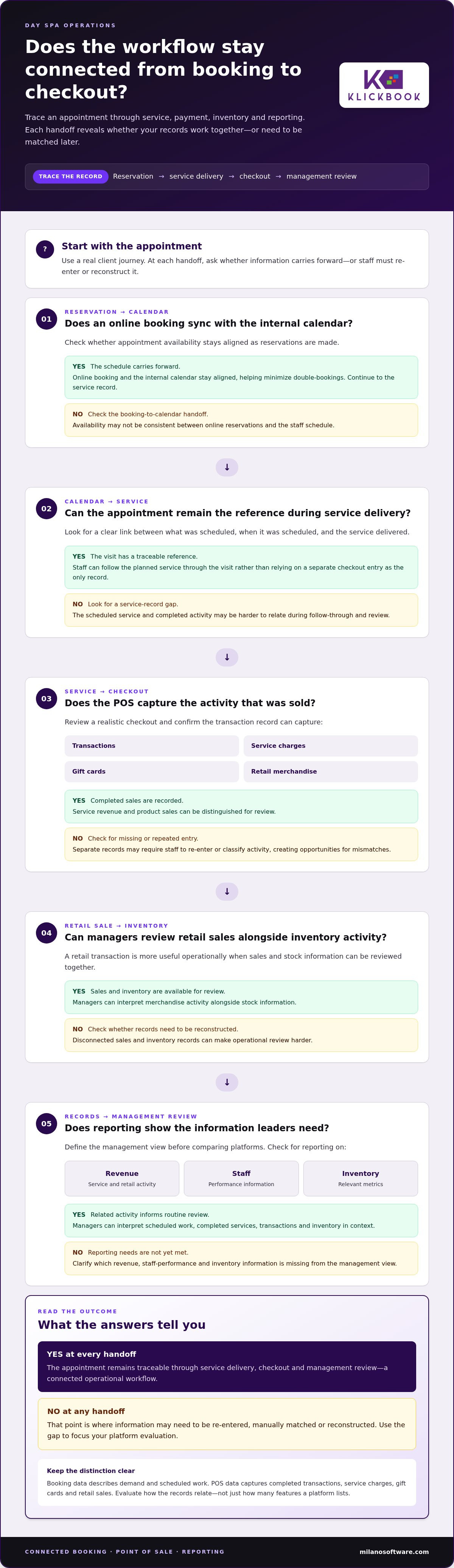
Evaluate the full sequence: reservation, service delivery, checkout, and management review. At each handoff, note whether information carries forward or staff must reconstruct it. This practical test distinguishes a connected operating model from a bundle of separate features and gives decision-makers a clear basis for assessing day spa POS and booking systems.
How day spa booking and POS connect appointments to transactions
The value of an integrated workflow becomes clear at each handoff. A reservation establishes the planned service, the internal calendar reflects the booking, service delivery creates activity to record, checkout captures the sale, and reporting gives managers information to review. Booking data describes demand and scheduled work. POS data captures completed transactions, service charges, gift cards, and retail sales. Connected operations let leaders interpret both while recognizing that they serve different purposes.
From reservation to recorded sale, each stage should add operational detail while preserving a clear link to the client’s appointment. That continuity lets teams compare planned activity with completed services and checkout records, then use the information in routine business reviews.
From online reservation to an accurate service record
Online bookings synchronize with the spa’s internal calendar, keeping appointment availability aligned as reservations are made. This helps minimize double-bookings and gives staff a consistent schedule to work from. At the service stage, the appointment remains the reference for understanding what was planned and when, rather than leaving a separate checkout entry as the only record of the visit.
The handoff matters. If a client books a service online, staff should be able to use the calendar record to prepare for the visit and later relate the completed service to the transaction. Booking and POS data do not serve the same purpose. Their relationship should be clear enough to support follow-through and review.
From checkout to usable operating information
At checkout, the POS captures financial activity, including transactions, service charges, gift cards, and retail merchandise. These records help distinguish service revenue from product sales and give managers a clearer basis for reviewing what the spa sold. If staff must enter or classify the same activity in separate systems, mismatches can make it harder to reconcile the appointment with the completed sale.
Retail oversight depends on more than recording a payment. Inventory and sales records should be useful together, so managers can review merchandise activity alongside stock information. For example, a retail sale is more operationally useful when it contributes to both sales reporting and inventory visibility. That connection supports routine review without requiring leaders to reconstruct activity from disconnected records.
For management, the final stage is interpretation. Booking records show scheduled demand, transaction records show what was charged, and inventory records add context to retail movement. Reporting on revenue, staff performance, and inventory metrics helps leaders examine these signals together while keeping their distinct purposes clear.
Milano Software connects online booking, the internal calendar, POS activity, and operational reporting for day spa workflows. Explore Milano Software’s spa management platform to see how these capabilities support a connected operating model, or review connected spa operations as part of your platform evaluation.
Compare day spa POS and booking systems by operational fit
Feature lists show what a platform includes; operational testing shows whether its components work together across your spa’s actual service model. Compare systems against the records and handoffs your team relies on rather than assuming every day spa schedules staff, rooms, or services in the same way. For day spa pos and booking, the central test is whether booking, checkout, inventory, and management information form a traceable workflow.
Feature breadth describes what a system offers; operational integration shows whether those capabilities share usable records across the work. Apply the same criteria to each platform and record what you observe in a realistic scenario.
- Calendar synchronization: Do online reservations update the internal appointment calendar? Check whether availability and appointment details stay aligned as bookings are made.
- Service-to-transaction continuity: Can the team trace a completed service from its appointment reference into checkout and transaction records? Note where details carry forward and where manual steps intervene.
- Retail and inventory records: Can managers review retail sales alongside inventory information? Assess whether the records support routine merchandise oversight or remain disconnected totals.
- Staff and resource workflows: Can the scheduling model represent the spa’s actual staff assignments and, where relevant, room use? Evaluate your own operating model without assuming one resource structure fits every spa.
- Management reporting: Do reports cover revenue, staff performance, and inventory metrics in a form that supports the spa’s review schedule and decisions?
Test booking and checkout synchronization
Use a representative booking scenario. Make an online reservation, then inspect the internal calendar to see whether the appointment appears with usable service details. Follow the appointment through service completion and checkout. Observe whether the resulting transaction is clear and reviewable or whether staff must recreate or reconcile information manually. Include a retail sale to see how its sales and inventory records fit into the same operating picture.
Document each handoff. A system may offer booking and POS separately while leaving teams to bridge the records. Your assessment should establish whether the workflow connects those capabilities, not just whether each feature appears in a product demonstration.
Assess the management information behind each workflow
Review report outputs against decisions managers routinely make. Revenue, staff performance, and inventory metrics should be accessible as useful operating information, not just listed in a feature catalogue. Consider whether leaders can review the periods and activities relevant to their management schedule, and whether the underlying records make the results interpretable.
Score each criterion using observable evidence: synchronized records, captured transactions, accessible inventory activity, and reports relevant to operational review. This creates a practical comparison based on your spa’s workflow. Milano Software’s spa management platform brings booking, POS, and reporting into the operational context decision-makers can assess against these criteria.
Build a day spa POS and booking evaluation around real workflows
A useful evaluation starts before a platform demonstration. Document how the spa operates today: the appointment types offered, who delivers each service, which rooms or other resources matter, and where teams record changes, charges, and sales. Note every manual transfer between records. This baseline turns a general feature review into a practical test of whether day spa POS and booking capabilities can support the work already underway.
Use a consistent sequence for each platform under review:
- Document services and resources. Record the service categories, staff assignments, and room or resource needs that shape scheduling at your spa.
- Map handoffs. Follow a reservation through calendar updates, service delivery, checkout, and the records used afterward. Mark each point where information is re-entered or reconciled.
- Define reporting needs. Identify the revenue, staff performance, and inventory questions leaders need answered, then note which records should support each answer.
- Test representative scenarios. Run the same booking, service charge, gift card, and retail sale through every platform. Record what happens at each step.
Map daily booking and checkout scenarios
Build scenarios around the spa’s real service mix, not a generic demonstration. Include appointment types that differ in staff assignment or resource needs, where those differences apply. Change an appointment and observe how the update appears in the internal calendar. Then follow a completed service into checkout, checking where the service charge, gift card, or retail item appears in the transaction record.
Capture the outcome, including any manual work required. A workflow log can show whether appointment details remain useful through checkout and whether retail activity connects to inventory records. That evidence is more useful than a note that a platform “supports” booking or sales.
Set reporting requirements before platform review
Translate management priorities into specific questions. For revenue, identify the activity leaders need to review. For staff performance, define the operational view that matters. For inventory, specify the sales and stock information needed for routine oversight. Then trace each question back to the records that should support it.
Apply the same requirements and test scenarios to each platform. Record whether a report answers the question, which records contribute, and where interpretation or manual consolidation is needed. This keeps the comparison grounded in decision-making rather than feature volume.
Use a simple evidence log with fields for scenario, expected record, observed result, and manual steps. Separate observed workflow behaviour from assumptions made during a presentation. This makes gaps visible and gives operational and management teams a consistent basis for discussion.
Milano Software brings online booking, POS, and reporting into a spa management platform. Explore Milano Software’s day spa platform as you define the workflows and reporting requirements your evaluation needs to address.
How Milano Software connects day spa booking, POS, and reporting
The criteria for booking, checkout, inventory, and reporting provide a practical way to assess Milano Software against a day spa’s operating priorities. The platform is designed for day spas, resort spas, and Nordic spas. Its capabilities support different stages of spa operations: online booking supports appointment intake, POS records sales activity, and reporting gives managers information for business review.
Each record has a distinct purpose. Booking and the internal calendar establish scheduled activity, POS captures transactions, and inventory records and reporting support oversight. When assessing day spa POS and booking, consider how well these functions support the workflows and management needs your team has documented.
A connected operating platform for day spas
Online bookings synchronize directly with the spa’s internal calendar, helping keep appointment availability aligned and minimize double-bookings. At checkout, POS supports transactions, service charges, gift cards, and retail merchandise, while maintaining inventory and sales records. Together, these functions support the movement from planned appointments to recorded activity while preserving the separate roles of scheduling, payment, and stock oversight.
Reporting connects daily records to management review. Revenue, staff performance, and inventory metrics give leaders defined areas to examine, while booking and transaction records provide operational context.
Review Milano Software against your operating priorities
Return to the workflow map prepared during evaluation. Assess whether the booking calendar reflects the appointment activity your team needs to manage; whether POS records the service charges, gift cards, and retail transactions relevant to checkout; and whether inventory and sales information supports routine oversight. Then relate those records to the management questions in your reporting requirements.
Use your own scenarios and review priorities as the basis for assessment:
- Booking: Examine how online reservations connect with the internal calendar.
- Checkout: Review POS records for service charges, gift cards, and retail.
- Inventory: Consider how inventory and sales records support merchandise review.
- Reporting: Assess revenue, staff performance, and inventory metrics against management needs.
This approach keeps the decision grounded in documented workflows rather than feature volume. It also gives operational and leadership teams a shared basis for assessing how booking, checkout, and reporting fit together. Milano Software brings these capabilities into a spa management platform for day spa operations.
Explore Milano Software to evaluate how its booking, POS, inventory, and reporting capabilities align with your documented operating priorities.
Make your next platform decision operational
Turn your evaluation into an operating standard. Define which records teams rely on, who owns each handoff, and how managers will review the resulting information. This gives your day spa a durable basis for assessing day spa pos and booking beyond a one-time feature comparison.
Use the priorities already documented by your team to frame the decision: which workflows need to connect, where manual steps should be reduced, and what information leaders need for ongoing review. A platform decision grounded in those requirements can support consistent operations as the spa’s needs evolve, without confusing a broad feature set with practical fit.
Milano Software brings spa management, booking, point of sale, and reporting into one platform. Explore Milano Software’s spa management platform and assess how its capabilities align with the workflows your team has defined. A clear operational baseline gives decision-makers a stronger foundation for moving forward.
Frequently Asked Questions
Can day spa clients book appointments online outside business hours?
Yes. Milano Software’s online booking allows clients to schedule appointments 24/7 from any device. Online availability does not mean the spa itself is open around the clock; set bookable services and appointment availability to reflect the spa’s actual schedule. Because online reservations can arrive when front-desk staff are not working, make sure new bookings are visible for review before the next shift.
Does online booking replace a day spa’s front desk?
No. Online booking handles reservation entry, but front-desk staff still support the operational work around each visit. They may coordinate arrivals, respond to client requests, manage schedule changes, and ensure checkout records reflect what occurred. Treat booking as one channel in the service workflow, not a substitute for staff oversight. Milano Software’s online booking is part of its spa management platform.
How should a day spa handle appointment changes made after booking?
Set a consistent process for recording changes, then make the updated appointment the team’s working reference. If a client changes the service or time, for example, staff should review the revised calendar entry before preparing for the visit and ensure checkout details reflect the service delivered. During software evaluation, test changes made by both staff and clients, and note where the update appears or requires manual follow-up.
Can day spa booking software support walk-in appointments?
Walk-in handling depends on the platform’s scheduling workflow and the spa’s availability. Evaluate it by entering a walk-in appointment against the live schedule, assigning the appropriate staff member or room, and checking that existing bookings remain visible. Then trace the visit through checkout. This scenario shows whether the team can record unscheduled demand consistently without relying on a separate paper log or informal handoff.
When should a day spa consider replacing separate booking and POS tools?
Consider a change when staff repeatedly re-enter appointment details, reconcile inconsistent records, or assemble management views from separate systems. These patterns can signal that the current day spa POS and booking setup does not support how the business needs to operate. Document where the friction occurs and how often teams encounter it, then compare that baseline with the workflow a connected platform needs to support.
What should a day spa include in a software demonstration?
Bring a realistic operating scenario, not just a feature checklist. Ask to see a booking with a later change, a walk-in added to the schedule, a gift card used at checkout, and a retail purchase recorded. Include the reports leaders use to review business activity. Have someone from operations and someone from management note each handoff, the resulting record, and any step that depends on manual work.


