

A staff report can be numerically precise and still lead to an unfair decision. Spa staff performance reporting is useful only when it accounts for differences in schedules, service mix, booking opportunities, and operating conditions. A therapist’s revenue total, for example, says little on its own if you haven’t considered their scheduled availability and the appointments they could have received.
The challenge for spa leaders is turning booking, point-of-sale, and staffing information into a consistent view of what’s happening, then deciding what action is appropriate. Without context, reports can become scorecards rather than management tools. The goal isn’t to rank people in isolation. It’s to distinguish individual coaching needs from scheduling or demand constraints.
This guide sets out a practical approach to evaluating staff performance across day spas, resort spas, and Nordic spas. Learn how to select useful measures, interpret results fairly across different roles and schedules, and identify patterns that point to operational improvements. You’ll also see how connected booking, point-of-sale, and reporting workflows can clarify the factors behind the numbers, supporting focused conversations that recognize contributions, address barriers, and improve service and business outcomes.
Key Takeaways
- Start spa staff performance reporting with a clear operational question, so every measure supports a management decision.
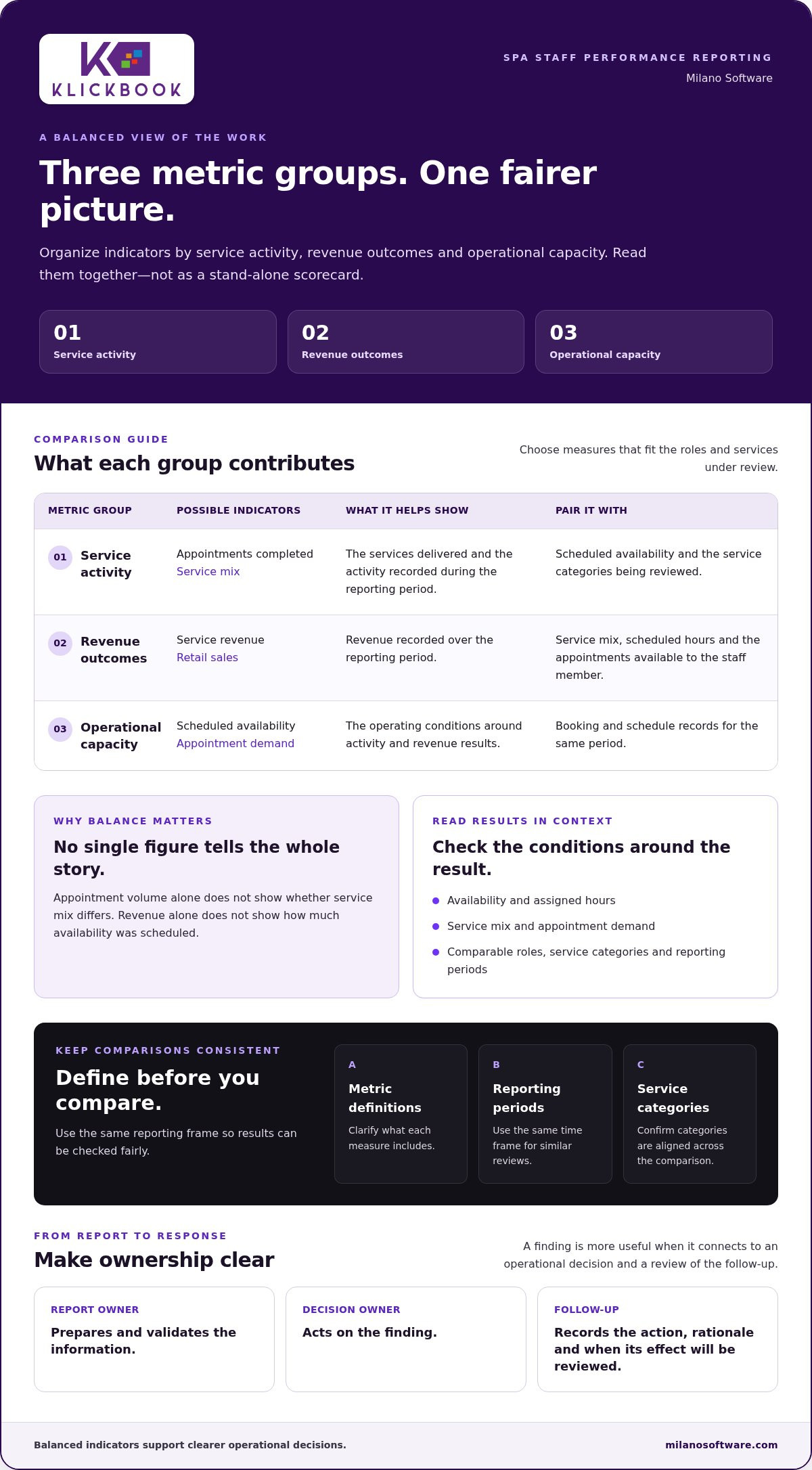
- Group indicators by service activity, revenue outcomes, and operational capacity to create a balanced view.
- Align service categories, reporting periods, and metric definitions before comparing staff results.
- Use a repeatable review workflow that assigns report preparation, management review, and follow-up actions.
- Connected booking, point-of-sale, and reporting workflows can make operational patterns easier to assess. Explore Milano Software for spa management reporting capabilities.
Spa Staff Performance Reporting: Define the Operational Questions First
Spa staff performance reporting is the structured review of operational and financial indicators connected to staff activity. Its value doesn’t come from collecting the most figures. It comes from using the right information to make clearer decisions about capacity, service delivery, and management priorities. Start by stating the operational question, then choose only the measures that can help answer it.
Measurement and evaluation are related, but they aren’t interchangeable. A report can show appointments completed or revenue recorded during a period. These figures describe activity; they don’t explain the conditions behind it or tell a manager what to conclude. Performance management connects individual contribution with organizational goals. In a spa, making that connection requires considering the operating conditions around each result.
The purpose is operational learning, not reducing someone’s contribution to a single score. A lower result may prompt a review of appointment availability, service mix, or assigned hours before it prompts an individual performance judgement. Treat the report as a decision aid, not a verdict.
Which management decisions should reporting inform?
Start with practical decisions: whether schedules align with appointment demand, whether availability is distributed appropriately, and whether workload is balanced across the team. Separate immediate questions from longer-term trends. A booking gap in a particular period may call for a schedule adjustment. A pattern that repeats across comparable periods may point to a broader issue with service operations or staffing priorities.
- Report owner: Identify who prepares and validates the information.
- Decision owner: Name the manager responsible for acting on the finding.
- Follow-up: Record the action, its rationale, and when its effect will be reviewed.
This chain of accountability connects the report to an operational response. Without it, accurate figures can circulate without changing a schedule, addressing a capacity constraint, or informing a management conversation.
What makes a spa performance report useful?
A useful report applies consistent definitions and reporting periods. If “service revenue” or “available hours” means something different from one review to the next, comparisons become unreliable. Define each measure before assessing results, and use the same time frame when reviewing similar roles or service categories.
- Pair staff indicators with relevant service and business context.
- Separate confirmed observations from interpretations that need further review.
- Lead with a concise summary, then provide supporting detail so the finding can be checked.
For example, a summary might flag a change in completed appointments, then show the service category and scheduled availability needed to interpret it. Connected records can make this context easier to assemble. Spa management software can support consistent reporting by bringing operational workflows and reporting into the same environment.
Choose Spa Staff Performance Metrics That Reflect the Work
A useful set of metrics reflects the work being reviewed, rather than applying the same generic scorecard to every role. For spa staff performance reporting, organize possible indicators into three groups: service activity, revenue outcomes, and operational capacity. Then select a focused set that relates to the management decision. Adding more measures doesn’t necessarily create more insight. It can make the important signals harder to interpret.
Build a balanced set of staff indicators
Service activity might include appointments completed or service mix. Revenue outcomes may include service revenue or retail sales during a reporting period. Capacity indicators can frame those results against scheduled availability or appointment demand. Choose measures that fit the roles and services under review, and define exactly what each one includes before comparing results.
Balance activity with outcomes and context. Appointment volume alone doesn’t show whether the service mix differs. Revenue alone doesn’t show how much availability was scheduled. A balanced view helps managers see where measures move together and where they diverge. Don’t treat any one figure as a complete assessment of an individual’s contribution.
Milano Software’s reporting tools provide insights into staff performance and revenue, alongside inventory metrics. Use these report categories to structure an analysis, and apply consistent definitions to services, transactions, and staff records. Before comparing results, confirm that the same categories and reporting periods are being used for everyone in the comparison.
Connect booking, point-of-sale, and reporting data
Booking records provide appointment and schedule context: who was booked, for which service, and within what period. Online booking synchronizes with the spa’s internal calendar, helping managers interpret activity against scheduled availability rather than treating an appointment total as self-explanatory. For a closer look at booking workflows, see this guide to spa booking software.
Point-of-sale records add transaction context, including service charges, gift cards, retail sales, and inventory records. A change in recorded revenue, for example, could reflect service transactions, retail activity, or a different mix of offerings. Reviewing relevant booking and point-of-sale information together can help distinguish these patterns when the records use compatible definitions and reporting periods.
Keep the comparison focused:
- Service activity: Select measures that describe work performed, such as appointment volume or service mix.
- Revenue outcomes: Review relevant service or retail results without assuming they represent identical work across roles.
- Operational capacity: Add schedule or availability context where it supports a meaningful comparison.
Use the smallest set of measures that answers the question, and document what each one includes. Connected spa management workflows can make the evidence easier to review. Milano Software reporting brings staff performance, revenue, and inventory insights into the reporting conversation.
Interpret Spa Staff Reports Fairly: Context Before Comparison
A comparison is only as reliable as the conditions behind it. Before interpreting differences, align service categories, reporting periods, and metric definitions. Comparing appointment activity across different service types, or revenue totals across periods with inconsistent boundaries, can create apparent gaps that reflect the reporting method rather than the work.
Context changes the meaning of a result. Appointment mix affects the number and type of services recorded. Scheduled availability affects the opportunity to receive bookings. Role differences can also shape which activities appear in a report. In spa staff performance reporting, treat a variance as a prompt to investigate, not proof of its cause. The report shows where to look, but it can’t establish an individual explanation on its own.
Separate individual contribution from operating conditions
Review schedule allocation and appointment availability alongside reported results. Consider service type and duration before comparing activity or revenue. Two team members may have different appointment opportunities or service mixes during the same reporting period. Check for missing, duplicated, or inconsistently categorized records, too. Resolve data-quality issues before using the figures to make management decisions.
Identify patterns without creating misleading rankings
Look for repeated movement across reporting periods rather than turning an isolated result into a conclusion. Start with team-level patterns to identify shared operating conditions, then investigate individual variation within a comparable group. League tables can hide differences in workload and service mix, creating rankings that look definitive but lack the context needed for a sound decision.
Use a compact review like the one below to turn a reported difference into a focused follow-up:
| Signal in the report | Possible context to examine | Follow-up question |
|---|---|---|
| Lower appointment volume | Scheduled availability, booking distribution, or service mix | Were comparable appointment opportunities available? |
| Different revenue outcome | Service categories, appointment duration, or recorded transactions | Are the roles and revenue definitions comparable? |
| Change from a prior period | Period boundaries, schedule changes, or record completeness | Does the pattern persist under consistent comparisons? |
Use the table to guide inquiry, not to assume an answer. If a difference appears only once, verify the records and operating conditions before acting. If it persists across comparable periods, document the pattern and the evidence for further review. Keep management conversations specific: what changed, what context was checked, and what should happen next.
Consistent definitions and dependable operational records make these reviews more actionable. Milano Software’s reporting provides staff performance and revenue insights, while connected booking and point-of-sale workflows can add relevant context. Explore spa management reporting tools as a foundation for structured review.
Create a Repeatable Spa Staff Reporting and Review Workflow
A repeatable workflow turns staff reports into accountable management action. It establishes who prepares the information, who interprets it, and who tracks what happens next. For spa staff performance reporting, consistency matters more than complexity. Use a process managers can apply across review cycles, adapting the cadence to operational needs and the information available.
Use this sequence to move from a management question to documented follow-up:
- Define the question. State the operational issue the review needs to address, such as whether appointment allocation aligns with service demand.
- Assign report preparation. Name the person responsible for gathering the agreed indicators, applying stable definitions, and preparing the review summary.
- Validate the information. Check that records are complete and that reporting periods and categories match the agreed approach. Flag gaps or inconsistencies instead of presenting them as settled results.
- Review the pattern. The responsible manager examines material changes, relevant operating context, and unresolved questions before deciding whether action is warranted.
- Record the decision. Document the action, its owner, the intended operational outcome, and the rationale. Tie the conclusion to the evidence because a reported pattern alone doesn’t prove its cause.
- Track and revisit. The action owner records progress, and the report preparer carries the same indicators into the next review so the team can assess what changed.
Assigning these roles prevents a common process gap: the report is produced, but no one is responsible for interpretation or follow-through. In a smaller operation, one manager may hold more than one responsibility. The essential control is clarity about who owns each step.
Prepare consistent reports for management review
Keep metric definitions and reporting periods stable from one review to the next. Before sharing results, check that the records are complete and note material changes in the underlying information. Present a concise summary first: the observed pattern, the context considered, and any unresolved question. Supporting detail should make the finding traceable without burying managers in raw figures.
Set the review cadence according to the decisions being made and the reliability of the available operational data. Review often enough to support relevant management decisions, but don’t treat incomplete information as a meaningful trend. A change in staffing or reporting setup may also affect comparability, so record it as context for the next review.
Turn reporting findings into operational follow-through
Choose one practical action linked to the pattern under review, such as examining how appointment availability is distributed. Record the intended outcome without claiming the action will resolve a cause the report hasn’t established. At the next review, revisit the same indicators and note whether the pattern continued, changed, or needs further investigation.
A connected reporting foundation can make preparation and review more consistent. Explore spa management software to support operational reporting and management review.
Use Spa Management Software to Make Performance Reporting Sustainable
A reporting framework is useful only if managers can apply it consistently without rebuilding the evidence for every review. When booking, point-of-sale, and staffing records are fragmented, preparation can take more effort and relevant context can be scattered across sources. Connected spa management software offers a more coherent foundation: managers can review staff performance and revenue alongside inventory insights, then interpret findings in relation to the workflows that generated them.
Technology supports the process; it doesn’t replace management judgement. A system can organize operational information, but leaders still need to choose relevant measures, interpret differences fairly, and decide what action is appropriate. Sustainable spa staff performance reporting relies on both reliable records and a disciplined review method.
What connected reporting changes for spa operations
Centralized operational information can help standardize report preparation and give managers a consistent reference point across review cycles. Booking records provide appointment and schedule context, while point-of-sale records capture transactions, service charges, gift cards, retail sales, and inventory records. Considered alongside staff performance and revenue reporting, these workflows can help managers distinguish a change in activity from a change in transaction mix or operating conditions.
Inventory reporting adds another operational perspective. It lets leaders consider inventory information alongside the staff and revenue indicators under review, rather than treating each report category as an isolated result. The value is added context for management review, not an automatic explanation of why a result changed. For a broader view of how spa systems support operations, explore this spa management software guide.
Milano Software’s reporting tools provide insights into staff performance, revenue, and inventory. Online booking synchronizes with the spa’s internal calendar, and point-of-sale capabilities manage transactions and retail activity. Bringing these workflows together can reduce fragmented report preparation and support a more repeatable review process for day spas, resort spas, and Nordic spas.
Establish the next step for your reporting process
Put the framework into practice with a sequence managers can maintain: define the decision the report should inform, select relevant indicators, standardize definitions and reporting periods, review results in context, and document follow-up. Assign responsibility for preparation, decision-making, and action tracking so findings lead to a clear next step.
Keep conclusions precise. Record the observed pattern, the context considered, the decision made, its owner, and when it will be reviewed again. Use the same indicators in the next review to assess what changed, and avoid claims the data can’t support. Software can make information easier to access and organize, but accountability, interpretation, and fair staff conversations remain management responsibilities.
Build a more consistent reporting foundation with Milano Software spa management software.
Make the Next Review a More Informed One
The first reporting cycle doesn’t need to resolve every operational question. Its value is establishing a disciplined baseline: which decisions the information supports, where interpretation remains uncertain, and what managers should examine next. Use those lessons to refine future reviews and keep reporting aligned with the spa’s current priorities.
Over time, spa staff performance reporting can help leaders identify where management attention is needed and assess whether operational changes are producing the intended result. The standard isn’t a more elaborate dashboard. It’s a clear line from information to decision, with accountability for what follows.
As your reporting approach develops, the systems supporting it should make consistent review easier to sustain. Explore Milano Software’s spa management platform to support your next step.
Start with one decision, establish a repeatable review, and build from there. Fair, useful reporting grows stronger through consistent practice.
Frequently Asked Questions
How often should a spa review staff performance reports?
Set the review frequency according to the decisions the report needs to support and how consistently the relevant information is recorded. Operational exceptions, such as an unexpected availability gap, may need prompt attention. Broader trend reviews need comparable periods and enough context to interpret results. For spa staff performance reporting, choose a repeatable cadence, state its purpose, and adjust it when operational needs or data quality change.
Can spa staff performance reports account for different service lengths?
Yes. Compare services within relevant categories and account for their scheduled durations before interpreting appointment counts or revenue. A staff member delivering longer appointments may complete fewer bookings in a shift than someone with shorter services. That difference doesn’t automatically indicate lower contribution. If duration information is available and consistently recorded, include it as context or compare results within similar service types instead of treating every appointment as equivalent.
Can point-of-sale data help evaluate spa staff performance?
Yes, as context, not as a standalone judgement. Point-of-sale records can show service transactions, service charges, gift card activity, and retail sales. Interpret these figures only when a transaction can be reliably connected to the relevant service or staff activity. Sales totals alone don’t establish individual contribution. Milano Software’s reporting tools provide revenue and staff performance insights. Explore spa management reporting for a connected view of operational information.
What should a manager do when a staff performance report appears inconsistent?
Pause interpretation and check the underlying records before discussing the result. Confirm that the reporting period and categories match the intended comparison, then look for missing entries, duplicate transactions, cancellations, or schedule changes. If the discrepancy remains, record it as unresolved and exclude the affected measure from decisions until it can be reconciled. Correct a data-quality issue rather than attributing it to an employee.
How can spa managers use performance reports without creating staff competition?
Use reports to guide private, role-relevant conversations and operational improvements, not public rankings. Set shared service or capacity objectives where appropriate, and discuss individual results alongside responsibilities and working conditions. For example, if appointment distribution varies across a team, review how availability is allocated before using the report to set individual expectations. Recognize collaboration and service consistency, not only the measures that are easiest to count.
What information should be left out of a spa staff performance report?
Leave out information that doesn’t support the stated operational decision, can’t be defined consistently, or hasn’t been verified. Avoid speculative explanations, irrelevant personal details, and client-identifying information that managers don’t need for the review. Exclude measures that can’t be interpreted fairly across the roles being compared. A focused report makes its purpose clear, limits distraction, and gives managers a sounder basis for follow-up.


