
A reservation is only workable when the spa has the capacity to deliver it. Spa booking software that simply collects appointments can still leave staff reconciling separate calendars, resolving booking conflicts and correcting online availability that doesn’t reflect service or staff schedules.
Booking administration can take time away from coordinating guest service and daily operations. The issue isn’t only whether guests can book online. It’s whether each reservation aligns with the spa’s internal calendar and can be managed through to checkout.
This article explains how spa booking software can coordinate appointments, staff schedules and guest workflows. It covers the capabilities that keep online availability synchronized, connect booking activity with point of sale and reporting, and give teams a clearer operational view. Milano Software brings these functions together in a connected platform for day spas, resort spas and Nordic spas, helping teams manage reservations alongside other spa operations.
Key Takeaways
- Distinguish the guest-facing booking interface from the calendars and operational records that support appointment delivery.
- Trace the booking journey from service or package selection to time confirmation, and identify the details staff need to manage each reservation.
- Assess spa booking software by how it supports calendar synchronization, staff coordination, client records, checkout and reporting, not only online reservations.
- Identify shared booking requirements, then account for workflow differences across day spas, resort spas and Nordic spas.
- See how Milano Software connects online reservations with internal calendars, staff and client coordination, point of sale and operational reporting.
What Spa Booking Software Coordinates Beyond Online Reservations
A booking page is the guest-facing part of an appointment system. Behind it, accurate availability depends on schedules and reservation records that reflect what the spa can deliver. If online availability and internal schedules fall out of sync, guests may see time slots that staff can’t accommodate, leaving the team to resolve conflicts manually.
What happens between a guest request and a confirmed spa appointment?
Spa booking software publishes appointment availability and coordinates reservations with the operational calendars and records that support them.
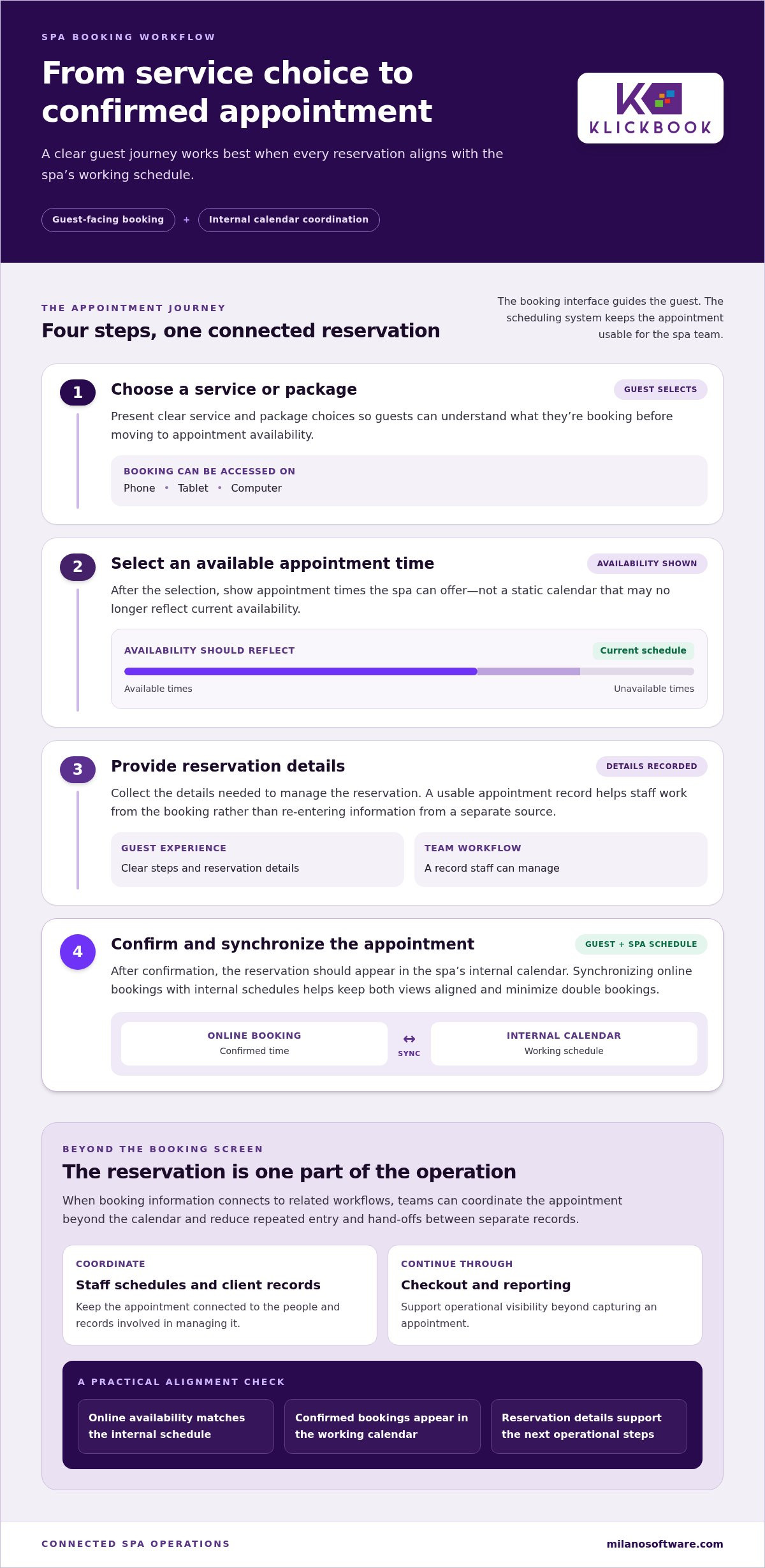
A typical guest journey follows a clear sequence: select a service or package, choose an available appointment time, provide the details needed for the reservation, then receive confirmation. The booking interface makes those steps accessible. The scheduling system must also keep the selected time consistent with the spa’s internal calendar.
This connection matters. If a time reserved internally remains open online, or an online booking doesn’t appear in the working calendar, staff must reconcile conflicting information. Calendar synchronization helps align published availability with internal schedules and minimize double bookings. For a neutral overview of the broader technology category, see Appointment scheduling software.
Why a booking calendar is not the entire booking operation
Capturing an appointment is one step in the operating workflow. Teams may also need to coordinate staff, maintain client records, process checkout and review performance through reporting. When booking information is separate from these activities, staff may enter the same details more than once or pass information between systems and people.
Those handoffs take time and create opportunities for records to diverge. A connected operating platform can carry reservation activity into related workflows, giving staff a clearer view of the appointment and its status. Checkout and reporting add operational visibility beyond the calendar itself.
The right setup depends on how the spa operates. A day spa, resort spa and Nordic spa may structure services, schedules and guest workflows differently. The core requirement is consistent: make booking accessible, keep availability aligned with internal records, and support the operational steps that follow a reservation.
How Online Spa Booking Moves from Service Selection to Calendar Confirmation
A guest booking involves a sequence of decisions, not just a time slot. The online flow needs to connect the service or package selected to appointment times the spa can offer, then record the reservation so staff can manage it. Each step should make the process clear for the guest and avoid extra scheduling work for the team.
How should online booking present services and appointment availability?
Start with clear service and package choices. Once a guest makes a selection, the booking flow should show available appointment times rather than a static calendar that may not reflect current availability. The guest then provides the details required to manage the reservation and proceeds to confirmation.
Online booking that works from any device gives guests a consistent way to make reservations on a phone, tablet or computer. Keep the steps easy to follow: choose a service or package, select a time, provide reservation details, then confirm. Clear choices and current availability help guests understand what they’re booking.
For spa booking software, the operational test is what happens after confirmation. The reservation needs to become part of the spa’s working schedule, not remain isolated in a guest-facing interface. That connection gives staff a usable appointment record and helps keep internal scheduling aligned with what guests can book online.
How does calendar synchronization help prevent booking conflicts?
When an online reservation synchronizes with the spa’s internal calendar, guest-facing availability and the staff schedule can reflect the same booking activity. Without a shared view, the team may need to transfer details manually or reconcile changes across separate records. Each handoff adds administrative work and creates another opportunity for availability to become inconsistent.
Synchronized availability helps minimize double bookings by aligning online reservations with the spa’s internal calendar.
A consistent booking flow can reduce manual scheduling steps: the guest selects an available time, confirms the reservation, and the appointment appears in the internal calendar. Staff can then work from the schedule instead of re-entering each booking from a separate source. Teams remain responsible for managing the operational details of their spa.
Milano Software supports online reservations and service packages from any device, with bookings synchronized to the internal calendar. Explore Milano Software’s spa booking platform as part of a connected approach to guest reservations and spa operations.
Spa Booking Software Compared: Booking Widget or Connected Operating Platform?
An attractive booking widget can make service selection clear and convenient. But the interface alone doesn’t show whether a confirmed appointment is synchronized with the spa’s working calendar, associated with staff and client records, or carried into checkout and reporting. Assess the full booking lifecycle, not just the guest-facing screen.
The key difference is operational scope. A booking-only tool centres on capturing appointments; a connected operating platform can support the processes around each reservation. Capabilities vary by system, so compare how each approach handles the work your spa needs to do.
| Operational area | Booking-only tool | Connected operating platform |
|---|---|---|
| Calendar synchronization | May record the appointment in its own booking calendar, while internal schedule updates require a separate step. | Can synchronize bookings with the spa’s internal calendar, keeping online availability and working schedules aligned. |
| Staff coordination | May capture the requested time without supporting broader staff coordination. | Can connect reservations with staff scheduling and coordination processes. |
| Client records | May collect guest details for the reservation, with further record management handled elsewhere. | Can associate booking activity with client records used in spa operations. |
| Checkout | May leave service charges and other transactions to a separate checkout process. | Can connect reservation activity with point of sale workflows. |
| Reporting | May focus on booking activity or require information to be consolidated elsewhere. | Can include booking activity in broader operational and financial reporting. |
When can standalone spa appointment booking software be sufficient?
A standalone tool may suit a simpler operating model, with a defined booking workflow, limited coordination requirements and related tasks managed through existing processes. Its advantage is a focused reservation function. The trade-off appears when staff must transfer appointment details into separate calendars, client records or checkout workflows. Those steps can mean repeat entry and extra administrative handoffs.
When does connected spa booking software add operational value?
Connected spa booking software becomes more relevant when reservations involve several operational steps. Shared booking, staff coordination, client records, point of sale and reporting can give teams a more continuous view of the guest visit, from confirmed appointment through checkout. The value is in coordinating records and reducing manual handoffs, rather than assuming a particular revenue result.
Choose based on operational complexity, not feature count alone. A long feature list matters less than whether the platform supports the workflows your spa actually uses. For day spas, resort spas and Nordic spas, booking should fit the operating model rather than force every team into the same process.
Match Spa Booking Software to Day Spa, Resort Spa, or Nordic Spa Workflows
The booking fundamentals are similar across spa types: guests need clear service or package choices, accurate appointment availability and a reliable confirmation. Teams need reservations recorded with relevant client details and visible alongside staff schedules. What differs is how those records support the operating environment around each appointment.
Which booking workflows are common across spa types?
At a day spa, a reservation may centre on a selected service, a suitable time and the staff schedule. Resort and Nordic spas also need those core elements, while guest coordination or capacity planning may play a larger role in their workflows. In every setting, a consistent booking record gives staff a common reference as responsibilities pass between team members, supporting visibility beyond the initial reservation.
Assess whether spa booking software supports the workflows your team uses. The goal isn’t to impose one setup across every spa format. It’s to keep the booking record clear and useful throughout the relevant guest journey.
How do resort and Nordic spa environments change booking priorities?
Resort spas may need to coordinate reservations with a guest’s wider resort experience. Room-folio billing is one workflow to map: identify where the spa booking sits in the guest journey, how service charges are recorded, and how the spa’s checkout process connects with folio billing.
Nordic spas may need booking workflows that account for capacity and session planning. Define how reservations relate to operating periods and the capacity the team needs to manage.
Use the operating model to set priorities. A day spa may focus on service scheduling and staff coordination. A resort spa may need to map booking and billing handoffs across the guest journey. A Nordic spa may emphasize capacity planning. Shared records can make those handoffs easier to oversee while allowing each environment to use workflows suited to its operations.
For more detail, see resort spa software and Nordic spa software. Milano Software supports day spas, resort spas and Nordic spas with online booking, internal calendar synchronization, staff and client coordination, point of sale and reporting. Explore spa management software for your operating model.
Build a Connected Spa Booking Workflow with Milano Software
Online booking works best as part of the spa’s operating platform, not as a separate guest-facing feature. Milano Software brings reservations together with internal calendar synchronization, staff and client coordination, point of sale, and reporting. This gives teams a shared operational framework for managing booking activity through the guest visit.
How does Milano Software connect booking with spa operations?
Guests can book services and packages from any device. Once a reservation is made, it synchronizes with the spa’s internal calendar, helping keep appointment availability consistent and giving staff a shared schedule. Staff coordination and client profiles provide further context for managing each booking within the spa’s workflow.
The reservation is also part of a broader service and transaction record. Milano Software includes point of sale for service charges, gift cards and retail merchandise. Checkout is part of the same spa management platform as booking, supporting a more continuous view of guest activity.
Reporting extends that visibility to operational and financial measures, including revenue, staff performance and inventory. Spa leaders can review booking activity alongside wider operating performance and use those insights to guide business decisions.
What should spa leaders map before evaluating a booking platform?
Start with the operating model, then trace guest and staff workflows from reservation through reporting. A practical assessment should document:
- Spa type: day spa, resort spa or Nordic spa, including the workflows that distinguish its operating environment.
- Service and package structure: what guests can reserve and how those choices should appear in online booking.
- Staffing model: how appointments are coordinated with staff schedules and client records.
- Booking channels: where reservations originate and how they need to appear on the internal calendar.
- Operational handoffs: how a confirmed reservation proceeds through appointment delivery, point-of-sale checkout and management reporting.
This map turns platform evaluation into an operational review. Identify where staff currently re-enter information, reconcile schedules or assemble reports, then assess how connected spa booking software could support those workflows. Explore Milano Software’s spa management platform against your spa’s booking, staffing, checkout and reporting requirements.
Align Spa Booking with the Full Guest Journey
Effective spa booking software does more than display appointment times. It connects guest reservations to operational capacity, keeps online availability aligned with the internal calendar, and supports the workflows that continue after an appointment is booked. The right platform also reflects the spa’s operating model, whether it serves day guests, resort guests or Nordic spa visitors.
Milano Software brings online booking together with spa operations. Guests can reserve services and packages, while synchronized bookings support a consistent internal calendar. At checkout, the integrated point of sale supports transactions for service charges, gift cards and retail merchandise. These connected capabilities give teams a clearer path from reservation to payment and operational oversight.
Evaluate the platform against your actual workflows: how guests book, how staff coordinate appointments, and how reservations move through checkout and reporting. Explore Milano Software’s spa booking and management platform to see how connected booking can support your spa’s operations. With the right workflow in place, your team can manage reservations with greater clarity and focus on a consistent guest experience.
Frequently Asked Questions
What is spa booking software?
Spa booking software publishes appointment availability and records reservations so guests and staff can coordinate bookings. It typically supports service or package selection, time selection, guest details and confirmation. In a spa operating platform, booking can also connect with internal calendars, staff coordination, client profiles, point of sale and reporting. When comparing systems, distinguish a tool that captures appointments from one that supports the broader reservation workflow.
How does online spa booking software work?
Online spa booking software guides a guest through selecting a service or package, choosing an available time, entering reservation details and confirming the appointment. The confirmed booking should appear in the spa’s internal calendar so staff can manage it alongside other scheduled work. Milano Software supports online reservations and service packages from any device, with bookings synchronized to the internal calendar to help keep availability consistent.
Can spa booking software prevent double bookings?
Synchronized spa booking software can help minimize double bookings by aligning online reservations with the spa’s internal calendar. When a confirmed appointment updates the shared schedule, teams have less need to reconcile separate booking records manually. Software can reduce conflict risk, but no scheduling system should be described as eliminating every possible error. Accurate calendars and consistent staff workflows remain important to reliable appointment management.
What should spa booking software include?
Core capabilities should match the spa’s operating requirements. Consider online service and package booking, availability synchronized with the internal calendar, staff scheduling coordination and client records. A connected platform may also include point of sale for service charges, gift cards and retail merchandise, plus reporting on revenue, staff performance and inventory. The right setup depends on the spa type, booking process and operational handoffs.
Is spa booking software different from spa management software?
Spa booking software may refer to a focused tool for accepting and managing appointments. Spa management software covers a broader set of operational workflows, with booking as one component alongside staff and client coordination, point of sale and reporting. Milano Software brings these capabilities together for day spas, resort spas and Nordic spas, connecting guest reservations with internal calendars and wider management processes.
Can resort spa booking software handle room-folio billing?
Room-folio billing depends on how the resort’s spa booking and billing workflows are coordinated. Map the process from reservation through checkout, including where service charges are recorded and how they reach the guest folio. This helps clarify the role of spa booking and point-of-sale workflows within the resort’s broader billing process.

