

The reduce therapist downtime software category centres on making appointment scheduling, calendar synchronization and no-show patterns more visible, so teams can identify where time is being lost and act on recurring issues. Appointment reminders can be set for 24 hours and 2 hours before therapy sessions.
Scheduling friction often appears as open slots, conflicting calendars, and missed appointments. A clear view of bookings and attendance helps distinguish isolated disruptions from recurring gaps, so teams can make scheduling decisions based on patterns rather than guesswork.
This article explains how downtime monitoring works, how synchronized calendars and reminders support appointment management, and how attendance records can guide practical changes. It also covers what to consider when coordinating scheduling and reporting in a spa management workflow.
Key Takeaways
- Use a centralized appointment calendar to make availability, bookings and schedule changes easier to manage.
- Set reminders for 24 hours and 2 hours before sessions, then review attendance patterns to inform follow-up.
- Assess calendar tools by how they handle synchronization, booking conflicts, reminders and waitlists.
- Use flexible scheduling and deliberate buffer times to organize sessions around practical workflow needs.
- Milano Software’s online booking and reporting support spa operators in managing appointments and reviewing daily operations.
Appointment scheduling and calendar management
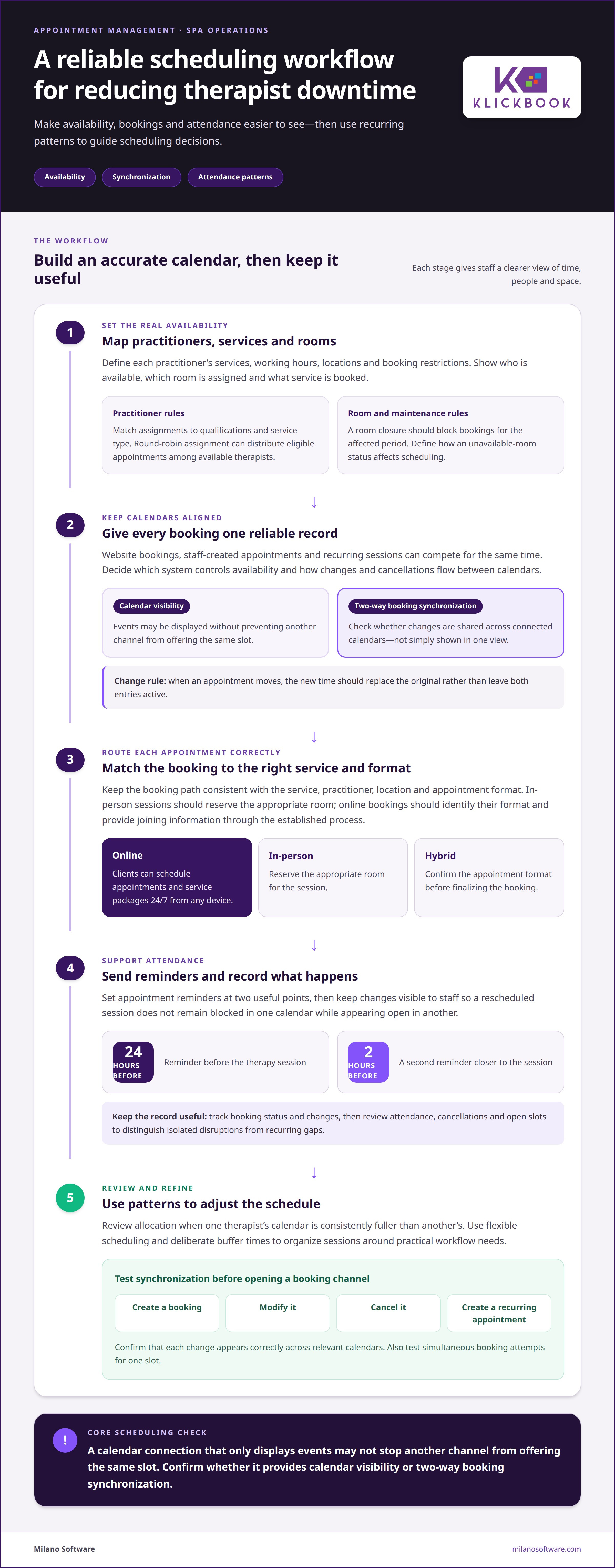
Appointment scheduling should show who is available, which room is assigned, and what service is booked. A shared calendar gives reception and practitioners one operational view. If a room closes, for example, it should no longer appear as available. The schedule should prevent bookings whenever a required resource is unavailable. This reduces manual coordination and makes open capacity easier to identify. Software that helps reduce therapist downtime starts with an accurate view of availability.
For a multi-therapist spa, define each practitioner’s services, working hours, locations, and booking restrictions. Round-robin assignment can distribute eligible appointments among available therapists instead of filling one person’s calendar first. Assignment rules should reflect qualifications and service type, so practitioners receive only sessions they can deliver. Managers can review allocation patterns and adjust availability if one schedule is consistently fuller than another.
Online, hybrid, and in-person sessions need distinct appointment details. An online booking should identify its delivery format and provide joining information through the practice’s established process. An in-person appointment should reserve the appropriate room. For hybrid schedules, a coordinator can confirm the format before finalizing the booking. Online booking lets clients schedule appointments and service packages 24/7 from any device, reducing reliance on staff-entered requests.
Reminders support attendance and help clients prepare. Appointment reminders can be set for 24 hours and 2 hours before therapy sessions. A practice can use those touchpoints to communicate the appointment time and relevant logistical instructions. The booking record should make changes visible to staff, so a rescheduled session doesn’t remain blocked in one calendar while appearing available in another.
Include maintenance in the same resource plan as appointments. A scheduled room closure should block bookings for the affected period, preventing sessions from being assigned to unavailable space. If a facility uses a room-status sensor, define how its signal affects scheduling. An unavailable-room status might block new bookings or alert an administrator. Sensor data should not change appointments without an established operational rule.
Scheduling security depends on controlled access to booking details. Assign permissions by role, limit calendar visibility to operational needs, and define how appointment information is collected, stored, and shared. Keep treatment notes separate from calendar details unless your procedures require otherwise. These controls give staff the scheduling information they need without exposing unrelated client details.
Keep booking access, resource availability, and permissions aligned as operations change. When services, rooms, or practitioner availability shift, update the relevant scheduling rules and review affected appointments. This gives staff a consistent basis for managing sessions and keeps the calendar accurate. Regular reviews help ensure the schedule reflects current operations, not outdated assumptions.
Calendar synchronization and double-booking prevention
A synchronized calendar keeps booking channels aligned with the spa’s operating schedule. The key is a single appointment record: when a client books, staff should see the same time, practitioner, service, and status. A calendar connection that only displays events may not prevent another channel from offering the same slot. Confirm whether a connection provides calendar visibility or two-way booking synchronization before relying on it.
Map each booking path before enabling it. A website booking, a staff-created appointment, and a recurring session can all compete for the same practitioner’s time. Define which system controls availability, how changes flow between connected calendars, and how cancellations release a slot. If a client changes a Tuesday appointment, for example, the new time should replace the original rather than leave both entries active. Clear ownership reduces conflicting records.
Website and Facebook booking integrations can make appointments easier to access, but each channel needs consistent service and availability rules. A booking link should direct clients to the right service, practitioner, location, and appointment format. If Facebook displays a link rather than live availability, the booking page it opens remains the place to choose a time. Review the client journey on desktop and mobile, then confirm that each booking appears in the spa calendar.
Group sessions require different availability rules from one-to-one appointments. A group booking should identify the session time, facilitator, and participant capacity. A service booking link should show only relevant appointment types, not every calendar option. For recurring groups, keep schedule and capacity rules consistent across future dates, and make sure cancelling one session does not unintentionally remove later sessions.
Online booking can act as a virtual front desk for routine appointment selection. Clients can book available sessions while staff focus on exceptions, such as a room change or practitioner absence. Define which changes clients can make themselves and which require staff action. A platform that records booking status, channel, and subsequent changes gives administrators a clearer audit trail for resolving discrepancies.
Test synchronization with representative cases before opening a new channel: create a booking, modify it, cancel it, and create a recurring appointment. Confirm each change appears correctly across the relevant calendars. Also test simultaneous booking attempts for one slot, since a visible calendar alone may not resolve competing requests. For spa operators assessing online booking workflows, the useful comparison is whether channel access and internal appointment control support one coherent schedule.
No-shows and cancellations
A no-show keeps a reserved session from being offered to another client, while a late cancellation may leave too little time to refill the slot. Record each outcome separately. An advance cancellation is operationally different from a missed session without notice. Consistent labels help a spa distinguish attendance issues from schedule changes and assess whether disruption recurs on particular days or with certain booking channels or appointment types. Software to reduce therapist downtime is more useful when it supports these distinctions.
Avoid relying on general no-show figures such as 5-8% or 30% without a relevant, verifiable source. Local patterns matter more: compare booked sessions with attended, cancelled, rescheduled, and missed appointments. Review those categories by practitioner and time period. This creates a clearer view of where capacity is lost and whether disruptions cluster around particular booking conditions.
Automated reminders can support attendance, but they depend on accurate contact details and clear appointment updates. Establish a process for recording a client’s confirmation, cancellation, or rescheduling response. When a client changes a booking, update the authoritative calendar and release the original slot promptly. This prevents staff from treating an outdated appointment as active while the newly available time remains hidden.
Google Calendar can be part of a spa’s schedule, but a displayed event and a confirmed appointment are not always the same record. Define which platform controls booking status and how changes appear in connected calendars. After a cancellation, staff should be able to see whether the slot is available for rebooking, rather than relying on an event deletion alone. Document how staff handle duplicate entries, failed updates, and changes received by phone.
Use a repeatable response process for newly opened capacity. First, record the cancellation and make the slot’s status clear. Next, identify clients who have requested an earlier appointment, where the practice maintains such a list. Then contact eligible clients through the practice’s approved channel and record the result. Review whether the opening was refilled and how much notice remained. This connects attendance tracking to a practical staffing and booking decision.
Review no-show and cancellation patterns on a consistent reporting cycle. Compare missed sessions with total bookings, separating same-day changes from advance notice. That distinction helps managers assess whether follow-up workflows or scheduling policies need adjustment. For practices using software to reduce therapist downtime, reports should make these outcomes distinguishable and useful for planning. Reliable records help teams identify avoidable gaps, apply a consistent response, and assess whether later bookings use released capacity.
How can therapists use flexible scheduling and buffer times to reduce gaps between sessions?
Flexible scheduling works best when availability reflects actual operating conditions, not just empty calendar space. A therapist’s bookable windows can account for service type, location, room access, and working hours. For example, a practitioner assigned to one treatment room should not appear available for an appointment elsewhere at the same time. Clear constraints make open time useful without creating conflicts for staff or clients.
Buffer times should reflect the work between appointments. A session may require room turnover, equipment preparation, documentation, or movement between spaces. Protect time for those transitions when the service workflow requires it. A buffer that is too short can delay the next appointment; one that is unnecessarily long can leave capacity unused. Managers can review actual transitions and adjust calendar rules accordingly.
Use appointment templates to apply scheduling rules consistently. A template can pair a service with its required practitioner, room, and transition allowance. If different services require different setups, separate templates prevent one default from shaping every booking. Staff can offer suitable availability, while administrators can revise templates when operating procedures or room use change.
Flexible booking windows can also reduce isolated gaps. A spa might offer selected appointment start times that align with existing bookings instead of displaying every possible opening. This works when clients retain meaningful choice and the schedule remains accessible. Review fragmented availability, then adjust eligible start times without changing a therapist’s working hours or assigning a service to an unsuitable room.
For multi-therapist operations, set availability by practitioner and service eligibility. A shared calendar should distinguish an open appointment from a therapist who is unavailable or not assigned to that service. If a client requests a particular practitioner, preserve that preference during booking. If the client has no preference, the spa can direct the booking to another eligible therapist with suitable availability.
Govern schedule changes with a clear process. When a therapist’s hours change, update the source calendar first, then review affected appointments and room assignments. Avoid moving one booking without checking the surrounding schedule. Moving an appointment earlier, for example, may remove a transition window or overlap with a room’s existing use. Review the client, practitioner, service, and physical space together.
Use reporting to assess whether scheduling rules produce workable days. Compare unused time with adjacent appointments, service requirements, and staff availability. If a recurring gap appears between particular services, adjust the template or start-time options and review the resulting schedule. This helps distinguish necessary recovery and setup time from avoidable calendar fragmentation while protecting the quality of each appointment.
How do therapist software platforms compare on calendar integrations, reminders, and waitlist features?
Compare platforms across three areas: calendar integrations, reminder management, and waitlist handling. A feature label alone does not explain how bookings behave. For a Google Calendar connection, determine whether events are read-only or appointment changes flow both ways. Then identify which calendar controls the booking record. This matters when a staff member edits a session in one system while a client books through another.
Evaluate calendar connections by creating, changing, and cancelling a sample appointment. Confirm that each action appears in the relevant calendars with the correct practitioner and appointment status. Also test a recurring session and a time change made by staff. These cases show whether a connection synchronizes availability or merely displays events. A clear source of truth helps teams resolve discrepancies without relying on conflicting entries.
Reminder controls should be assessed by timing, delivery channel, and update behaviour. The research for this article identifies reminders set for 24 hours and 2 hours before sessions. A platform comparison should establish whether staff can configure those intervals and whether a rescheduled appointment uses the updated time. For example, a reminder tied to the original booking time could confuse a client after a change. Confirm how the system handles edits and cancellations.
Waitlist features are useful when they connect an opening to a suitable client and appointment. Check whether staff can record a client’s preferred service, practitioner, location, and available times. Then review what happens when a cancellation creates an opening. A client seeking an evening appointment may not suit a midday vacancy. A clear process helps staff identify relevant requests, communicate the opening, and record whether it was filled.
Assess the administrative view as carefully as the client experience. A coordinator should be able to distinguish confirmed bookings, pending requests, and waitlisted clients. Test what happens when two clients respond to one available slot and how staff close the remaining request. These details affect schedule accuracy and show whether the platform supports a controlled handoff from cancellation to rebooking.
Use a consistent evaluation matrix rather than comparing feature names when you want to reduce therapist downtime software. Record calendar direction, recurring-event behaviour, reminder timing, change handling, waitlist criteria, and booking-status visibility across your calendar, reminder, and waitlist workflows. Follow a sample appointment from initial booking through rescheduling and a later opening. Connecting intake, scheduling, and billing in Milano Software is stated to recover 3-5 hours each week previously spent copying data between disconnected tools.
Milano Software
Milano Software helps spa operators oversee appointment activity and daily capacity. Its spa management platform coordinates staff schedules, client profiles, and day-to-day administrative tasks. Online booking lets clients schedule appointments and service packages from any device, while reporting tools help operators review activity and identify schedule gaps that may need attention.
Milano Software’s platform is designed for day spas, resort spas, and Nordic spas coordinating bookings with broader operations. Its Point of Sale capabilities support transactions, service charges, gift cards, and retail sales, while maintaining sales and inventory records. These tools support spa operations rather than providing therapy or medical services.
To discuss how Milano Software can help your spa manage appointment capacity and reduce avoidable downtime, contact the team.
Turn schedule visibility into an operating practice
Reducing avoidable gaps takes ongoing operational attention, not a one-time calendar adjustment. Assign responsibility for reviewing booking patterns, maintaining scheduling rules, and responding to openings. A consistent review process helps teams distinguish capacity that can be made available from time needed for preparation, room turnover, or other operational requirements.
When assessing software to reduce therapist downtime, define the decisions the system should support: who can book, how availability changes, and how teams respond when plans shift. Then align those decisions with your spa’s operations. Milano Software provides spa management, online booking, and reporting to help coordinate appointments with daily activity.
Contact Milano Software to discuss your needs and determine a practical next step for your operation. A clearer scheduling framework can give your team a more disciplined basis for managing capacity.
Frequently Asked Questions
What software features help therapists reduce cancellations and no-shows?
Look for automated reminders, clear appointment statuses, and reports that distinguish cancellations from missed sessions. These controls help a spa identify patterns and assign follow-up consistently. Staff can review whether missed appointments cluster around a particular service or booking period, then adjust communications or scheduling procedures. Online booking makes appointment access easier, while accurate contact details support timely reminders and booking updates.
What are the best appointment scheduling and waitlist tools for therapists in Canada?
The right tool depends on whether a spa needs individual appointment management or broader operational coordination. Compare calendar ownership, appointment-status tracking, reminders, reporting, and support for multiple practitioners and locations. Milano Software provides spa management, online booking, and reporting for spa operators. Also distinguish a waitlist that records client interest from a workflow that matches an opening with a suitable request.
How can automated reminders and online booking reduce therapist downtime?
Automated reminders keep appointment details visible to clients, while online booking lets them select available appointments without relying on staff to enter every request. Together, these functions can reduce administrative handoffs and help keep booking records current. A client booking outside reception hours, for example, can use online booking to select an appointment. Staff can manage it within the scheduling workflow, with reminders reinforcing attendance.
Which therapy practice management software offers cancellation-fill or waitlist automation?
Cancellation-fill automation should match a newly available appointment with a suitable client, communicate the opening, and record the outcome. A waitlist may only store requests, so assess how the system handles matching and booking status. Milano Software’s spa platform includes walk-in waitlists for managing spa walk-ins. This supports walk-in queue management, which is distinct from automatically filling a therapist’s cancelled appointment.