
Contactless check-in for spas can move arrival, forms and payment steps out of the front-desk queue. Clients can check in by tablet, email or phone, wait nearby until staff are ready, and complete checkout without contact where the necessary features are enabled.
A low-contact process still needs clear communication, accurate appointment records and a controlled flow through the spa. The goal is not to remove personal service, but to reduce avoidable hand-offs while keeping staff informed.
This guide explains how tablet-based self-check-in and digital intake can work, how spas can notify clients when it is time to come in, and which contactless options can support checkout. It also covers how online booking and connected workflows link arrival, service and payment.
Key Takeaways
- Structure tablet-based arrival around appointment identification, clear next steps and a smooth hand-off to staff.
- Use an email address or phone number to connect check-in with the correct booking and keep arrival details organized.
- Digitize intake and waiver forms to reduce paper handling across check-in and checkout.
- Let clients wait nearby and notify them when staff are ready to help manage waiting-area flow.
- Coordinate online booking, point of sale and reporting to support a more connected spa operating workflow.
Client self-check-in using an iPad or tablet
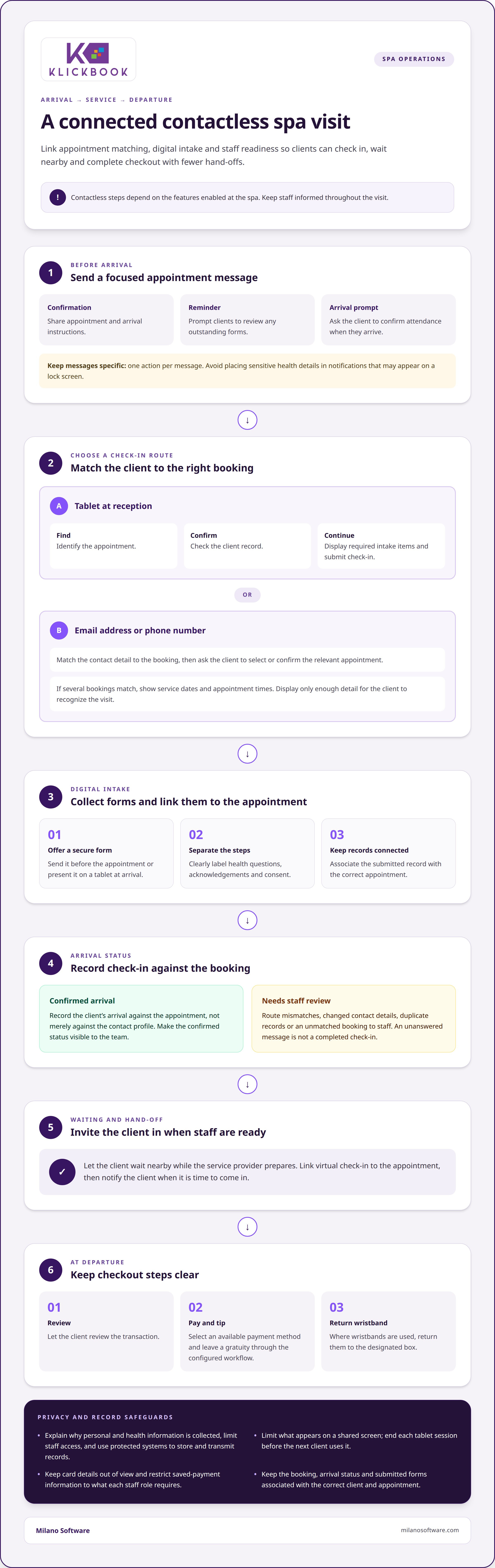
A tablet at reception can let clients find an appointment, confirm arrival and follow the next step without a staff hand-off. Keep the screen flow short: identify the booking, confirm the client record, display required intake items, then submit check-in. A clear completion message prevents repeat submissions and gives staff a reliable arrival signal.
Canadian privacy and health-information requirements depend on the spa’s province and operating context. Treat identity details and health information as sensitive: explain why each item is collected, limit staff access, and use protected systems to store and transmit records.
To collect intake forms, waivers and consent digitally, send clients a secure form before their appointment or present it on a tablet at arrival. Use separate, clearly labelled steps for health questions, acknowledgements and consent, then associate the submitted record with the correct appointment.
For identity verification, match the booking to a client profile using details the spa already collects, such as the client’s name and appointment information. Protect payment and personal data by limiting what appears on a shared screen, ending each session before the next client uses the tablet, and keeping card details out of view.
Profiles can make repeat visits more efficient by retaining relevant contact details and preferences. Saved card information requires careful access controls: staff should see only what their role requires, and the tablet should not expose payment credentials to the next guest. At checkout, clients can review the transaction, select an available payment method and leave a gratuity through the configured workflow. At spas using wristbands, guests can return them to a designated box before leaving.
For clients waiting outside the reception area, virtual check-in can record arrival while the service provider prepares. Staff can notify clients when it is time to come in, keeping appointments moving without relying on a crowded waiting area.
Client-record migration needs its own controlled sequence. Map fields from existing records to the new profile structure, identify duplicates and test a small sample before transferring the full dataset. Confirm that appointment history, contact details and any saved-payment references remain associated with the correct client. Keep legacy records available during reconciliation, then restrict access once new profiles are validated.
These steps make the tablet part of a managed service workflow, not a stand-alone screen. Clear prompts, controlled access and verified records support a consistent arrival and checkout experience.
Virtual check-in can let clients wait outside until their service provider is ready, giving the arrival process a clear hand-off point. The client’s arrival and the provider’s readiness can guide when to invite the guest inside, rather than asking them to wait near reception. Keep this option linked to the appointment record so staff can identify the visit being coordinated.
At departure, spa guests can leave a gratuity at the kiosk and return their wristbands in a return box. Presenting these as separate actions makes the final steps easier to follow. Staff can include both in the departure flow without obscuring the transaction review or exposing another guest’s information.
Check-in using an email address or phone number
An email address or phone number can connect a client to an existing appointment without requiring a reception tablet. The client follows a message sent before arrival or provides contact details at reception. The system uses the booking record to identify the appointment and record arrival. For example, a client with two upcoming visits should see the service date before confirming the correct one.
Set the message sequence around the appointment lifecycle. A confirmation can provide arrival instructions; a later reminder can prompt the client to review outstanding forms. On arrival, a check-in message can ask the client to confirm attendance. Keep each message focused on one action, so clients know whether they are confirming a booking, completing a form or reporting arrival.
Email works well for longer instructions, such as directions to a resort spa entrance or a link to digital intake. A phone message is more immediate for a short arrival prompt. Use the channel the client supplied, and clearly identify the spa and appointment. Avoid putting sensitive health details in notifications that may appear on a lock screen.
A reliable workflow separates identity matching from arrival confirmation. Match the submitted email or phone number to the booking record, then display only enough appointment detail for the client to recognize it. If several bookings match, show service dates and appointment times for selection. If no record matches, direct the client to staff rather than creating an unlinked visit.
- Send the appointment message to the contact detail associated with the booking.
- Ask the client to select or confirm the relevant appointment.
- Record the arrival against that booking, not merely against the contact profile.
- Route mismatches, changed contact details and duplicate records to staff review.
Software should make each status visible to the team. A confirmed arrival can appear in the appointment workflow, while an unanswered message remains distinct from a completed check-in. This helps staff avoid treating a delivered email as proof that a client has arrived. The same status logic applies when a client follows a phone message or reports arrival by phone.
Contact data needs regular upkeep. When a client changes an email address or phone number, update the profile through a controlled process and preserve the appointment association. For a family booking, confirm whose contact information receives each client’s message. This prevents one guest’s check-in prompt from being mistaken for another’s appointment.
Design a staff fallback for clients without access to a message, clients with outdated contact details, or bookings that cannot be matched. Staff can locate the appointment using the client’s name and scheduled service, then record arrival in the same workflow. Email and phone check-in work best as coordinated entry points, with one appointment record guiding the next step.
Contact-free check-in and checkout
A contact-free workflow connects arrival, service completion and payment without requiring a face-to-face hand-off at every stage. Assess how each step is recorded and how staff handle exceptions.
Contact-free arrival and departure
At arrival, the client confirms the appointment through the spa’s enabled digital process, and staff receive an arrival status. Digital intake and waiver forms can also support paper-free check-in. At departure, the client reviews the transaction and uses the spa’s configured payment process. Integrated payments record transactions automatically when the payment terminal communicates with the salon software.
Checkout should show the amount and any applicable surcharge before payment. Spas that pass card surcharges to clients should disclose them clearly. Define how clients receive a receipt and how staff confirm the appointment is closed. These steps make the departure record part of the same workflow as the service and payment.
Handling check-in exceptions
Late arrivals, walk-ins, accessibility needs and failed check-ins require a staff-supported route. For a late client, staff can review the appointment and service schedule before confirming the next step. For a walk-in, record the requested service and assess current availability before creating or assigning an appointment.
Provide an accessible alternative for clients who cannot use the digital interface. Staff can complete arrival with the client while recording the same appointment status. If a device, message or payment connection fails, use a defined manual fallback and reconcile the record once normal processing resumes.
A contact-free system should distinguish each status: expected, arrived, in service and checked out. This prevents a completed digital form from being mistaken for physical arrival. A client may submit a waiver before travelling but still need to confirm arrival at the spa.
Set an exception path for unmatched bookings. Staff can search by the client’s name and appointment details, confirm the correct record, then update arrival status. Avoid creating a second booking just because the client’s email or phone number does not match the saved profile.
For accessibility, consider the full interaction: readable on-screen instructions, a clear way to request staff assistance and an alternative to touch-based use. Keep assisted check-in available at reception, rather than making digital completion a condition of service.
Checkout also needs a recovery process. If payment is not recorded, staff should review the transaction status before retrying to reduce the risk of duplicate charges. If a terminal cannot communicate with the software, document the unresolved transaction and reconcile it against the appointment record after service is restored.
These procedures keep exceptional cases visible without bypassing the standard workflow. Assigning each exception to an owner, such as the front-desk team for unmatched appointments, helps preserve a complete arrival and departure record.
Contactless spa check-in
In Canada, contactless spa check-in can use a tablet kiosk, a client’s phone or a message linked to an appointment. The operating model determines how arrival status reaches reception, service staff and checkout.
Compared with a staffed reception desk, digital check-in can reduce repeated data entry and let clients confirm arrival independently. Potential challenges include device or connection failures, unmatched bookings and clients who need assistance. A staffed fallback remains essential for exceptions and personal support.
Options include spa management software with booking and payment workflows, tablet-based kiosks, and email or text-message check-in links. Some spas combine these approaches, using a reception kiosk and phone-based arrival confirmation for clients waiting nearby.
The key distinction is integration. A stand-alone form may collect a client’s name but leave staff to find the booking manually. A connected workflow associates check-in with the appointment, updates its status and makes arrival visible to staff. Before deployment, map how each channel records arrival and what happens when a record cannot be matched.
Design the arrival sequence around the spa’s operating model:
- Identify: Match the client to the booked appointment using the spa’s selected details.
- Confirm: Ask the client to select the correct visit when multiple appointments appear.
- Route: Send the arrival status to the team responsible for the next service step.
- Recover: Give staff a manual process for an unavailable device or an unmatched booking.
For example, a resort spa can ask a guest to confirm a treatment appointment on a lobby tablet. A day spa can send a message that lets a client report arrival from nearby. In either case, the status must indicate actual arrival, not just that a message was delivered or a form submitted.
Choose a setup by tracing an appointment from booking through departure. Identify which channel captures arrival, where staff see the status, how payment is recorded and who resolves errors. This walkthrough can expose gaps a feature list misses, such as a kiosk that records check-in but does not notify the assigned service team.
Keep the staffed desk available for clients who cannot use a device, need assistance or have an appointment that does not appear. Contactless check-in should offer an alternative, not make digital completion the only route to service. Clear instructions and visible staff support preserve reception while moving routine confirmations into the digital workflow.
Arrival instructions should explain where clients can wait and how they will receive an update. After checking in, clients can wait in their car or nearby until the spa notifies them that staff are ready.
Spas can notify clients when they are ready, helping avoid crowded waiting areas. Make the notification part of the arrival process, and explain that checking in is separate from being called for service. Staff should see which clients have arrived and contact them when ready, while keeping a staffed fallback for anyone who needs help.
Enabling contactless features
Contactless check-in systems connect arrival to booking records, payment workflows and spa management software. The appointment provides the operational reference: the client confirms arrival, staff receive the status, and checkout records the transaction against the visit.
Integration works best when each system has a defined role. Online booking creates the appointment record; check-in updates its arrival status; staff use that status to coordinate the next service step. Online booking can also let clients schedule appointments and service packages 24/7 from any device.
Payments connect through the payment terminal and software. With integrated payments, transactions are recorded automatically when the terminal communicates with the spa software. This can reduce separate transaction entry while keeping the payment record associated with the visit.
Contactless features can begin before arrival. A spa can send medical questionnaires before the appointment and use virtual consultations to limit face-to-face communication. Keep questionnaires and consultations distinct from arrival confirmation, so staff can tell whether a client has completed preparation, arrived or both.
Build the feature sequence around the guest journey:
- Before arrival: Send appointment details and any required questionnaire.
- On the day: Let the client report arrival and wait in a car or nearby location.
- Staff notification: Notify the client when the team is ready to see them.
- At checkout: Process payment through the enabled terminal workflow and record the transaction.
At a resort spa, an arrival notification can coordinate a guest’s movement from nearby accommodation to the spa entrance. At a day spa, it can signal when a treatment room and service provider are ready. In either case, the message should reflect operational readiness, not just the scheduled appointment time.
Before enabling a feature, map its data hand-off. Confirm which record receives the arrival status, where staff see it and how a payment appears after terminal communication. A test appointment can reveal mismatched statuses, duplicate transaction entries or a notification sent to the wrong client.
Keep a staff-assisted route for a failed message, an unmatched booking or a client who needs help. The digital workflow should pass exceptions to staff without losing the appointment or transaction context.
Explore connected spa workflows to assess how booking, arrival and payment steps can operate as one process.
Milano Software
Milano Software helps spas coordinate the operational workflows behind contactless guest journeys. Its spa management software brings together online booking, point of sale and reporting to support oversight of appointments, transactions and daily performance.
For day spas, resort spas and Nordic spas, this platform can help teams align booking records with service delivery and checkout. It is a practical option when arrival and payment rely on separate workflows that create reconciliation or visibility gaps.
Contact Milano Software to discuss how its spa management capabilities fit your operation and contactless check-in requirements.
Design the next stage of arrival
The next step is to define what a successful guest arrival should look like across your operation. Set the intended role of contactless check-in for spas, identify where staff involvement remains essential, and align the digital journey with your service standards. A clear operating model gives teams a practical basis for refining the experience as guest needs and workflows evolve.
Consider how the approach will work in different settings, from a day spa reception to a resort arrival sequence. Clear ownership of exceptions, useful client instructions and thoughtful coordination between teams can make each interaction feel deliberate rather than transactional.
Milano Software can help you assess the operational fit within your broader spa workflows. Contact Milano Software to discuss the next step for your spa. A well-designed arrival process can support a more considered guest experience and a more coordinated operation.
Frequently Asked Questions
What is contactless check-in for spas and how does it work?
Contactless check-in for spas lets guests register arrival digitally rather than completing every step at a staffed desk. For example, a resort spa could use a kiosk for booked treatments while directing walk-ins to reception for availability decisions. The workflow should distinguish a completed booking confirmation from actual arrival, so teams do not act on a message that only confirms attendance intent.
What steps should a spa follow to set up contactless guest check-in?
Assign an operational owner, such as the spa manager, and document the arrival workflow from booking to staff notification. Configure the chosen check-in channel to use the spa’s appointment records, then define how staff handle unmatched bookings, walk-ins and technical failures. Test representative scenarios with staff before launch, including a repeat guest and a client with multiple bookings. Review the process after launch and refine unclear instructions or hand-offs.