
A spa visit is only as dependable as the handoffs behind it. A booking may be captured in one system, staff schedules managed elsewhere, and checkout recorded separately. When details don’t carry through, teams lose continuity and managers see only part of the day’s operational picture. Spa operations software connects these workflows and supports more consistent records from booking through checkout.
Operational coordination means more than keeping appointments on a calendar. Booking details, staff responsibilities, service records, transactions, and reporting all need to work together so information remains useful throughout the visit. Mapping these handoffs helps identify what information needs to move between roles, who owns each update, and where gaps are affecting the day.
Software should support the spa’s actual operating model and management needs. Milano Software connects online booking with the internal calendar, and brings together staff schedules, client profiles, point of sale, and operational reporting. The platform is designed for day spas, resort spas, and Nordic spas, with tools for coordinating daily workflows and reviewing business activity.
Key Takeaways
- Trace each guest visit from booking through checkout to identify where information or responsibility can be lost.
- Use spa operations software to coordinate workflows and records, not just appointment scheduling.
- Set clear owners, source records, next handoffs, and exception paths before changing operational systems.
- Align coordination priorities with your day spa, resort spa, or Nordic spa operating model. Milano Software connects core spa workflows and reporting.
Spa operations software connects the handoffs behind every guest visit
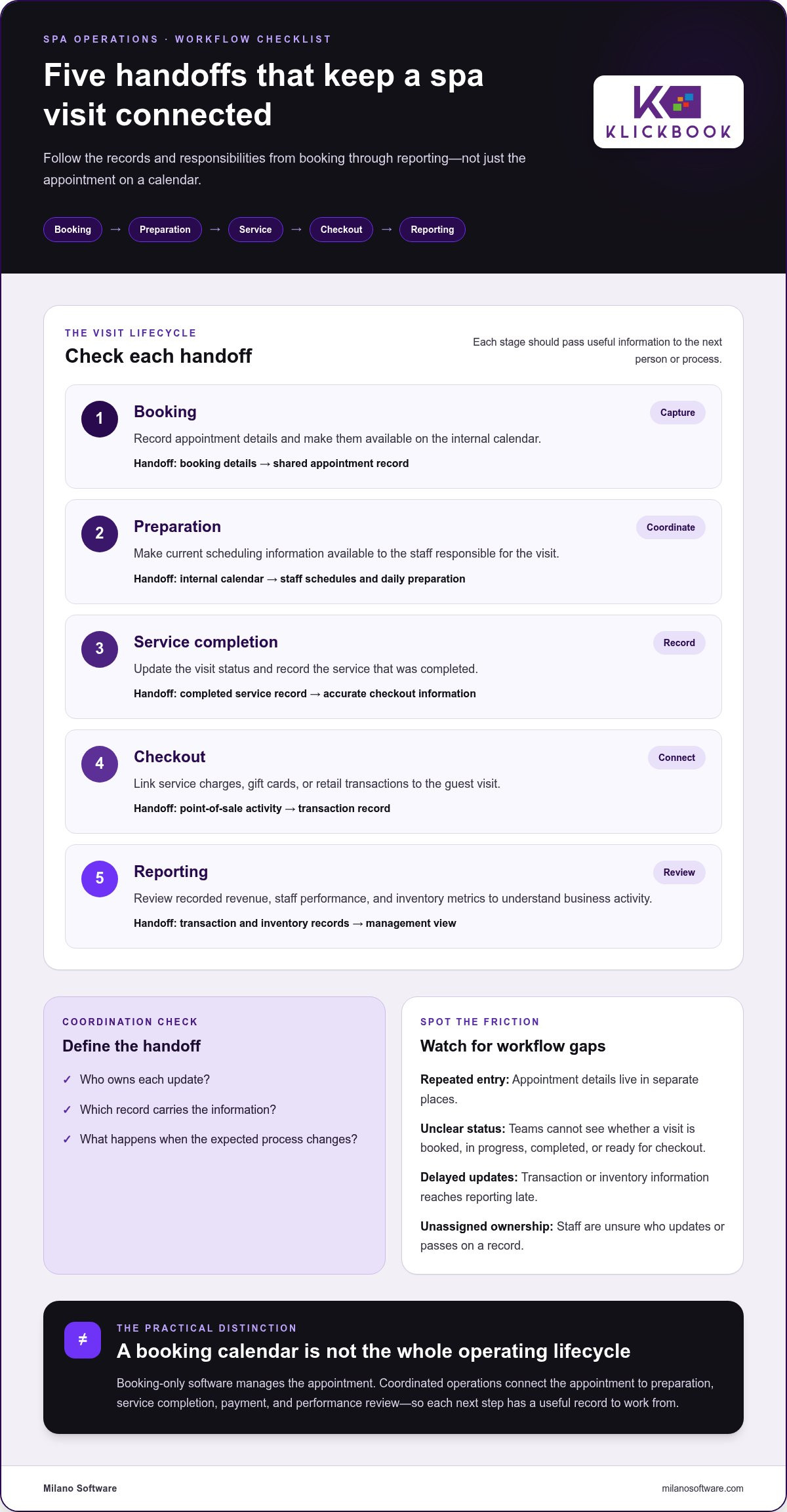
A guest visit creates a sequence of operational records, not just an appointment entry. Booking details inform the internal calendar and staff schedules. The completed service establishes what was delivered, checkout records the transaction, and reporting brings activity into view for management. Each transition depends on accurate information reaching the next person or process.
Spa operations software coordinates the workflows, records, and decisions that carry a guest visit from booking through reporting. Booking-only software manages the appointment, not the full operating lifecycle. The distinction is practical: a calendar can show when a guest is expected, while coordinated operations also connect the appointment to preparation, service completion, payment, and performance review.
Which operational handoffs shape a spa visit?
Think of each stage as a transfer of information and accountability. Appointment details need to reach the internal calendar and relevant staff schedules. After the service, the completed visit needs to connect to the correct point-of-sale record. Transaction and inventory records can then contribute to operational reporting, giving leaders a more consistent basis for reviewing activity.
- Booking: Capture appointment details and make them available on the internal calendar.
- Preparation: Make scheduling information available to the staff responsible for the visit.
- Service completion: Record the visit’s status and completed service so checkout has accurate information.
- Checkout: Connect service charges, gift cards, or retail transactions to the visit.
- Reporting: Review revenue, staff performance, and inventory metrics to understand recorded activity.
This lifecycle view is more useful than a feature inventory because it shows where continuity matters. For context on how one salon and spa software product is described, Phorest Salon Software provides an external reference. The operational question for any spa is how its records pass between stages and who is responsible for each handoff.
How fragmented workflows create avoidable friction
Fragmentation often shows up in routine moments. A booking detail may need to be entered again in another record. The calendar may show an appointment while a staff member is still waiting for an update. A completed service may not be reflected promptly at checkout. Each tool might perform its individual task, but the gaps make the full visit harder to follow.
- Repeated entry: The same appointment information is maintained in separate places, making it unclear which record is current.
- Unclear status: Teams lack a shared view of whether a visit is booked, in progress, completed, or ready for checkout.
- Delayed updates: Transaction or inventory information reaches reporting after the operational moment it describes.
- Unassigned ownership: Staff aren’t sure who updates a record or passes it to the next team.
For each handoff, define the responsible role, the record that carries the update, and what happens when the expected process changes. This helps leaders determine whether inconsistent visibility comes from workflow design, unclear responsibilities, or incomplete records. Milano’s spa management software connects booking, staff coordination, point of sale, and reporting within a spa’s day-to-day operations.
How spa operations software coordinates booking, service, checkout, and reporting
A coordinated workflow preserves the meaning of each record as a guest visit progresses. Booking establishes the planned appointment. Staff schedules and daily preparation use that information. Service completion provides the basis for checkout, and recorded transactions feed operational and financial reporting. The value lies in continuity between stages, not in maintaining a longer list of software features.
For managers, this sequence makes ownership and record quality easier to assess. Each stage should leave the next person with information they can act on, without requiring staff to reconstruct the visit from separate records.
From online booking to staff scheduling
Online booking synchronized with the spa’s internal calendar gives the team a shared appointment record. Appointment details can inform staff schedules and daily preparation, helping staff see what is planned and when. The operating process still needs clear responsibility for reviewing schedules and managing changes. Synchronization supports coordination, but it doesn’t replace operational ownership.
For example, if a guest’s appointment details change, the internal calendar should show the current booking so staff prepare using the same information. That shared reference reduces ambiguity about the planned visit and gives the next handoff a reliable starting point.
- Capture: Online booking creates appointment details.
- Synchronize: The internal calendar reflects the booking information.
- Coordinate: Staff schedules and daily preparation use the current appointment record.
- Complete: The service record reflects the visit that took place.
- Reconcile: Checkout activity and reporting connect the visit to operational results.
From completed service to checkout and reporting
Once a service is complete, checkout records the associated transaction. Point of sale can handle service charges, gift cards, and retail purchases, while inventory metrics provide another view of recorded activity. The operational link matters: the completed visit and its transaction should be understandable as related parts of the same business activity, rather than isolated entries managers have to interpret separately.
Consistent records make reporting more useful because leaders can review activity across services, transactions, staff performance, and inventory using information captured through the operating workflow. Revenue and inventory reporting describe recorded activity. They don’t, by themselves, forecast future demand or guarantee a business outcome.
- Service charges document charges associated with completed visits.
- Gift-card transactions appear within checkout activity.
- Retail sales connect point-of-sale activity with relevant inventory metrics.
- Operational and financial reports give managers a structured view of revenue, staff performance, and inventory.
A useful review follows the record from appointment to report: confirm the booking details, verify the visit’s completion, and compare the associated transaction with the reporting view. Milano’s spa management software connects these core operational records through online booking, staff schedules, point of sale, and reporting.
Day, resort, and Nordic spa operations have different coordination priorities
A spa’s operating model determines which handoffs need the closest attention. Appointment-led services, a resort setting, and a Nordic spa’s visit model can place different demands on scheduling, staff coordination, transactions, and management reporting. Spa operations software should support the workflows a business uses rather than impose one standard process across every property.
Use this comparison as a starting point for mapping priorities, not as a universal specification. Each spa’s service model and transaction flow determine which records need to connect and who owns them.
Operating model | Scheduling | Staff coordination | Transactions | Management visibility
Day spa | Appointment flow and an accurate internal calendar | Staff schedules aligned with planned visits | Service charges and retail activity | Review appointment, revenue, staff, and inventory records
Resort spa | Spa appointments coordinated within the spa’s own workflow | Clear handoffs between spa staff and any teams involved in the guest transaction | Define who records charges and how they are reconciled | Clarify ownership of spa records and transaction reconciliation
Nordic spa | Scheduling shaped by the spa’s specific services and visit structure | Assign responsibilities according to the operating model | Record transactions relevant to the spa’s offerings | Review reporting against the activity the business records
Coordination priorities for day spas and Nordic spas
For a day spa, the core sequence often centres on appointments, staff schedules, completed services, service charges, and retail transactions. Map who maintains each record and how updates reach the next role. For a Nordic spa, begin with its specific service and visit model, then identify the scheduling, staff, and transaction handoffs that model requires. Avoid adding steps for equipment or access processes that aren’t part of the spa’s actual workflow.
Resort spa workflows and hotel-system boundaries
A resort spa may need to define how a guest’s spa purchase is recorded when the transaction is routed to a room folio. Treat this as a cross-team workflow: specify whether spa staff or the hotel team records the charge, which record is authoritative, and who reconciles the transaction. Clear ownership helps distinguish the spa’s operating records from hotel-system responsibilities.
When mapping this process, document the point where spa checkout ends and the room-folio process begins. Identify the record each team uses, the information that needs to pass between them, and the person responsible for resolving discrepancies. These steps make the handoff easier to manage without confusing spa records with hotel billing responsibilities.
Document the priorities that fit your service model before defining system requirements. Milano Software’s spa management software is designed for day spas, resort spas, and Nordic spas, with core spa workflows connected to operational and financial reporting.
Map spa workflows before changing operational software
Software decisions are more reliable when they follow a documented operating model. Start with how work happens today, including informal workarounds and points where staff rely on verbal updates. Then define the target process. This sequence helps leaders separate a genuine system requirement from a gap in role clarity or record ownership.
A documented handoff needs four elements: an accountable owner, a source record, a named next recipient, and a defined exception path. Apply that standard to booking, staff schedules, client records, completed services, transactions, and inventory wherever each is relevant.
Document ownership, records, and exceptions
Trace a representative visit from booking through payment and post-visit review. At each transition, note who creates or updates the record, what information needs to carry forward, and which role uses it next. Capture both the ordinary process and exceptions. A workflow that describes only the ideal path won’t tell staff what to do when details change.
Use a consistent map for each process:
- Owner: The role accountable for the update, not simply the team involved.
- Source record: The calendar, staff schedule, client profile, service record, transaction, or inventory record used as the reference.
- Next handoff: The person or process that relies on the update.
- Exception path: The action to take and the record owner when the expected sequence changes.
For example, document who updates the calendar after a schedule change, who records a service adjustment, and who corrects a checkout entry. Specify where revised information is recorded and how the next responsible role receives it. This makes it easier to spot gaps, such as an update being made in one record but missed in another.
Set measures and review data quality
Once responsibilities and records are mapped, define the measures leaders will use to review operations. Choose relevant views across revenue, staff performance, inventory, and appointment activity. Agree on what each measure includes, who reviews it, and the reporting period. Without shared definitions, teams may compare different versions of the same result and mistake inconsistency for a change in performance.
Test the documented process before relying on it for management review. Walk through a standard visit and a changed appointment. Confirm that staff know which record to update and that the next role can find the information. Then review sample outputs for completeness, consistent terminology, and missing or duplicated entries. Resolve data-quality issues before interpreting trends.
Reports can help leaders identify patterns for further investigation, but a pattern alone doesn’t establish its cause. Check the underlying records and operational context before drawing conclusions or changing staffing and inventory decisions. Explore spa management software that connects booking, staff coordination, point of sale, and reporting as you translate documented workflows into system requirements.
Milano Software connects core spa operations in one platform
A workflow framework becomes useful when it can be matched to the systems staff use each day. Milano Software provides spa management software for day spas, resort spas, and Nordic spas, connecting online booking, staff schedules, client profiles, point of sale, and operational and financial reporting. For leaders assessing spa operations software, the key question is whether these capabilities support the handoffs their operating model depends on.
Coordinate bookings, staff schedules, and client profiles
Online bookings synchronize with the spa’s internal calendar, giving staff a shared view of scheduled appointments. Staff schedules support day-to-day coordination around those visits, while client profiles provide a place for relevant client information. Together, these records give teams an operational foundation for managing appointments and preparing for upcoming work.
The practical test is whether booking information appears in the calendar staff use and whether client and scheduling records support daily administration. Clear ownership still matters: spa leaders need to establish who reviews schedule details and maintains accurate records within their workflows.
Connect transactions with operational reporting
At checkout, point of sale handles service charges, gift cards, and retail transactions. Reporting covers revenue, staff performance, and inventory metrics, giving managers structured views of recorded activity. These capabilities connect transaction and operational records with management review. Reports describe what has been recorded, not guaranteed future performance.
Match platform capabilities to the handoffs identified in the workflow map. A spa can assess how booking, staff schedules, client profiles, checkout records, and reporting fit its documented responsibilities. For a broader perspective on connected workflows, review spa management software for connected operations.
- Booking: Online reservations synchronize with the internal calendar.
- Coordination: Staff schedules and client profiles support daily administration.
- Checkout: Point of sale handles service charges, gift cards, and retail purchases.
- Management visibility: Reporting covers revenue, staff performance, and inventory metrics.
For day spas, resort spas, and Nordic spas, the same platform capabilities can support different operating priorities. The workflow map determines how each record should be used and who acts on it next. Explore Milano Software to see how its spa management capabilities align with your operating model.
Turn workflow clarity into your next operating decision
Workflow design is an ongoing management discipline, not a one-time software project. Use the handoffs you’ve documented to establish clear operating standards, then review whether teams can follow them consistently as services, staffing, and transaction patterns change. This gives leaders a stronger basis for future system decisions and helps focus attention on the operational gaps that matter most.
The right spa operations software should reflect how your spa works and give teams a coherent structure for carrying out their responsibilities. Milano Software brings spa-focused operational capabilities together for day spas, resort spas, and Nordic spas. Explore how its platform can support your management priorities and strengthen coordination across daily operations.
Explore Milano Software and take the next step towards more coordinated spa operations.
Frequently Asked Questions
What is spa operations software?
Spa operations software supports the coordinated workflows and records used to administer a spa, rather than handling only appointment selection. Depending on the platform, its scope may include scheduling, client administration, point of sale, and management reporting. Compare which functions share information and which records leaders can review. Milano Software provides spa management software for spa operations.
How is spa operations software different from spa management software?
The terms can overlap, and there’s no universal industry definition that separates them. “Operations” often emphasizes coordination of daily processes, while “management” may describe a broader platform for running a spa business. Assess the scope by listing the tasks your teams perform, then mapping which records and handoffs the system supports. For example, determine whether managers can review operational and financial information alongside scheduling activity.
Can spa operations software support multiple spa locations?
Multi-location requirements depend on how an organization assigns responsibility and reviews performance. Before selecting a system, define which processes should be shared and which remain location-specific. Identify who owns schedules and records at each spa, then agree on reporting definitions so comparable measures mean the same thing across locations. A central view is useful only when leaders understand how local activity is recorded and who is accountable for its accuracy.
Does spa operations software replace a hotel property management system?
No. Spa operations software and a hotel property management system serve different operational roles. A resort may need a defined process for recording spa charges against a guest folio, with clear responsibility across the spa and hotel teams. Decide which team enters the transaction, which record is authoritative, and who reconciles it. Treat this as a workflow boundary, not evidence that the systems are interchangeable or connected.
What information should spa leaders map before implementing operations software?
Before implementation planning, document process owners, source records, handoffs, exception paths, and the measures leaders need to review. Include the records that apply to your model, such as client, appointment, staff, transaction, and inventory information. This preparation clarifies where data originates, who maintains it, and how teams use it. It also gives decision-makers a grounded basis for defining requirements and identifying unresolved responsibilities before system configuration begins.
Can spa operations software improve profitability?
It can give leaders more consistent operational and financial records to inform business decisions, but it can’t guarantee higher profitability. Managers may use reporting to investigate revenue patterns, staff performance, or inventory activity, then assess possible actions against the operating context. Results also depend on decisions, demand, costs, and other conditions beyond the platform. Treat software as a source of management information, not as a standalone cause of financial outcomes.


